#PowerPlatformTip 138: 'Graph API via HTTP with Microsoft Entra ID'
Call Microsoft Graph in Power Automate without app registrations or secrets, use the preauthorized 'HTTP with Microsoft Entra ID' action. No OAuth setup.
TL;DR: Skip app registrations and secrets, the preauthorized “HTTP with Microsoft Entra ID” action calls Microsoft Graph directly. Point both the Base Resource URL and the Resource URI to
https://graph.microsoft.com.
💡 Challenge
Calling Graph APIs in Power Automate traditionally meant registering a Microsoft Entra ID (formerly Azure AD) app, setting up client secrets or certificates, and configuring complicated OAuth flows, slow to set up and easy to break.
✅ Solution
Use the built-in “HTTP with Microsoft Entra ID (preauthorized)” action, sign in once, and point both the Base Resource URL and the Application ID URI to https://graph.microsoft.com.
🔧 How It’s Done
1. Add the action
🔸 Insert “HTTP with Microsoft Entra ID (preauthorized)”, authentication is already set to “Log in with Microsoft Entra ID”.
2. Set the Base Resource URL
🔸 https://graph.microsoft.com
3. Set the Microsoft Entra ID Resource URI
🔸 https://graph.microsoft.com
4. Pick the method and endpoint
🔸 e.g. GET https://graph.microsoft.com/v1.0/me
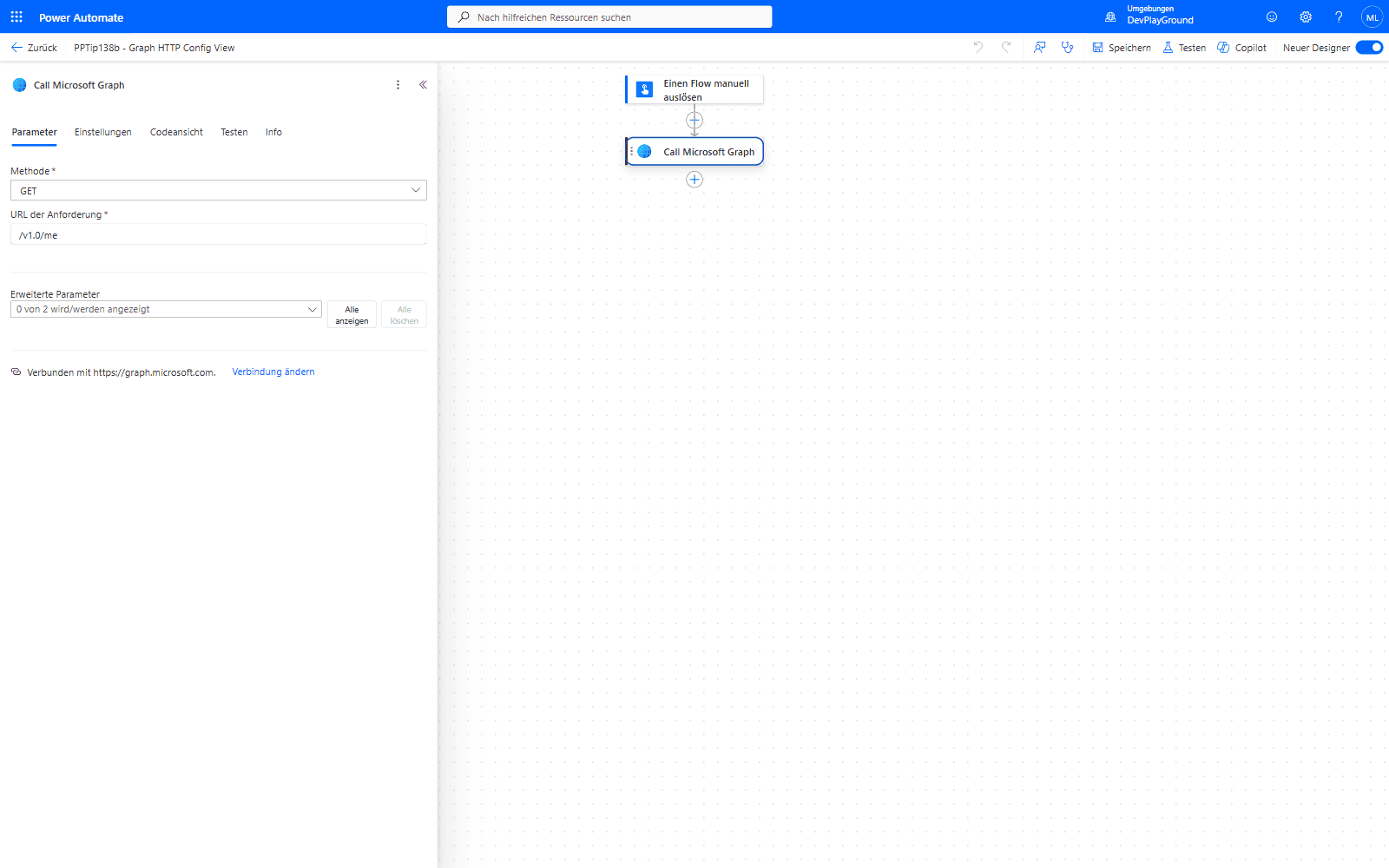 The action’s Parameter tab once the connection is correctly scoped: just Method and a relative URL, “Verbunden mit https://graph.microsoft.com.” confirms the resource binding - no separate auth fields to fill in.
5. Run the flow
🔸 The connector fetches and injects the token for you, no manual token handling.
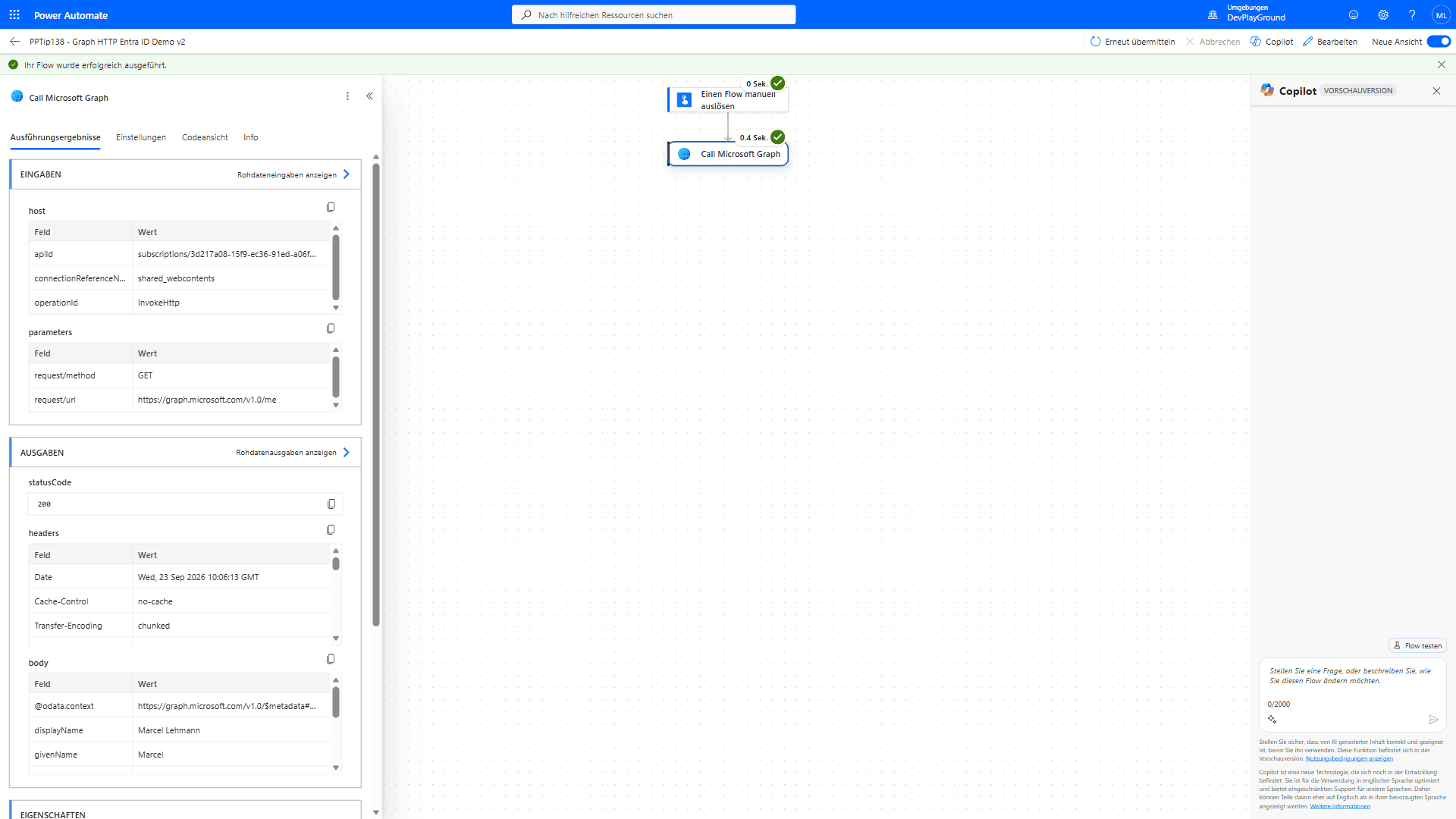 Real flow run: GET
 https://graph.microsoft.com/v1.0/me via the preauthorized connector, no app registration involved.
🎉 Result
You get JSON responses from Graph in seconds, no app registration, no secrets, and no manual token handling.
🌟 Key Advantages
🔸 Zero custom app setup in Microsoft Entra ID
🔸 Automatic token acquisition and renewal
🔸 Easily extended to any Graph endpoint
🧪 Tested: which Graph endpoints this connector can read
All calls below were run as GET through HTTP with Microsoft Entra ID (preauthorized) against https://graph.microsoft.com with one signed-in connection. Status codes and error texts are what the run history showed.
| Endpoint | Result |
|---|---|
/v1.0/me, /beta/me?$select=id,displayName | 200 |
/v1.0/me/memberOf?$top=1 | 200, mixes #microsoft.graph.directoryRole and group objects, pages with @odata.nextLink |
/v1.0/me/memberOf/microsoft.graph.group?$top=1&$select=id,displayName | 200, groups only |
/v1.0/users?$top=1, /v1.0/users?$top=2&$select=id | 200, @odata.nextLink for the next page |
/v1.0/groups?$top=1, /v1.0/groups/{id}/members?$top=1, /v1.0/groups/$count (header ConsistencyLevel: eventual) | 200 |
/v1.0/organization, /v1.0/applications?$top=1, /v1.0/servicePrincipals?$top=1 | 200 |
/v1.0/sites?search=*, /v1.0/sites/root/lists?$top=1 | 200 |
/v1.0/me/drive, /v1.0/me/drive/root/children?$top=1 | 200 |
/v1.0/me/messages?$top=1, /v1.0/me/mailFolders?$top=1, /v1.0/me/events?$top=1, /v1.0/me/outlook/masterCategories | 200 |
/v1.0/me/mailboxSettings/automaticRepliesSetting | 200 for your own mailbox, 403 for another user’s mailbox |
/v1.0/me/joinedTeams, /v1.0/me/planner/tasks?$top=1, /v1.0/me/todo/lists?$top=1 | 200 |
/v1.0/me/chats?$top=1 | 403 Forbidden: “Missing scope permissions on the request. API requires one of ‘Chat.ReadBasic, Chat.Read, Chat.ReadWrite’” |
/v1.0/me/presence | 403 Forbidden (empty message) |
/v1.0/me/authentication/methods | 403 accessDenied: “Request Authorization failed” |
/v1.0/auditLogs/signIns?$top=1 | 403 Authentication_MSGraphPermissionMissing: “The principal does not have required Microsoft Graph permission(s): AuditLog.Read.All to call this API.” |
/v1.0/identity/conditionalAccess/policies | 403 AccessDenied: “You cannot perform the requested operation, required scopes are missing in the token.” |
/v1.0/deviceManagement/managedDevices?$top=1 | 403 Forbidden: “Application must have one of the following scopes: DeviceManagementManagedDevices.Read.All, DeviceManagementManagedDevices.ReadWrite.All” |
/v1.0/reports/getOffice365ActiveUserCounts(period='D7') | 403 S2SUnauthorized: “Invalid permission.” |
/v1.0/admin/serviceAnnouncement/messages?$top=1 | 403 UnknownError (empty message) |
/v1.0/me/onenote/notebooks?$top=1 | 401 40001: “The request does not contain a valid authentication token.” |
Two 400s that are Graph rules, not connector limits: /v1.0/directoryRoles?$top=1 returns Request_UnsupportedQuery “This resource does not support custom page sizes”, and /v1.0/me/joinedTeams?$top=1 returns “Query option ‘Top’ is not allowed”. Drop $top on those two.
Scopes the token actually carries. The /me/chats 403 lists them: Application.ReadWrite.All, Calendars.ReadWrite, Calendars.ReadWrite.Shared, Contacts.ReadWrite, DelegatedPermissionGrant.ReadWrite.All, EduAdministration.Read, EduAdministration.ReadWrite, EduRoster.Read, EduRoster.ReadWrite, Files.ReadWrite.All, Group.ReadWrite.All, IdentityUserFlow.ReadWrite.All, Mail.ReadWrite, Mail.ReadWrite.Shared, Mail.Send, Mail.Send.Shared, MailboxSettings.ReadWrite, People.Read, People.Read.All, Sites.Read.All, Tasks.ReadWrite, User.Read, User.Read.All, User.ReadWrite. That is why Group.Read.All and GroupMember.Read.All questions answer themselves: the token holds Group.ReadWrite.All, which covers listing groups and their members. Anything outside this list (Chat, Presence, AuditLog, Intune, Reports, Conditional Access, OneNote) fails with one of the 403/401 texts above, no matter which admin role the signed-in user has.
Paging. Every collection response that has more rows carries @odata.nextLink. Put that value straight into the next action’s URL (@{body('HTTP')?['@odata.nextLink']}) and you get the following page with the same $select/$top. For $count=true or $count segments add the header ConsistencyLevel = eventual in the action’s Headers field.
🛠️ FAQ
1. What permissions does it use?
The token the connector sends carries a fixed set of delegated scopes (the list in the tested section above). Your account’s roles do not extend that list: a Global Administrator still gets 403 on /auditLogs/signIns because AuditLog.Read.All is not among the connector’s scopes.
2. Can I use POST or PATCH methods?
Yes, just pick the method and supply your body and headers as usual.
3. How do I fetch Teams data?
Change the endpoint to /v1.0/teams/{team-id}; the base URL stays the same. /v1.0/me/joinedTeams works (without $top); chats and presence do not, the token has no Chat.* or Presence.* scope.
4. What does a 403 look like, and how do I tell “no scope” from “wrong query”?
A scope problem returns 403 with one of the codes Forbidden, AccessDenied, accessDenied or Authentication_MSGraphPermissionMissing; the last one names the missing permission in the message. A wrong query returns 400 Request_UnsupportedQuery with the offending property or option in the message. The action itself fails in both cases, so read body('HTTP')?['error']?['code'] and ?['message'] in a Configure run after branch.
5. How do I get all pages?
Loop while body('HTTP')?['@odata.nextLink'] is not empty and call that URL in the next iteration. A /users?$top=2&$select=id call followed by its nextLink returned the next two ids with the same selection, nothing else to pass along.
🔗 Related Tips
- #PowerPlatformTip 58: HTTP Actions, the fundamentals of building HTTP requests in Power Automate.
- #PowerPlatformTip 96: Scraping Web Data with Standard Connectors, more no-premium HTTP patterns.
This tip is by Marcel Lehmann, Microsoft MVP (Business Applications) and founder of the Power Platform Academy – live Power Platform workshops, free or CHF 49. Join the workshop waitlist to get notified about new dates. For companies that want this implemented for them, see KMUpower – Power Platform consulting & automation for SMEs (DACH).