#PowerPlatformTip 109: 'Use TimeOut'
Long approvals timing out in Power Automate? Extend action timeouts with ISO 8601 durations (P2W, P1D) and add run-after error handling so flows never fail.
TL;DR: Raise an action’s Timeout (ISO 8601, e.g.
P2W) and add ‘Configure run after’ handling so long approvals finish without failing the flow.
💡 Challenge
Approvals and other long-running tasks can take longer than an action’s default timeout, risking interruptions and unintended cancellations.
✅ Solution
Raise the timeout on the specific action so it has room to finish, and add error handling so the flow continues gracefully even if a timeout does occur.
🔧 How It’s Done
1. Raise the action’s Timeout.
🔸 In the settings of your approval (or any long-running action), set Timeout to an ISO 8601 duration that covers the expected delay:
🔸 P2W = two weeks · P1D = one day · PT2H = two hours · PT30M = 30 minutes · PT45S = 45 seconds
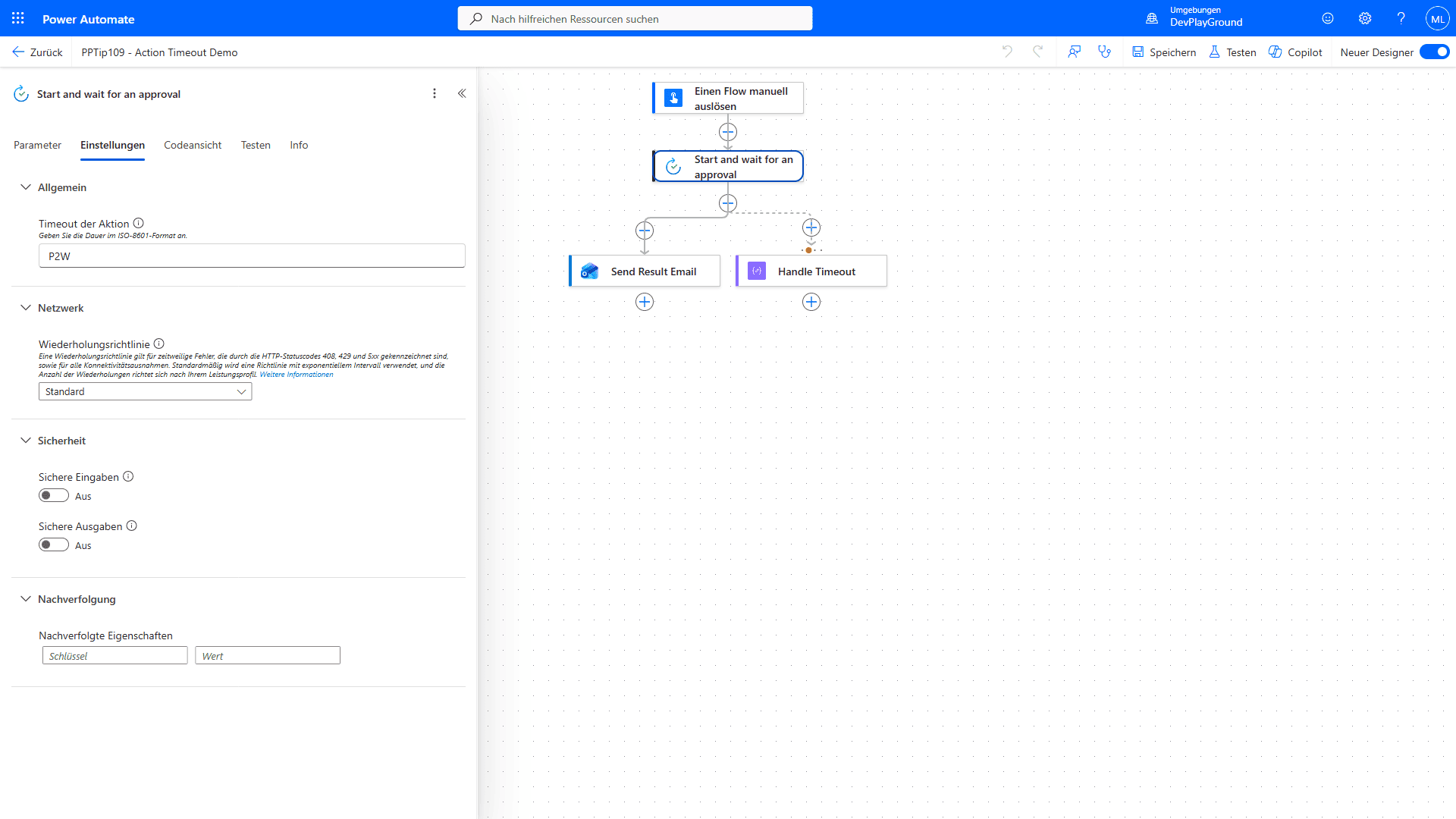 The action’s Settings pane, Timeout set to
 P2W (two weeks).
2. Add error handling.
🔸 Use Configure run after to define what happens if the action times out, e.g. start an alternative branch, send a notification, or kick off a new approval.
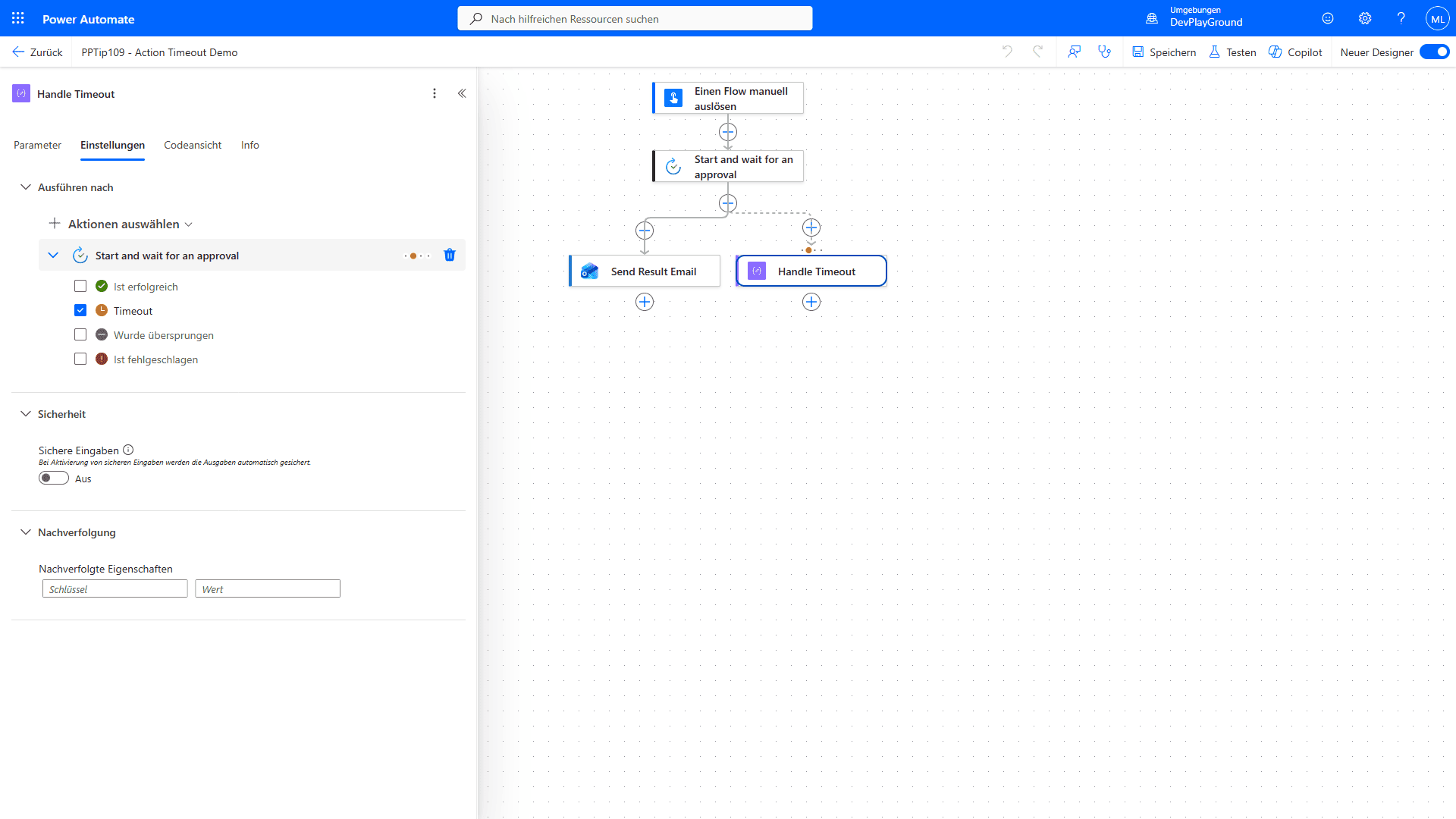 Configure run after on the next action, with only “has timed out” checked.
3. Test and refine.
🔸 Run the flow under different conditions to fine-tune the timeout and the run-after logic.
🎉 Result
Your flows stay operational and adaptable, handling long-running tasks without falling victim to unnecessary timeouts or disruptions.
🌟 Key Advantages
🔸 Reliability: flows survive tasks that take longer than expected.
🔸 Flexibility: choose how to proceed if a long-running task times out.
🔸 Efficiency: automation keeps moving by handling hiccups automatically.
🎥 Video Tutorial
🛠️ FAQ
1. How do I specify custom timeout values in Power Automate? Use ISO 8601 duration format (e.g. P2W, P1D, PT2H, PT30M, PT45S) in the Timeout field of the action’s settings.
2. Will my flow still fail if an action times out? If you don’t configure error handling, a timeout fails the run. Use Configure run after to catch timeouts and continue.
3. Can I use timeouts with all actions in Power Automate? Most built-in actions allow timeout configuration. For unsupported actions, wrap them in scopes or alternative logic.
🔗 Related Tips
- #PowerPlatformTip 144: Infinite Approvals beyond 30 days, keep approvals alive past the 30-day limit.
- #PowerPlatformTip 98: Secure Inputs & Secure Outputs, more action-setting tricks in flows.
This tip is by Marcel Lehmann, Microsoft MVP (Business Applications) and founder of the Power Platform Academy – live Power Platform workshops, free or CHF 49. Join the workshop waitlist to get notified about new dates. For companies that want this implemented for them, see KMUpower – Power Platform consulting & automation for SMEs (DACH).