#PowerPlatformTip 168: 'Collect Failed Action Details with the result() Function'
TL;DR: Put your actions in a Scope, then in a Catch action (run after has failed) call
result('Scope_name'). It returns an array with every top-level action in that scope - including the failed one’sstatus,codeanderror.message. Filter forstatus = Failedand send the real error to a user, an admin - or back to a Copilot Studio agent so it can self-correct and retry.
A flow fails at 2 a.m. The run history holds the exact reason - a bad expression, a 404, a null value - but the person who needs to know can’t even open the run. So the failure stays invisible until someone complains. The Try-Catch pattern (see #15) already emails a link to the run; with the result() function you can now grab the actual error message from the action that broke.
💡 Challenge
When an action fails, the error is buried in the run history. Business users often have no access to it, and even makers have to click into the run and hunt for the red action. There is no obvious way to grab “what exactly went wrong” and surface it in a notification - or hand it back to a caller that could act on it.
✅ Solution
Wrap the risky actions in a Scope. When something inside fails, the result() function hands you the details. result('<scopeName>') returns an array containing the top-level actions of that scope - each entry carries the same fields as actions(): name, status, code, startTime, inputs, outputs and, for failures, an error object with the message. Filter that array down to the failed actions and you have a clean, human-readable failure report to email, log, or return to a Power Apps / Copilot Studio caller.
flowchart TD
    A["Scope: Try"] -->|action fails inside| B["Catch: run after = has failed"]
    B --> C["Compose: result('Try')"]
    C --> D["Filter array: status = Failed"]
    D --> E["Extract error.message"]
    E --> F["Email/notify, or return to agent"]
🔧 How It’s Done
1. Put your logic in a Scope.
🔸 Group the actions that might fail inside a Scope (rename it, e.g. Try). result() only works against a scoped action - a Scope, Apply to each, or Until. Point it at a plain action and the flow won’t even save.
2. Add a Catch that runs on failure.
🔸 After the Scope, add a Compose (or your notification action) and open Configure run after - tick has failed (and optionally has timed out) so it only runs when the Scope breaks.
3. Read the results of the scope.
🔸 In that Compose, use the expression: result('Try'). You get back an array of the scope’s top-level actions with their status and error details.
4. Keep only the failures.
🔸 Feed result('Try') into a Filter array and keep items where item()?['status'] is equal to Failed. Now you have just the broken action(s), each with its error.message.
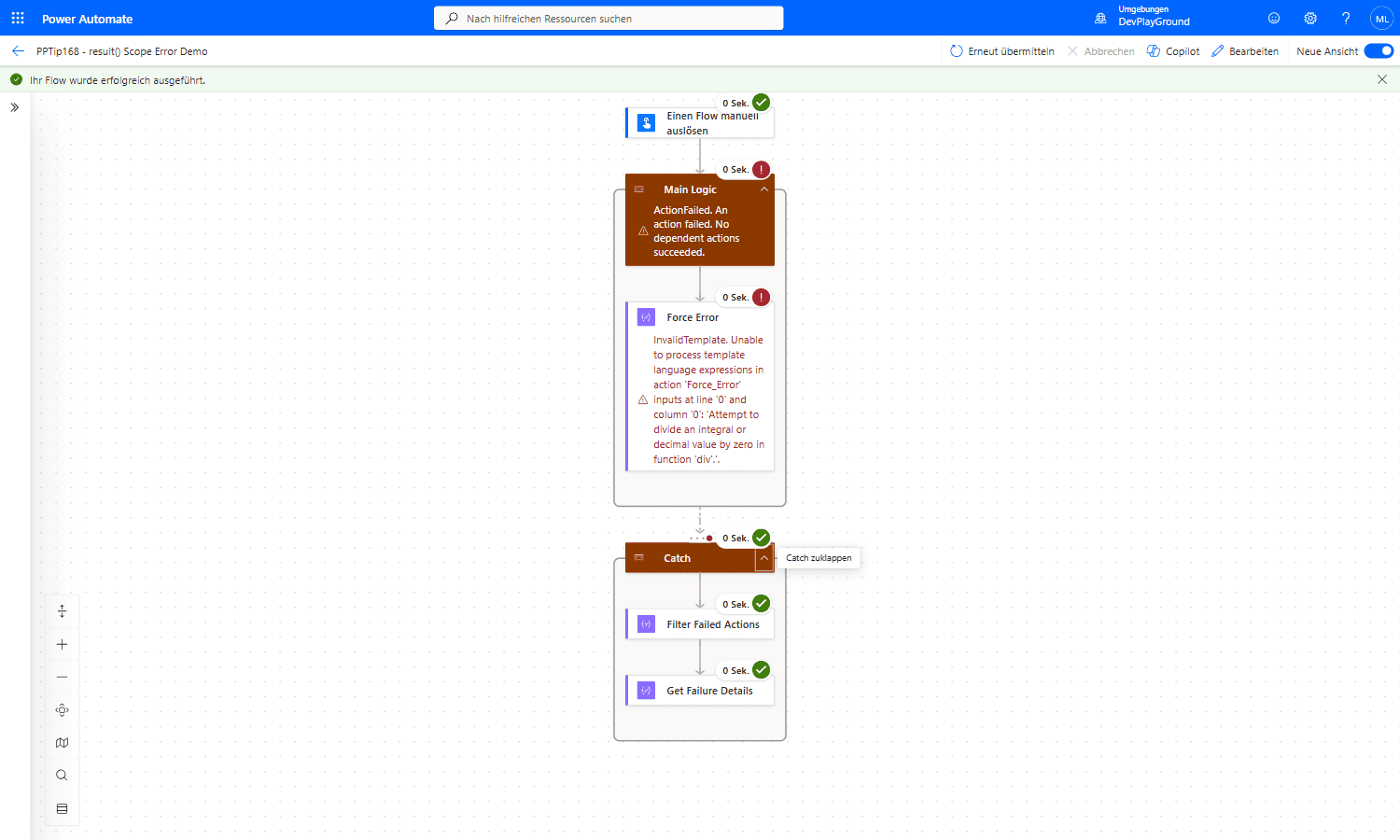 Real flow run:
 Main_Logic fails on @div(1,0) (“Attempt to divide an integral or decimal value by zero”), then Catch (Konfigurieren für Ausführung nach: hat einen Fehler) runs anyway and succeeds, filtering and extracting the failure details.
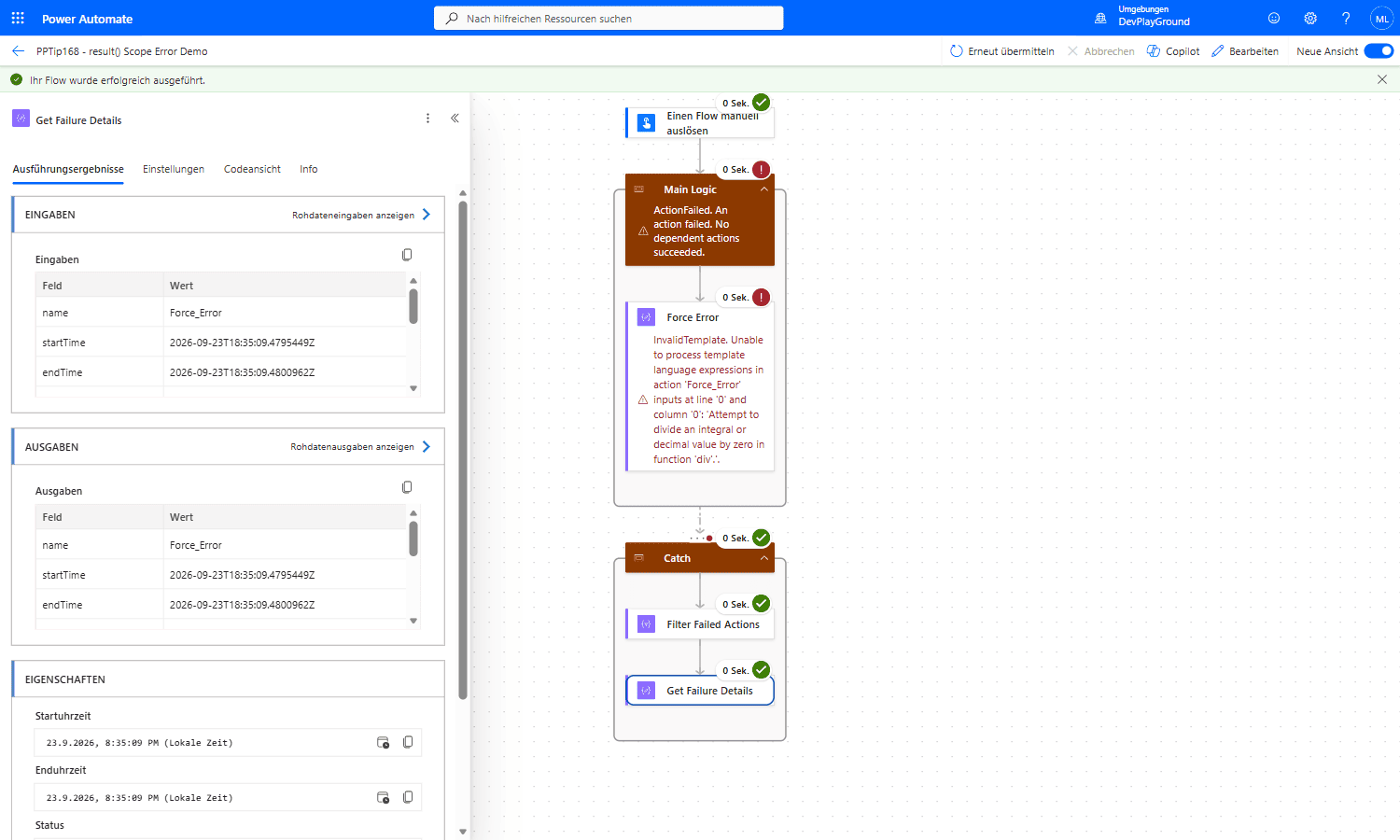 Real flow run:
 first(body('Filter_Failed_Actions')) on result('Main_Logic') correctly pulls out name: Force_Error plus its exact start/end time. Add first(body('Filter_Failed_Actions'))?['error']?['message'] when you want the full message text in your notification.
5. Send the real error where it’s needed.
🔸 Email or post the failure text, e.g. first(body('Filter_array'))?['error']?['message'], to the user or admin - together with the run link from the classic Try-Catch pattern (#15). Failures become visible to the people who actually care.
🤖 Bonus: self-healing Copilot Studio agents
This shines when a Copilot Studio agent calls your flow as a tool. Normally, if the flow fails, the agent only receives a generic error (for example FlowActionException, often surfaced as a generic failure code in chat) - a dead end, because the model can’t see why it broke. Instead, catch the failure with result() and return it as a normal output rather than failing:
🔸 Keep the flow synchronous (Respond to the agent → Settings → Asynchronous response = Off, run under ~100 s).
🔸 Return two outputs (Text/Boolean/Number are the only supported types): Status = Error and ErrorMessage = the text from step 4 - on success return Status = Success with your payload. The flow now ends succeeded, so the agent actually reads the error.
🔸 In the tool description or agent instructions, add: “If Status is Error, read ErrorMessage, correct the input that caused it, and call the tool again. Stop after 3 attempts and ask the user.” The agent’s generative orchestration then fixes its own input and re-fires - a self-healing tool call with a safe retry cap.
🎉 Result
Your flow now reports why it failed, not just that it failed. The exact error message from the failing action lands in an inbox - or in an agent’s context, where it can correct itself and retry. Error handling that finally reaches the business, no run-history access required.
🌟 Key Advantages
🔸 Real error text: you surface the action’s actual error.message, not a generic “flow failed”.
🔸 No run-history access needed: the details go straight to the user, admin - or agent.
🔸 Native and free: just a Scope, a run-after and an expression - no premium connector.
🔸 Self-healing agents: return the error as an output and a Copilot Studio agent can fix its input and retry.
🛠️ FAQ
1. Why do I get a template validation error on result()?
result() may only reference a scoped action - a Scope, Apply to each or Until. If you pass the name of a normal action (e.g. a Compose), saving fails with a template-validation error. Wrap the action in a Scope and reference the Scope instead.
2. It returns successful actions too - is that normal?
Yes. result() returns every top-level action in the scope, succeeded and failed. Run it through a Filter array on status equal to Failed to keep only what you need.
3. My failure is nested and doesn’t show up - why?
result() only returns the first level of actions inside the scope. Failures inside a nested Condition, Switch, Apply to each or a child Scope aren’t included directly - call result() again against that inner scoped action to drill down.
4. For a Copilot Studio agent, why not just let the flow fail?
A failed agent flow returns a generic error (FlowActionException / generic chat failure) with no usable detail, so the model can’t self-correct. By catching it with result() and returning Status/ErrorMessage as outputs, the flow succeeds and the agent receives the actual reason it can act on.
🔗 Related Tips
- #PowerPlatformTip 15: try-catch-finally, the pattern this tip supercharges - add
result()to the Catch scope. - #PowerPlatformTip 45: Use Scopes, why grouping actions in Scopes makes error handling far easier.
- #PowerPlatformTip 21: Use Triggeroutput, grab the flow starter’s email so your failure report reaches the right person.
This tip is by Marcel Lehmann, Microsoft MVP (Business Applications) and founder of the Power Platform Academy – live Power Platform workshops, free or CHF 49. Join the workshop waitlist to get notified about new dates. For companies that want this implemented for them, see KMUpower – Power Platform consulting & automation for SMEs (DACH).