#PowerPlatformTip 21: 'Use Triggeroutput'
TL;DR: In a manually started flow,
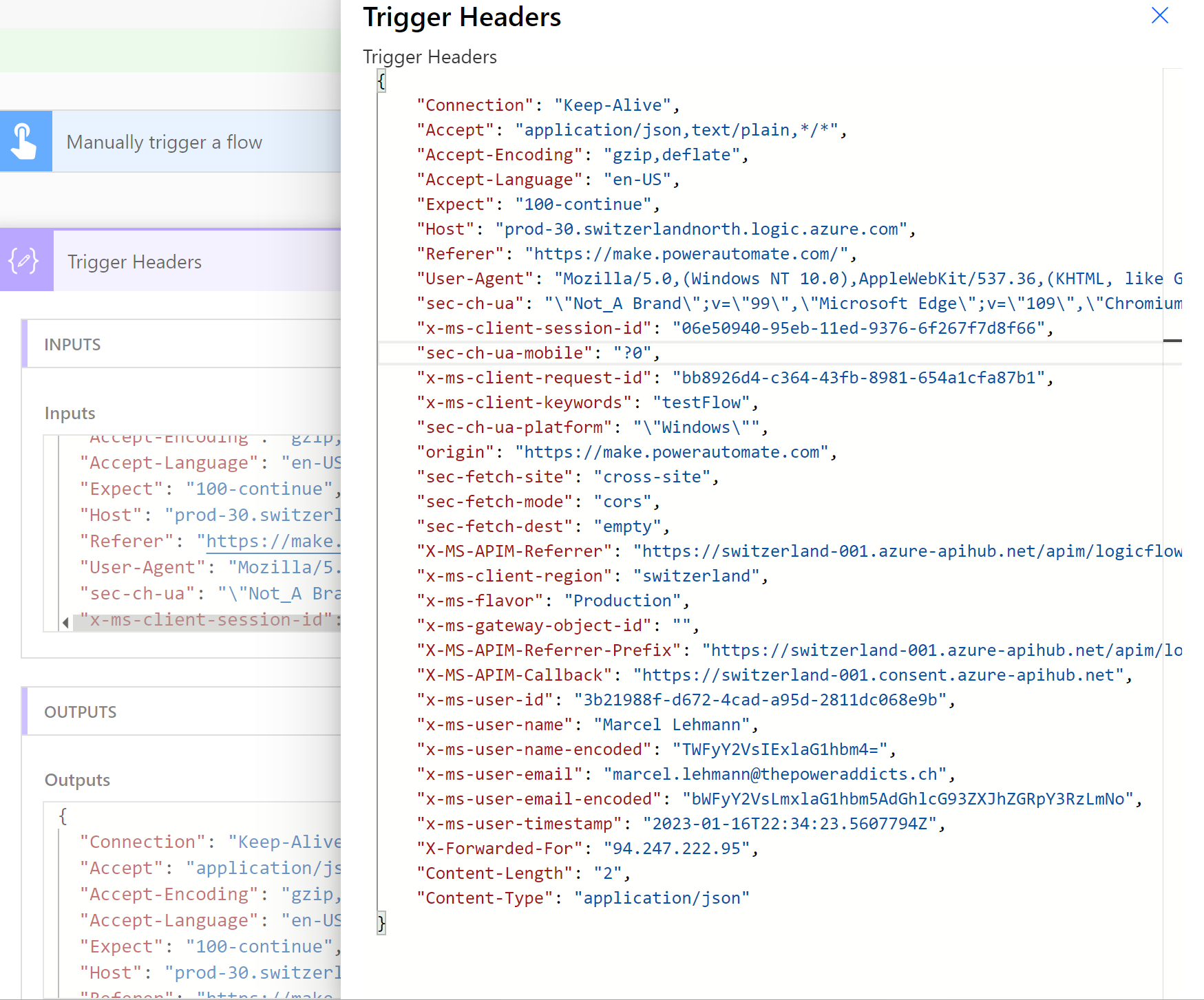
triggerOutputs()?['headers']?['x-ms-user-email']returns the e-mail address of the person who started the run. Use it to send that person the result, or an error message from a step that runs only when the main part fails. Request triggers called from outside don’t carry this header.
💡 Challenge
By default, flows don’t inform the user of success, details, or errors. How can you notify the flow initiator and handle potential errors within your flow?
✅ Solution
Use the triggerOutputs() expression to extract header information, send notifications to the flow starter, and manage errors.
🔧 How It’s Done
Here’s how to do it:
-
Capture the user’s email from the request headers. 🔸 Use the expression:
1
triggerOutputs()?['headers']?['x-ms-user-email']
-
Include additional header information as needed. 🔸 Use the expression:
1
triggerOutputs()?['headers']
-
Configure subsequent actions (e.g., send an email) using these outputs.
-
Tell the starter when something fails. 🔸 Put the main steps in a Scope, add a Send an email (V2) after it and set its Configure run after to has failed and has timed out only. Send it to
triggerOutputs()?['headers']?['x-ms-user-email']with the run link in the body (see Tip 15).
🧩 triggerOutputs() vs. triggerBody() and the body/ Notation
Both expressions read the same trigger, they just start at a different level. Everything below was observed in flow runs with a Request trigger and a manual (button) trigger.
1. What each function returns
🔸 triggerOutputs() returns the whole trigger result, an object with headers and body:
1
2
3
4
{
  "headers": { "Content-Type": "application/json", "User-Agent": "...", "X-Forwarded-For": "..." },
  "body": { "id": 5, "name": "Alice", "editor": { "displayname": "Bob" } }
}
🔸 triggerBody() is the body part only. triggerBody()?['id'], triggerOutputs()?['body']?['id'] and triggerOutputs()?['body/id'] all returned 5 in the same run.
2. What ?['body/id'] means
🔸 The slash inside the brackets is a path: body/id walks from body into id in one step. This is the notation the designer generates when you pick a trigger field from Dynamic content, for example triggerOutputs()?['body/editor/displayname'].
🔸 The path can be as deep as you like and mixed with the chained form: ?['body/editor/displayname'] and ?['body/editor']?['displayname'] both returned Bob. It also works below triggerBody(): triggerBody()?['editor/displayname'] returned Bob as well.
🔸 ?['body/editor']?['displayname'] is the safe choice when editor can be empty, see Tip 59.
3. Which headers you get depends on who calls the trigger
🔸 Manual trigger (button, “Manually trigger a flow”): the headers carry the person who pressed the button, x-ms-user-email, x-ms-user-name, x-ms-user-id, x-ms-tenant-id and x-ms-user-timestamp, plus Base64 copies x-ms-user-email-encoded and x-ms-user-name-encoded. triggerOutputs()?['headers']?['x-ms-user-email'] returned the e-mail address of the user who started the run.
🔸 Request trigger (“When an HTTP request is received”) called from outside via its URL: no x-ms-user-* headers at all. The headers that were present: Accept, Host, User-Agent, Accept-Encoding, Accept-Language, Content-Type, Content-Length, X-Forwarded-For (the caller’s IP), X-Forwarded-Host, X-Forwarded-Proto and a set of x-ms-* gateway headers such as x-ms-correlation-id.
🔸 With the ? the missing header is simply null. Without it, triggerOutputs()['headers']['x-ms-user-email'] fails the action with property 'x-ms-user-email' doesn't exist, available properties are 'Accept, Host, User-Agent, ...'. Keep the ? and wrap the value in coalesce() when the flow can be started both ways.
🎉 Result
The person who started the flow gets the result by mail, and a second mail with the run link if the main part fails. No address is hardcoded, so the same flow works for everyone who runs it.
🌟 Key Advantages
🔸 Notifies the person who actually started the run.
🔸 No extra action needed: the data is already in the trigger output.
🔸 With ? and coalesce(), the same expression is safe for triggers that don’t send the header.
🛠️ FAQ
1. Does triggerOutputs() work with all trigger types?
Every trigger has outputs, but the content differs. The x-ms-user-* headers come with the manual (button) trigger. A Request trigger called from outside has no user headers, and automated triggers such as SharePoint “When an item is created” deliver the item in the body, where the person is in fields like Author or Editor.
2. What other header information can I extract besides user email?
On a manual trigger: x-ms-user-name, x-ms-user-id, x-ms-tenant-id and x-ms-user-timestamp. On a Request trigger: User-Agent, X-Forwarded-For (caller IP), Content-Type and any custom header the caller sends. Read them with triggerOutputs()?['headers']?['<name>'].
3. How do I handle cases where the user email is not available?
Read it with ? so a missing header returns null instead of failing, and add a fallback: coalesce(triggerOutputs()?['headers']?['x-ms-user-email'], 'flowadmin@contoso.com').
4. What is the difference between triggerOutputs() and triggerBody()?
triggerOutputs() is the full trigger result with headers and body; triggerBody() is just the body. triggerBody()?['id'] and triggerOutputs()?['body/id'] return the same value.
5. What does triggerOutputs()?['body/id'] mean?
The slash is a path inside one bracket: go into body, then into id. It is the form the designer generates for dynamic content. ?['body/editor/displayname'] and ?['body/editor']?['displayname'] return the same value.
🔗 Related Tips
🔸 #PowerPlatformTip 126: ‘User Context for Automated Tasks’ - another way to act on who started or owns a run, without hardcoding a single account.
🔸 #PowerPlatformTip 98: ‘Secure Inputs, Secure Outputs’ - mask the email and header data this expression exposes in the flow’s run history.
This tip is by Marcel Lehmann, Microsoft MVP (Business Applications) and founder of the Power Platform Academy – live Power Platform workshops, free or CHF 49. Join the workshop waitlist to get notified about new dates. For companies that want this implemented for them, see KMUpower – Power Platform consulting & automation for SMEs (DACH).