#PowerPlatformTip 98: 'Secure Inputs / Secure Outputs'
TL;DR: Toggle Secure Inputs and Secure Outputs in an action’s settings to mask sensitive data in Power Automate run history and logs.
💡 Challenge
By default, the data processed by an action, passwords, tokens, or personal details, appears in plain text in the flow’s run history. Anyone who can open the run can see this confidential information.
✅ Solution
Enable Secure Inputs and/or Secure Outputs on the relevant action. This masks the action’s data in the run history so it is no longer visible to anyone reviewing the logs.
🔧 How It’s Done
Here’s how to do it:
- Open the action you want to secure in your flow.
- Select Settings (in the new designer, the settings pane of the action).
- Toggle on Secure Inputs and/or Secure Outputs to mask the data in logs.
- Save your changes so the settings are applied.
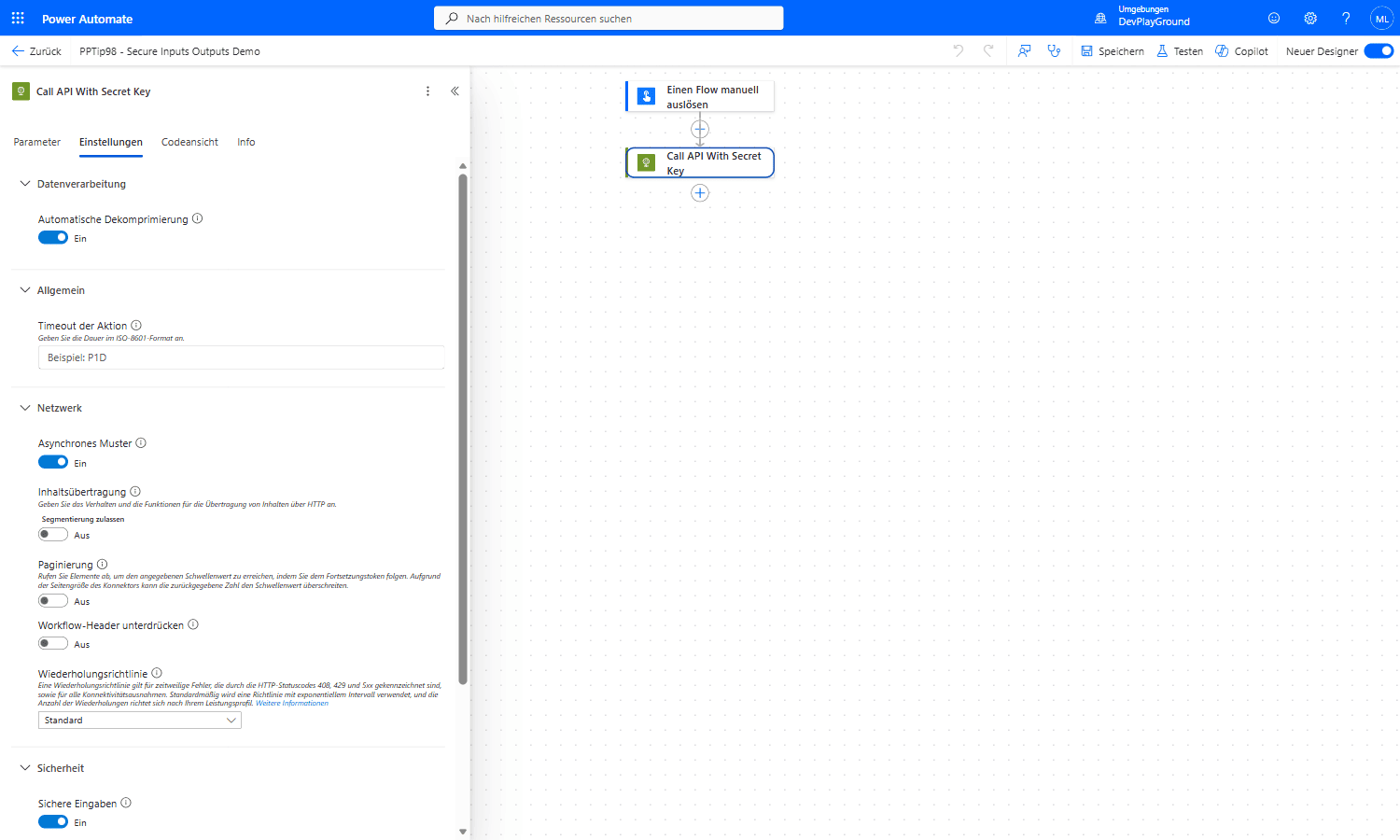 Real flow: the action’s Settings tab under Sicherheit/Security with both Secure Inputs and Secure Outputs switched On.
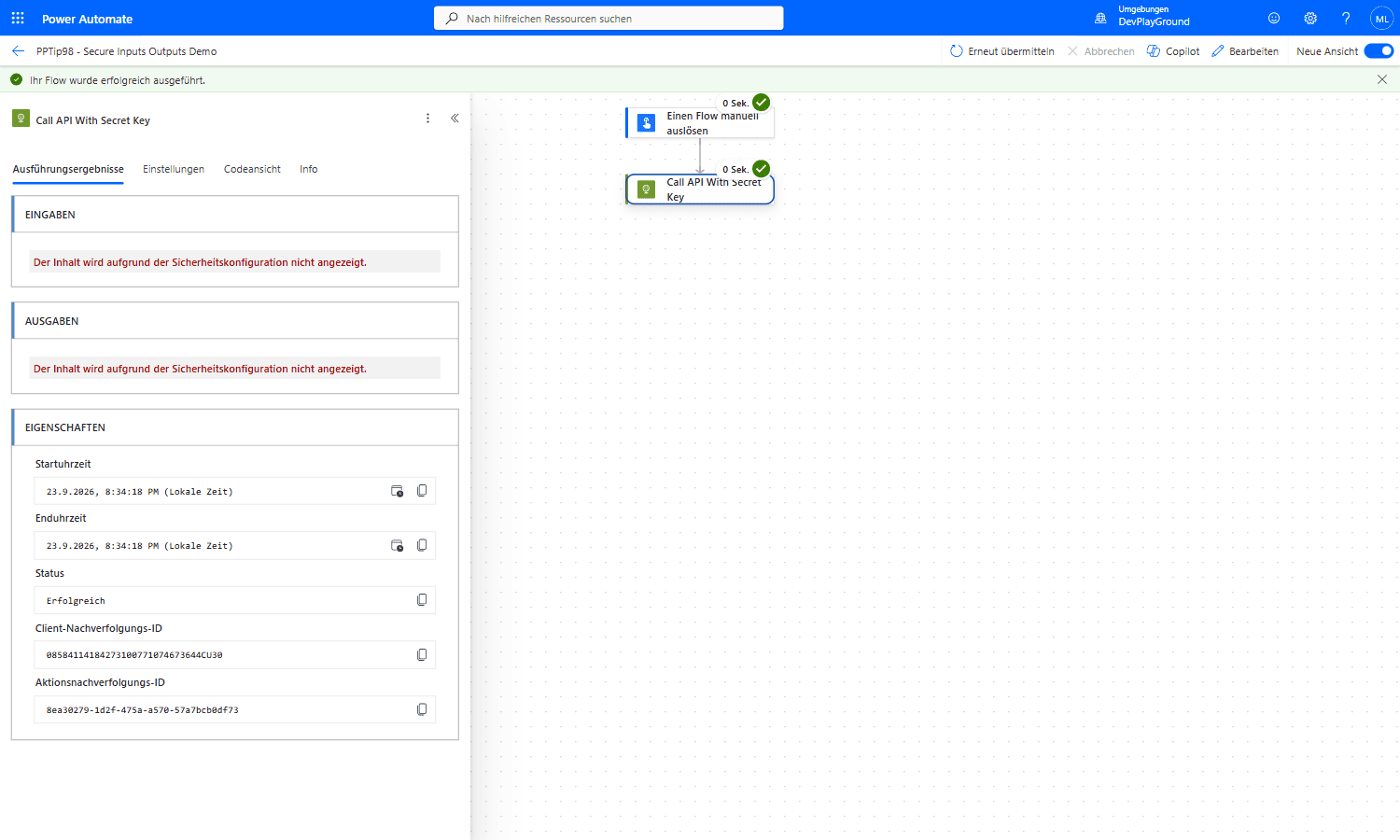 Real flow run: the same action’s run history now reads “Der Inhalt wird aufgrund der Sicherheitskonfiguration nicht angezeigt” (content hidden due to security configuration) for both Inputs and Outputs, the bearer token never appears in the log.
🎉 Result
Your flow’s sensitive data is hidden in the run history. If someone reviews the flow logs, they won’t see the actual data that was processed, significantly reducing the risk of data leakage or unauthorized access.
⚠️ Important Note: Secure Inputs and Secure Outputs are one part of a broader data-security strategy. Always consider the full context of your data processing and follow best practices for maximum protection.
🌟 Key Advantages
🔸 Enhanced Security: Sensitive data is not visible in flow logs, protecting against unauthorized access.
🔸 Compliance Friendly: Helps maintain compliance with data-protection regulations by safeguarding personal and confidential information.
🔸 Peace of Mind: Adds an extra layer of security so you can focus on building efficient workflows without compromising data integrity.
🎥 Video Tutorial
🛠️ FAQ
1. Why should I use Secure Inputs and Secure Outputs?
They hide sensitive data in the flow run history and logs, preventing unauthorized access to confidential information.
2. Will enabling Secure Inputs/Outputs affect my flow’s performance?
It has minimal impact on execution speed; it only changes how data is logged, not how it’s processed.
3. Can I toggle Secure Inputs and Secure Outputs individually?
Yes, you can enable Secure Inputs, Secure Outputs, or both for each action based on your security needs.
🔗 Related Tips
🔸 #PowerPlatformTip 21: ‘Use Triggeroutput’ - mask the email and header data this expression pulls into your run history.
🔸 #PowerPlatformTip 34: ‘PowerApps V2’ - secure the service-account credentials this trigger’s connection relies on.
This tip is by Marcel Lehmann, Microsoft MVP (Business Applications) and founder of the Power Platform Academy – live Power Platform workshops, free or CHF 49. Join the workshop waitlist to get notified about new dates. For companies that want this implemented for them, see KMUpower – Power Platform consulting & automation for SMEs (DACH).