#PowerPlatformTip 71: 'Array to Object'
TL;DR: Turn an array into an object in Power Automate by combining a Select action with nested Replace expressions, no loops required.
💡 Challenge
An API or a Select action hands you a list of key/value pairs such as [{"key":"id","value":"1"},{"key":"name","value":"Alice"}], but the next step needs one object: {"id":"1","name":"Alice"}. Power Automate has no built-in function that turns such an array into an object.
✅ Solution
Map every pair to a tiny one-property object with Select, serialise the result with string(), and merge the objects with a short replace() chain. A final json() turns the text back into a real object. No loop, no variable.
🔧 How It’s Done
1. Select: one small object per pair
🔸 From: your array. Switch the map to text mode and enter:
1
json(concat('{"', item()?['key'], '":"', item()?['value'], '"}'))
🔸 The Select returns [{"id":"1"},{"name":"Alice"}]. The json() wrapper matters: without it each element stays a string with escaped quotes.
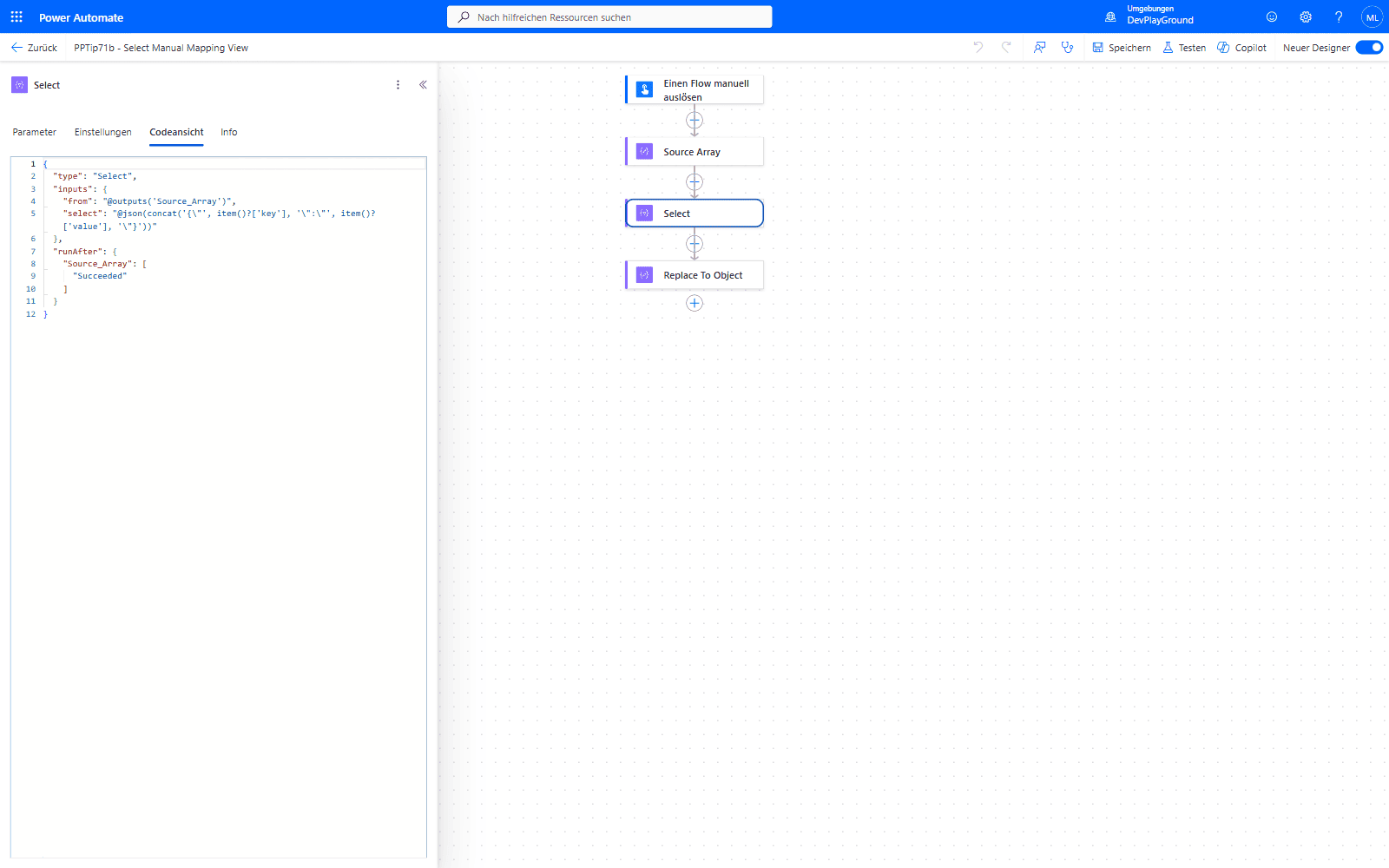 The Select action’s Code View: the manual text-mode mapping is wrapped in
 json(concat(...)) so each element comes out as a real object, not an escaped string.
2. Compose: merge the objects
🔸 Add a Compose with this expression:
1
json(replace(replace(replace(string(body('Select')),'},{',','),']',''),'[',''))
🔸 What happens: string() gives [{"id":"1"},{"name":"Alice"}], the first replace joins the objects to [{"id":"1","name":"Alice"}], the next two remove the brackets, and json() parses {"id":"1","name":"Alice"} into an object you can address with outputs('Compose')?['name'].
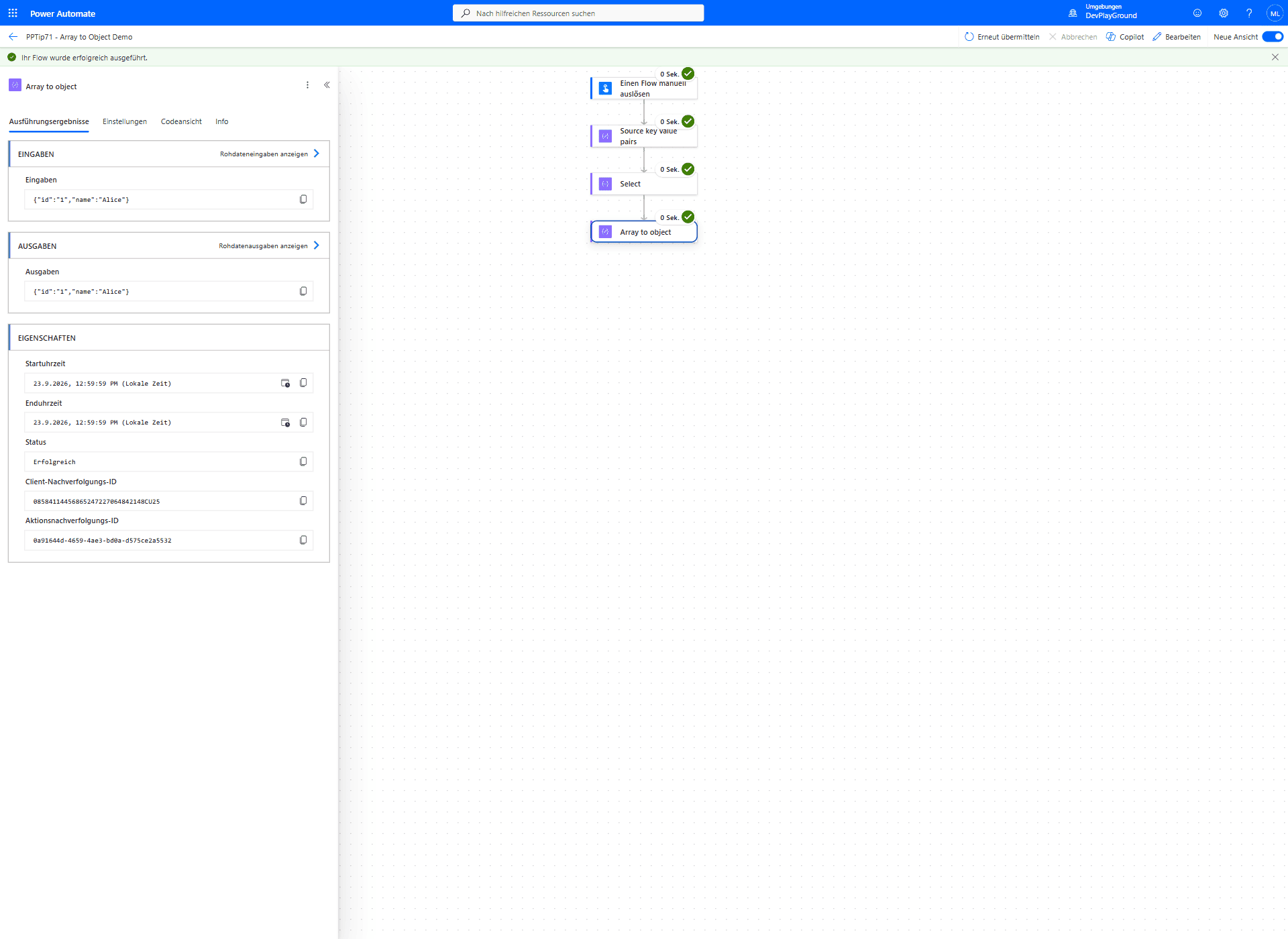 Real flow run: two key/value pairs go in,
 {"id":"1","name":"Alice"} comes out.
⚠️ Pitfall: The replace chain removes every
[and]and joins at every},{. As soon as a value contains brackets, a nested array or the text},{, the result breaks. For such data use the robust variant below, which does not depend on the serialisation.
🧩 Robust Variant, Object to Array, Reverse and Replace
The replace chain depends on the exact serialisation of the Select output. The variant below skips that and builds the object from plain "key":"value" fragments. All results come from one flow run.
1. Array to object without the replace chain
🔸 Select, text mode, map each item to one fragment: concat('"', item()?['key'], '":"', item()?['value'], '"')
🔸 From [{"key":"id","value":"1"},{"key":"name","value":"Alice"}] the Select returns ["\"id\":\"1\"", "\"name\":\"Alice\""].
🔸 Compose:
1
json(concat('{', join(body('Select'), ','), '}'))
🔸 Returns {"id":"1","name":"Alice"}, a real object. Every value is a string with this mapping.
🔸 Keep the original types (number, boolean) by letting the runtime quote the value: map to concat(substring(string(createArray(item()?['key'])),1,sub(length(string(createArray(item()?['key']))),2)), ':', substring(string(createArray(item()?['value'])),1,sub(length(string(createArray(item()?['value']))),2))). With values 1, "Alice" and true the same Compose returns {"id":1,"name":"Alice","ok":true}.
2. Object to array
🔸 There is no expression that lists the keys of an object. The XML functions do it: wrap the object in a root element, then query it.
🔸 Values: xpath(xml(json(concat('{"root":', string(outputs('Object')), '}'))), '/root/*/text()') on {"a":1,"b":"two","c":true} returns ["1","two","true"] (always strings).
🔸 Number of properties: the same with 'count(/root/*)' returns 3. Name of a property by position: 'local-name(/root/*[2])' returns b.
3. Reverse an array
🔸 reverse(createArray(1,2,3)) returns [3,2,1].
🔸 reverse('abc') fails: The template language function 'reverse' expects its first parameter to be of type array. The provided value is of type 'String'.
4. Replace values in an array
🔸 Select with the array as input and the map if(equals(item(), 'a'), 'z', item()) turns ["a","b","a"] into ["z","b","z"].
🔸 Expression only: json(replace(string(createArray('a','b','a')), '"a"', '"z"')) returns the same ["z","b","z"]. Include the quotes in the search string so a inside other values stays untouched.
🎉 Result
Your key/value list becomes one real object with two actions, and every value is reachable by its key, for example outputs('Compose')?['id'].
🌟 Key Advantages
🔸 No loop: no Apply to each, no variable, so the transformation runs in one step even for long lists.
🔸 Readable downstream: later actions address values by name instead of by array position.
🔸 Standard actions only: Select and Compose, no premium connector.
🎥 Video Tutorial
🛠️ FAQ
1. Why use the Select action and a replace chain?
Select builds one small object per pair in a single step. The replace chain then merges these objects as text, so you need neither a loop nor a variable.
2. Can this approach handle nested arrays or objects?
Not the replace chain: it removes every bracket and would destroy nested arrays. Use the robust variant with join() and the type-preserving mapping, which quotes values through the runtime instead of by hand.
3. What about duplicate keys?
A JSON object should not hold the same key twice. Make the keys unique before the transformation, for example by filtering the duplicates out with a Filter array first.
4. How do I convert an object to an array in Power Automate?
Wrap the object in a root element and use xpath(): xpath(xml(json(concat('{"root":', string(obj), '}'))), '/root/*/text()') returns the values as a string array, 'count(/root/*)' the number of properties and 'local-name(/root/*[2])' the name of the second one.
5. How do I reverse an array?
reverse(array): reverse(createArray(1,2,3)) returns [3,2,1]. It only accepts arrays, reverse('abc') fails.
6. How do I replace values in an array?
Use a Select action with the map if(equals(item(), 'old'), 'new', item()), or on the serialised array: json(replace(string(array), '"old"', '"new"')).
🔗 Related Tips
🔸 #PowerPlatformTip 37: ‘Table to JSON’ - a related transformation, turning a two-column table into a JSON record instead of an array.
🔸 #PowerPlatformTip 125: ‘Convert CSV to JSON’ - another no-premium data-shape conversion using standard actions.
This tip is by Marcel Lehmann, Microsoft MVP (Business Applications) and founder of the Power Platform Academy – live Power Platform workshops, free or CHF 49. Join the workshop waitlist to get notified about new dates. For companies that want this implemented for them, see KMUpower – Power Platform consulting & automation for SMEs (DACH).