#PowerPlatformTip 75: 'Boost Efficiency with Concurrency Control'
TL;DR: Turn on Concurrency Control on an ‘Apply to each’ loop to run up to 50 iterations in parallel instead of one-by-one. Never enable it when the loop increments a variable or appends to an array - and offload to a child flow to scale beyond 50.
💡 Challenge
By default, “Apply to each” (For each) loops in Power Automate execute their items sequentially - one after another. When you process hundreds of records, this becomes painfully slow. A loop that iterates over 500 items and calls an action per item can easily run for 10 minutes or more, even though each iteration is independent.
✅ Solution
Enable the Concurrency Control feature on the loop and raise the degree of parallelism (up to 50). Power Automate then processes multiple items at the same time, using the cloud resources far more efficiently. The same 500-item loop can finish in seconds instead of minutes.
🔧 How It’s Done
1. Open the loop settings
🔸 Click the … (ellipsis) on the “Apply to each” action and choose Settings.
2. Enable Concurrency Control
🔸 Turn on Concurrency Control and drag the Degree of Parallelism slider to the desired value (up to 50).
3. Scale beyond 50 with child flows
🔸 To process more than 50 items truly in parallel, set the degree to 50 and offload the per-item work to a child flow.
🔸 This way each item (e.g., when sending an adaptive card per user) gets a dedicated flow run, ensuring individual, isolated processing. See #PowerPlatformTip 117: ‘Optimize Parallel Object Processing’ for the pattern.
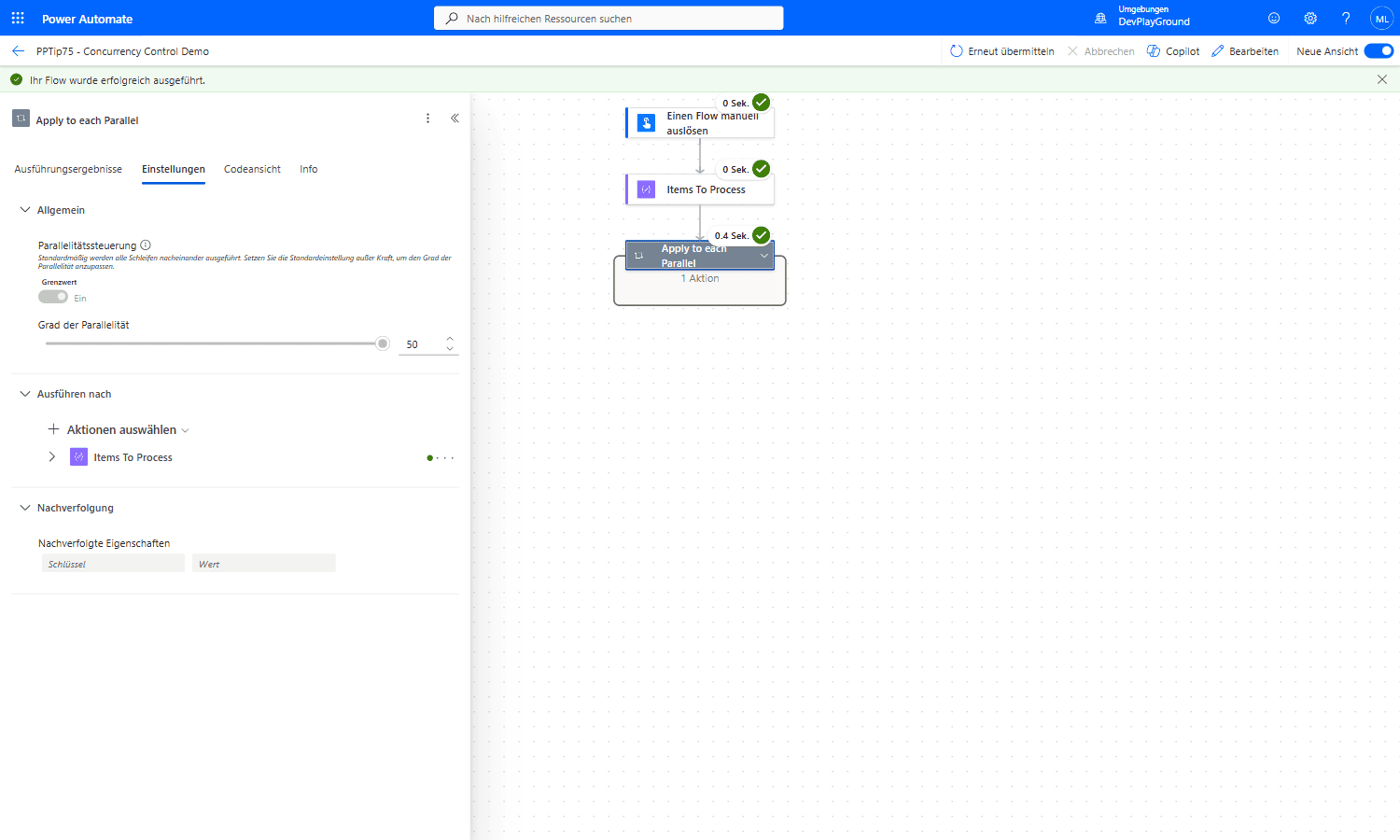 Real flow: the “Apply to each” loop’s Settings tab under Allgemein/General, Parallelitätssteuerung (Concurrency Control): Ein, Grad der Parallelität (Degree of Parallelism): 50.
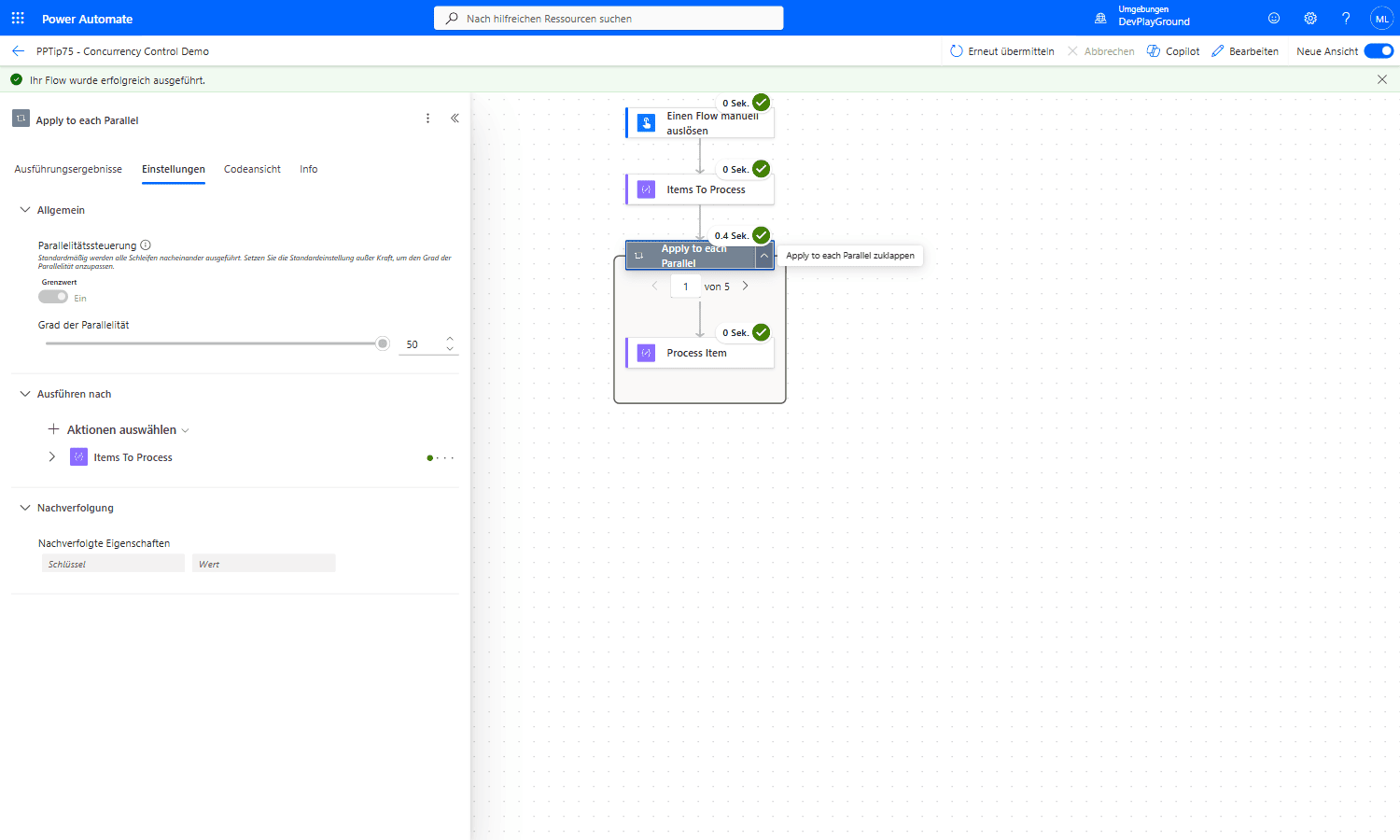 Real flow run: with concurrency on, the whole 5-item “Apply to each” loop, expanded to iteration 1 of 5, completes in 0.4 Sek. total, not 5 sequential steps.
🎉 Result
You’ve optimized your flow’s execution: independent items are processed simultaneously, cutting overall run time from minutes to seconds for large data sets.
🌟 Key Advantages
🔸 Speed & Efficiency: Parallel processing dramatically reduces overall execution time, especially for large data sets.
🔸 Scalability: Offloading to child flows lets you handle more than 50 parallel tasks without hitting the limit.
🔸 Individual Responses: Child flows per item ensure personalized, isolated processing and responses.
⚠️ When NOT to Use Parallelism
Concurrency Control only works when the actions inside the loop are independent of each other. Do not enable it if your loop:
🔸 uses Increment variable / Decrement variable (counters),
🔸 uses Append to array variable or Append to string variable,
🔸 or otherwise reads and writes the same variable across iterations.
When several iterations run in parallel, they all read and write that shared variable at the same time. Iterations overwrite each other’s results (a race condition), so your counter is wrong and your array ends up incomplete or in random order - data chaos. In those cases keep the loop sequential (degree of parallelism = 1) or avoid variables entirely, for example by building the result with Select, union() or a Compose action instead of appending in a loop.
⚠️ Also watch for throttling: Even with independent actions, excessive parallelism against a single connector (e.g., SharePoint, Dataverse) can trigger throttling and make your flow slower. Always test and monitor to find the optimal balance.
💡 Related: If your goal is the opposite - forcing a flow to run one instance at a time to prevent duplicates - see #PowerPlatformTip 35: ‘Concurrent Control’.
🎥 Video Tutorial
🛠️ FAQ
Q: What is Concurrency Control in Power Automate?
Concurrency Control lets you configure the number of parallel threads for an “Apply to each” loop, so multiple iterations run simultaneously instead of sequentially.
Q: What is the maximum degree of parallelism I can set?
You can set up to 50 parallel threads in an “Apply to each” loop. To process more items in parallel, offload the per-item work to a child flow and set the parent to 50.
Q: Why does my array or counter get wrong values after enabling parallelism?
Because “Increment variable” and “Append to array variable” share a single variable across all iterations. Running them in parallel causes race conditions where iterations overwrite each other. Keep such loops sequential (degree of parallelism = 1) or build the result with Select/union() instead of appending.
Q: Will setting a high degree of parallelism cause throttling?
It can. Excessive parallelism against a connector or the Power Platform may lead to throttling and actually slow your flow down. Test different settings to find the optimal balance.
🔗 Related Tips
🔸 #PowerPlatformTip 5: ‘Less Variables’ - swap Initialize Variable for Parse JSON/Compose so a loop stays eligible for the parallelism described above.
🔸 #PowerPlatformTip 36: ‘Static Result’ - test different concurrency settings safely without hitting the real connector every time.
This tip is by Marcel Lehmann, Microsoft MVP (Business Applications) and founder of the Power Platform Academy – live Power Platform workshops, free or CHF 49. Join the workshop waitlist to get notified about new dates. For companies that want this implemented for them, see KMUpower – Power Platform consulting & automation for SMEs (DACH).