#PowerPlatformTip 36: 'Static Result'
TL;DR: Enable Static Result on an action to return a predefined output without actually running it, great for fast, safe flow testing.
💡 Challenge
Testing Power Automate flows often requires running actions that can modify data or consume significant time, which isn’t always desirable or efficient.
✅ Solution
Use the “Static Result” feature to simulate the outcome of actions without actually executing them, keeping data unchanged and saving time during testing.
🔧 How It’s Done
-
Enable Static Results: Identify the action you want to test without execution and configure it to return a predefined static result instead of running.
-
Configure Test Conditions: Define the output you’d expect from the action so your flow can continue testing subsequent steps as if it had executed.
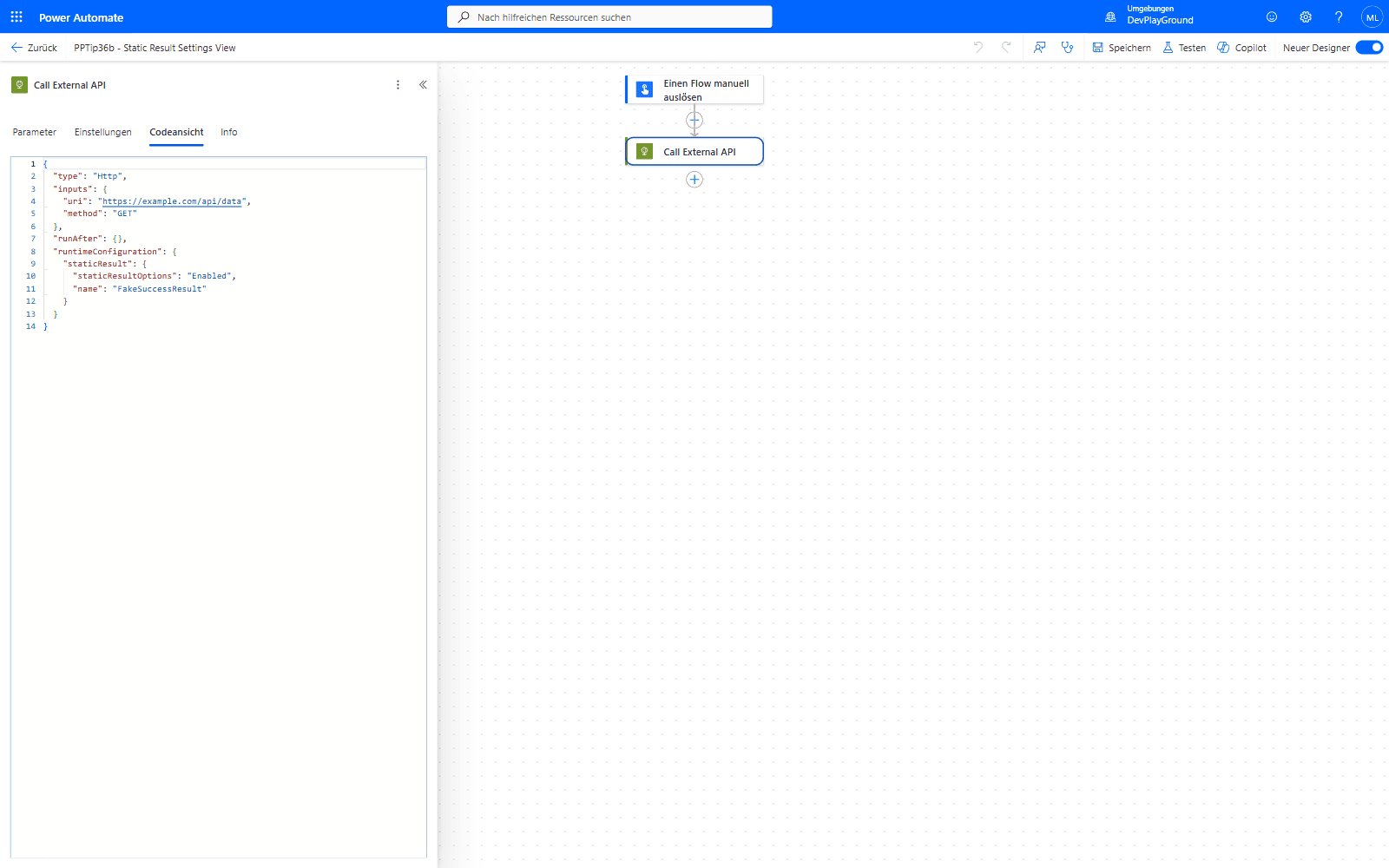 The action’s Code View:
 runtimeConfiguration.staticResult with staticResultOptions: "Enabled" and a name pointing at the predefined result - this is what “enabling Static Result” actually sets.
- Iterate and Optimize: Use static results to quickly iterate through your flow’s logic, debugging without the overhead of actual execution time or the risk of altering live data.
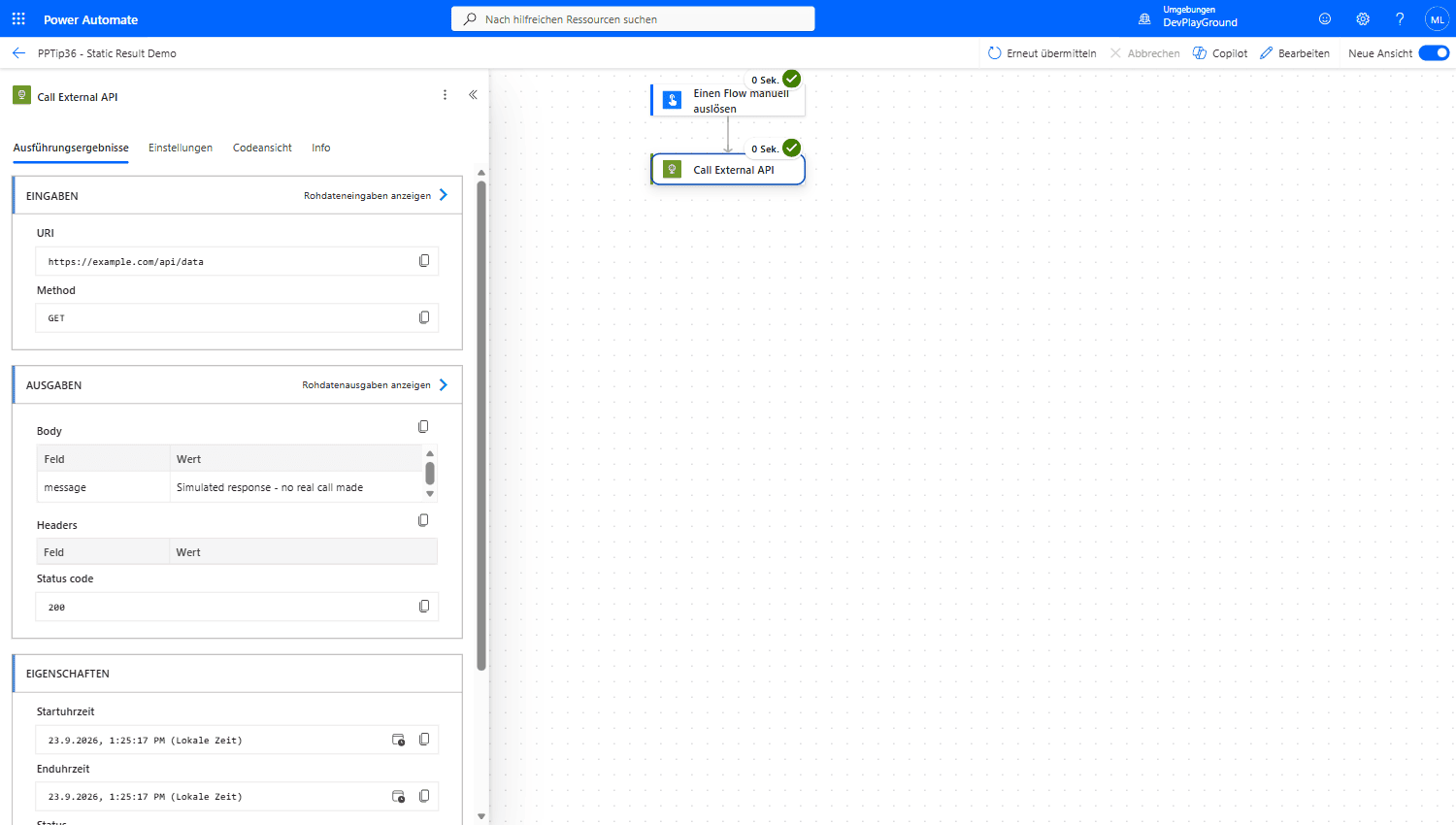 Real flow run: the HTTP action targets
 https://example.com/api/data, but Static Result returns the predefined {"message": "Simulated response - no real call made"} at status 200 - the endpoint was never actually called.
🎉 Result
A more efficient, controlled testing environment that allows rapid development and iteration of flows without compromising data integrity or consuming unnecessary resources.
🌟 Key Advantages
🔸 Time Efficiency: Dramatically reduce the time spent waiting for actions during testing.
🔸 Data Integrity: Avoid unnecessary modifications during the testing process.
🔸 Testing Flexibility: Test various scenarios without manipulating real-world data.
🎥 Video Tutorial
🛠️ FAQ
1. Can I use static results with all types of actions in Power Automate?
Static results work with most actions, but some system-level or security-sensitive actions may not support this feature.
2. How do I know when static results are enabled in my flow?
When static results are active, you’ll see an indicator in the flow designer showing that test data is being used.
3. Do static results affect the flow’s run history?
Yes, runs using static results appear in the run history but are marked as using simulated data.
🔗 Related Tips
🔸 #PowerPlatformTip 9: ‘Test Your Flow Before Activation’ - pair Static Result with the built-in Test feature for a full pre-activation check.
🔸 #PowerPlatformTip 51: ‘Which Flow Calls Which Flow’ - trace dependencies before you decide which actions are safe to mock.
This tip is by Marcel Lehmann, Microsoft MVP (Business Applications) and founder of the Power Platform Academy – live Power Platform workshops, free or CHF 49. Join the workshop waitlist to get notified about new dates. For companies that want this implemented for them, see KMUpower – Power Platform consulting & automation for SMEs (DACH).