#PowerPlatformTip 37: 'Table to JSON'
TL;DR: Convert a two-column Name/Value table to a JSON record and run it through Parse JSON so you can access each entry directly.
💡 Challenge
Working with two-column tables, specifically ‘Name’ and ‘Value’ pairs, in Power Automate can be tedious when trying to access individual entries efficiently. A table (an array of {"Name": ..., "Value": ...} objects, as you’d get from an Excel range or a hand-built array) forces you to loop and compare item()?['Name'] against a string every time you want one specific entry, when what you really want is to reference it by key like a dictionary.
✅ Solution
Streamline the selection of individual entries by converting the table into a JSON record and using the “Parse JSON” action.
🔧 How It’s Done
-
Convert your ‘Name’ and ‘Value’ table into a JSON record. This transformation allows more flexible data manipulation. For a small, fixed set of rows, the fastest route is a single Compose where you type the record by hand, referencing each row’s Value by its array index (e.g.
{ "Environment": body('Get_rows')?[0]?['Value'], "Owner": body('Get_rows')?[1]?['Value'] }). For a table whose rows vary in number or order, build the object dynamically in an Apply to each: initialize an object variable to{}, then on every iteration usesetProperty(variables('MyObject'), item()?['Name'], item()?['Value'])and set the result back into the variable, this accumulates one key per row without needing to know the row count in advance. -
Use the “Parse JSON” action in Power Automate to structure the data, enabling straightforward access to any entry within your flow via
body('Parse_JSON')?['KeyName']instead of filtering an array.
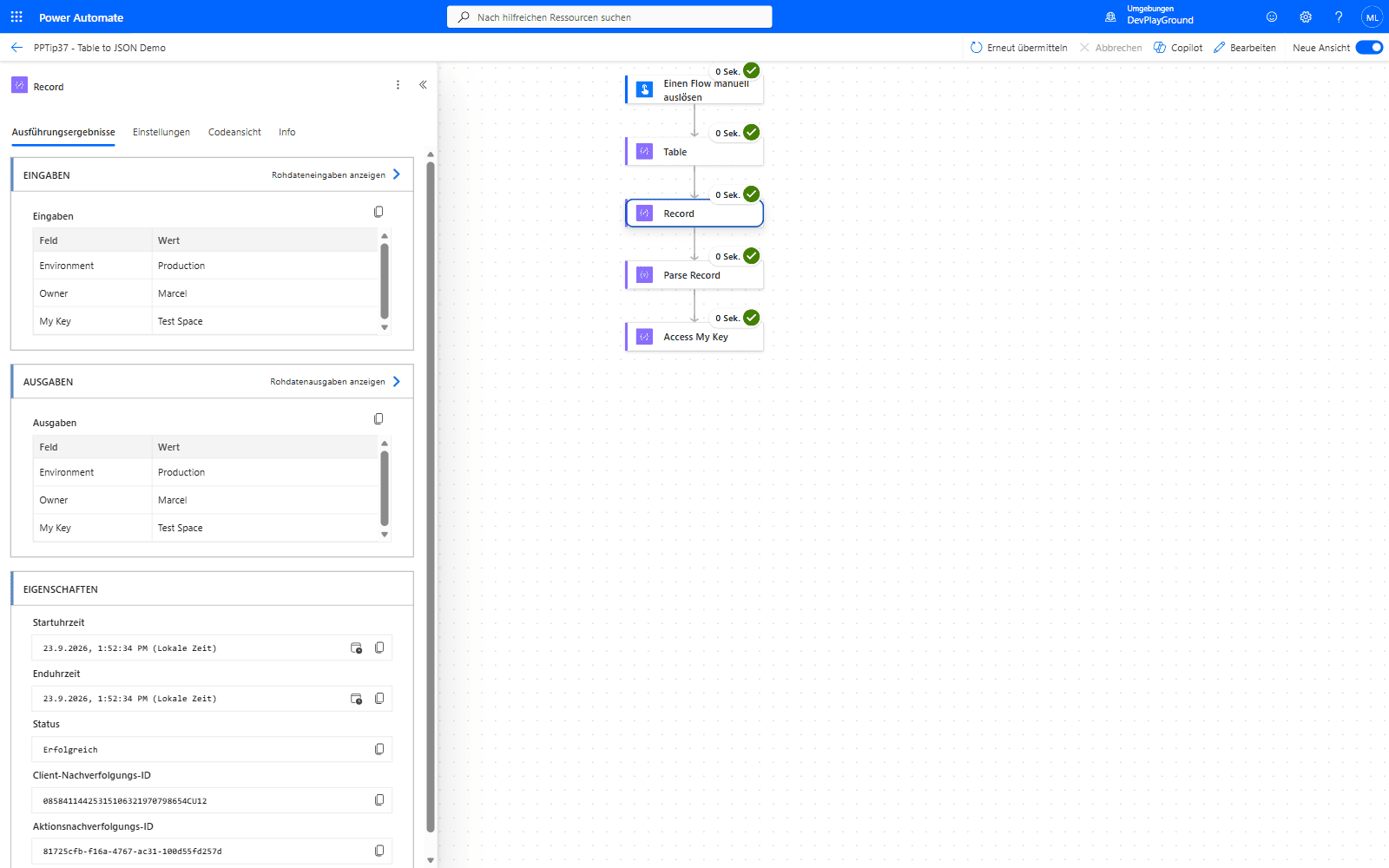 Real flow run: the two-column table’s rows become named fields (
Environment, Owner, My Key) in one Compose record, ready for Parse JSON.
⚠️ Stolperstein: Referenziere den Output eines Compose-Schritts immer mit
outputs('ActionName'), nicht mitbody('ActionName').body(...)ist für Aktionen gedacht, die selbst eine Body-Eigenschaft zurückgeben (HTTP, Parse JSON, …); bei Compose liefertbody(...)null, und jedes referenzierte Feld bleibt im nachgelagerten Schritt leer, ohne dass die Aktion selbst fehlschlägt.
- Watch reserved and unsafe characters. JSON object keys can’t safely be arbitrary text, spaces, hyphens, or a key that starts with a digit will still parse, but referencing them later needs bracket syntax (
body('Parse_JSON')?['My Key']) instead of dot notation. If the source names could contain such characters, sanitize them first, e.g.replace(triggerBody()?['Name'], ' ', '_'), so downstream references stay simple and consistent.
![Power Automate real flow run: bracket notation body('Parse_Record')?['My Key'] correctly returns "Test Space" for a key containing a space](/assets/images/posts/2023/03/access-key-with-space.png) Real flow run:
Real flow run: body('Parse_Record')?['My Key'] correctly returns “Test Space” - dot notation would fail on the space in the key name.
🎉 Result
Accessing and selecting data from two-column tables becomes seamless, saving time and reducing complexity.
🌟 Key Advantages
🔸 Efficiency: Quickly convert tabular data into a manipulable format.
🔸 Simplicity: Access individual data points without complex expressions.
🔸 Flexibility: Adapt the method for various data structures beyond simple name-value pairs, the same key-by-key access pattern extends to three-or-more-column tables once you nest the extra columns as properties of each value object instead of a flat string.
🎥 Video Tutorial
🛠️ FAQ
1. Can this method handle tables with multiple columns beyond name-value pairs?
Yes, but you’ll need to modify the JSON structure to accommodate additional columns, creating more complex object structures.
2. What happens if my table contains special characters or spaces in the names?
Special characters may need escaping in JSON. Consider using the replace() function to sanitize field names before conversion.
3. Is there a size limit for tables when converting to JSON?
While there’s no strict limit, very large tables may impact flow performance. Consider batch processing for tables with thousands of rows.
🔗 Related Tips
🔸 #PowerPlatformTip 104: ‘Efficient JSON Handling’ - build a solid Parse JSON schema for the record this conversion produces.
🔸 #PowerPlatformTip 24: ‘Merge Arrays or Tables’ - combine multiple tables before converting them to JSON.
This tip is by Marcel Lehmann, Microsoft MVP (Business Applications) and founder of the Power Platform Academy – live Power Platform workshops, free or CHF 49. Join the workshop waitlist to get notified about new dates. For companies that want this implemented for them, see KMUpower – Power Platform consulting & automation for SMEs (DACH).