#PowerPlatformTip 35: 'Concurrent Control'
TL;DR: Turn on Concurrency Control and set the degree of parallelism to 1 so flow instances run one at a time, preventing duplicates and conflicts.
💡 Challenge
Managing multiple instances of a Power Automate flow can lead to data duplication and conflicts, especially when flows run in parallel and manipulate the same data set.
✅ Solution
Enable the Concurrency Control feature in Power Automate and set the degree of parallelism to 1 to ensure flows run sequentially, eliminating duplicates and conflicts.
🔧 How It’s Done
Here’s how to do it:
-
Navigate to your flow’s trigger settings. 🔸 Open the flow in Power Automate.
🔸 Click the trigger’s ellipsis (…) and choose “Settings.”
-
Enable Concurrency Control and set parallelism to 1. 🔸 Toggle on the “Concurrency Control” option.
🔸 Enter “1” for the degree of parallelism.
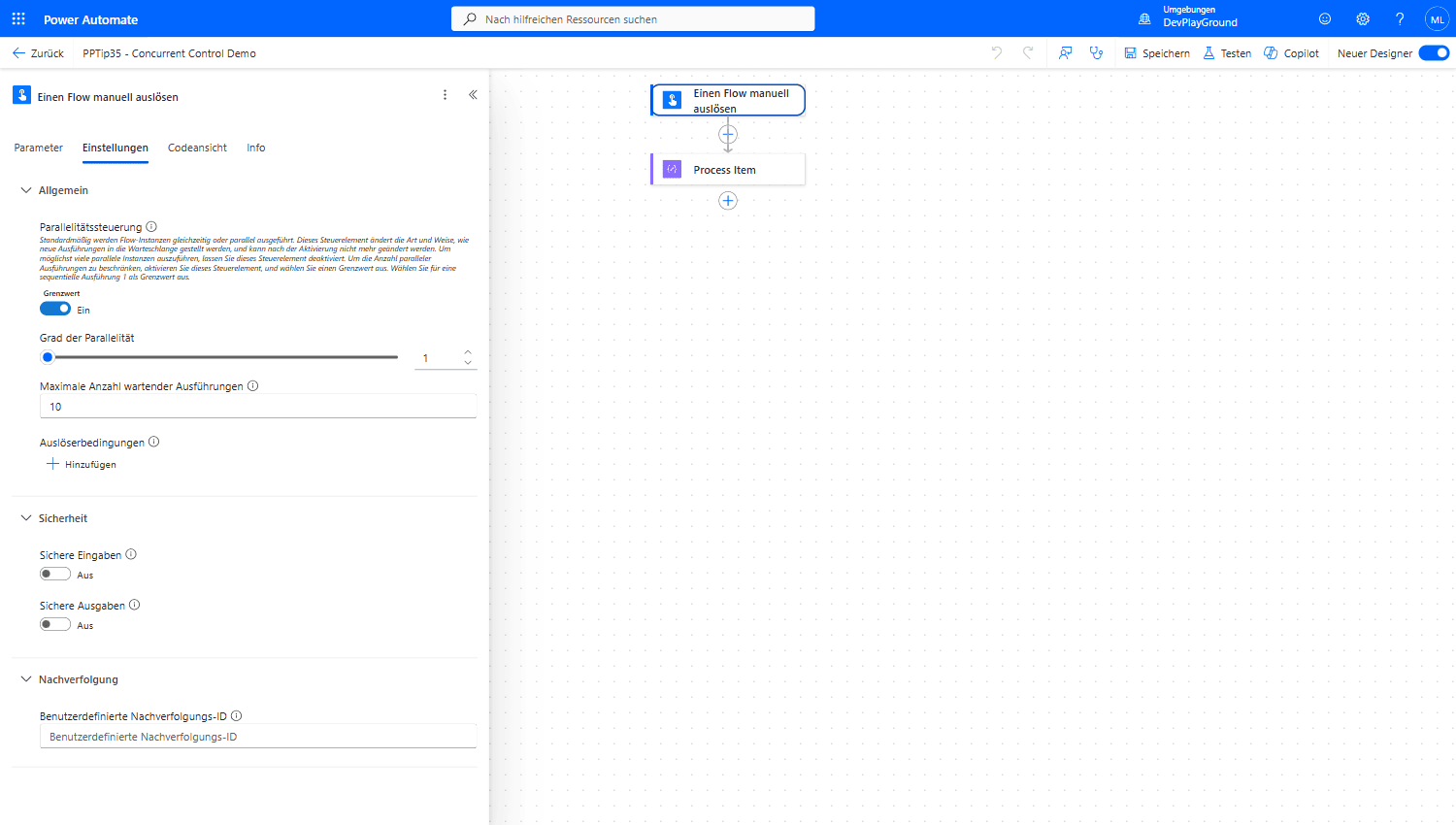 The trigger’s Settings pane: Concurrency Control on (“Grenzwert: Ein” in a German tenant), Degree of Parallelism set to 1.
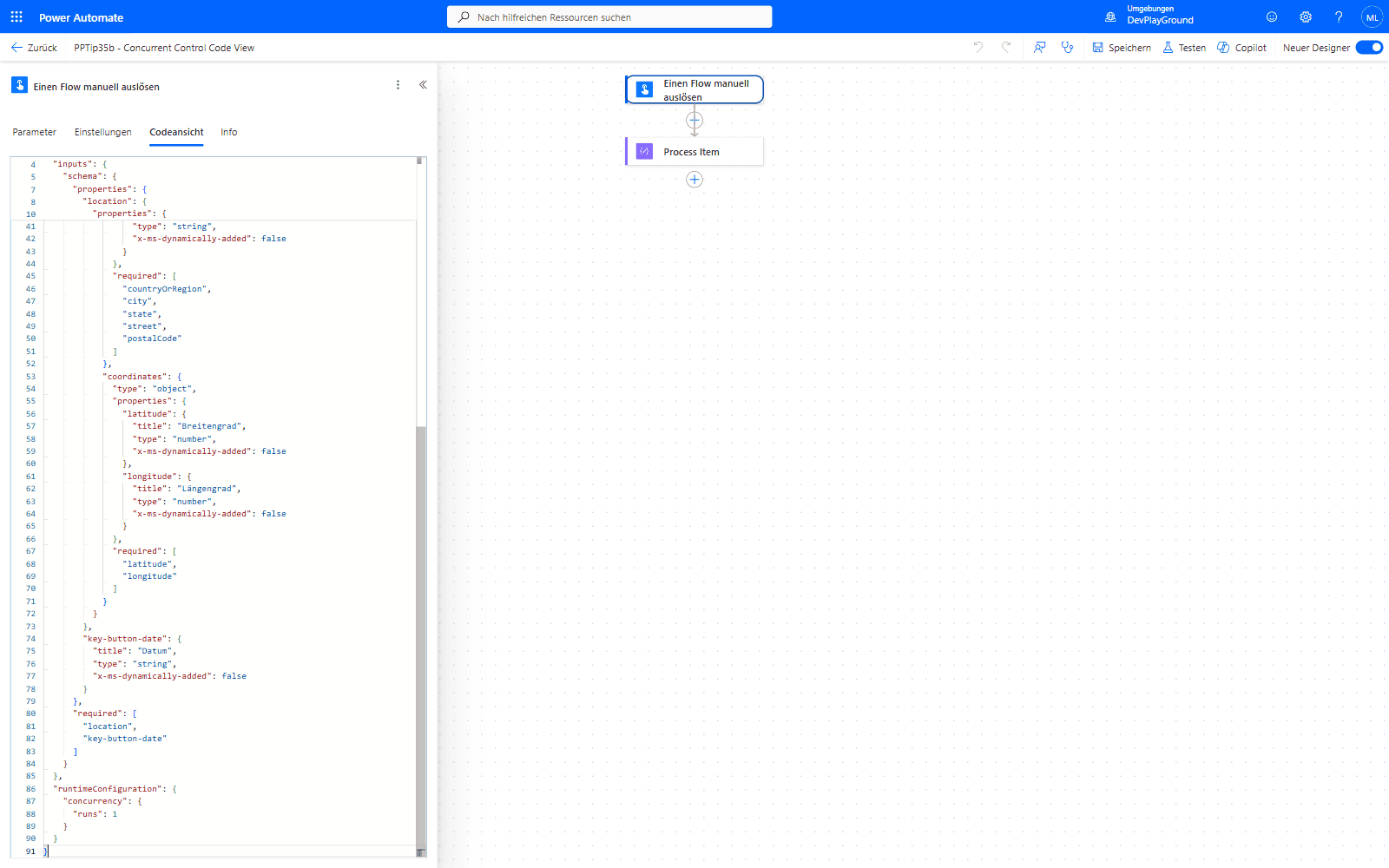 The same setting in the trigger’s Code View:
 "runtimeConfiguration": { "concurrency": { "runs": 1 } } - useful when you’re editing the flow definition directly instead of the UI.
-
Validate sequential execution. 🔸 Confirm only one instance runs at a time.
🔸 Check additional triggers queue for execution after the current run.
🎉 Result
A more reliable automation process where data integrity is maintained and the risk of conflicts and duplicates is minimized.
🌟 Key Advantages
🔸 Data Integrity: Ensures each flow instance accesses and modifies data without interference.
🔸 Sequential Execution: Queues flow instances for an orderly, predictable run sequence.
🔸 Conflict Reduction: Limits concurrent runs to significantly reduce data conflicts.
🛠️ FAQ
1. What happens to flows that are triggered while another instance is running?
When concurrency control is set to 1, additional triggers are queued and will execute sequentially after the current instance completes.
2. Can I set concurrency control to values other than 1?
Yes, you can set it to any value between 1-50, but higher values allow parallel execution which may reintroduce conflicts.
3. Does concurrency control affect flow performance?
It may increase total processing time since flows run sequentially, but it ensures data integrity and prevents conflicts in critical scenarios.
🔗 Related Tips
🔸 #PowerPlatformTip 5: ‘Less Variables’ - avoid Initialize Variable in loops, since it forces sequential execution even when Concurrency Control is left on.
🔸 #PowerPlatformTip 36: ‘Static Result’ - test how your flow behaves under load without risking real data.
This tip is by Marcel Lehmann, Microsoft MVP (Business Applications) and founder of the Power Platform Academy – live Power Platform workshops, free or CHF 49. Join the workshop waitlist to get notified about new dates. For companies that want this implemented for them, see KMUpower – Power Platform consulting & automation for SMEs (DACH).