#PowerPlatformTip 5: 'Less Variables'
TL;DR: Hold static parameters in Parse JSON or Compose instead of Initialize Variable to keep flows readable and preserve loop concurrency.
💡 Challenge
In many Power Automate flows, you might find yourself using the ‘Initialize Variable’ action to store a parameter that never changes throughout the flow. It’s like carrying a heavy toolbox when all you need is a single screwdriver! Worse, if that ‘Initialize Variable’ (or a later ‘Set Variable’ on it) sits inside an ‘Apply to each’, the designer silently disables the concurrency control on that loop, forcing every iteration to run one after another.
✅ Solution
Use ‘Parse JSON’ (or ‘Compose’) to hold static parameters instead of ‘Initialize Variable’. You avoid variables entirely, which keeps your flow readable and, importantly, doesn’t block parallelism inside loops.
🔧 How It’s Done
1. Replace ‘Initialize Variable’
🔸 Swap out the ‘Initialize Variable’ action for ‘Parse JSON’ or ‘Compose’.
2. Set the JSON schema
🔸 Define the JSON schema to match the parameter you want to set. For ‘Parse JSON’, mark fields that might legitimately be missing as non-required in the schema (or omit a required array entirely), otherwise a source that occasionally sends null or drops a property will throw a schema-validation error and fail the run, exactly the fragility you were trying to avoid by moving off variables.
3. Use in Flow
🔸 Reference the parsed object wherever you would have used the variable, e.g. outputs('Parse_JSON')?['settingName'] with the ? operator so a genuinely missing property returns null instead of erroring the whole expression.
4. Know when ‘Compose’ is enough
🔸 If the static value is a single flat string or number, ‘Compose’ is simpler than ‘Parse JSON’, you skip writing a schema entirely. Reach for ‘Parse JSON’ once you need more than one related static value or nested structure, so you’re not scattering a dozen separate Compose actions across the flow.
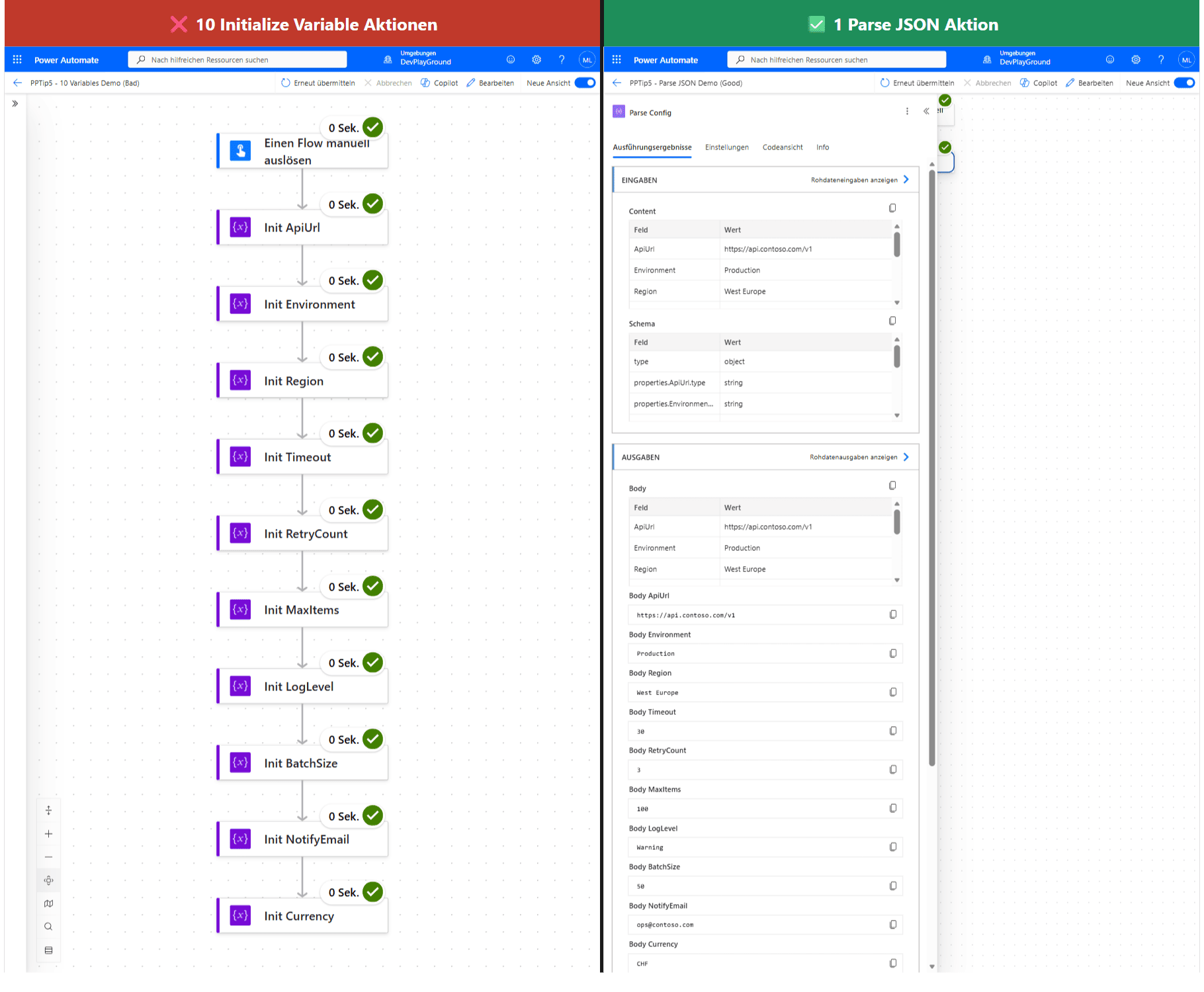 Same 10 static config values, two ways to hold them: ten
 Initialize Variable actions stacked one after another, or one Parse JSON action whose output exposes all ten as Dynamic Content.
🎉 Result
By using ‘Parse JSON’ for static parameters, your flow stays clean and its intent is clearer, and you keep the option to run ‘Apply to each’ loops with concurrency enabled.
🌟 Key Advantages
🔸 Clarity: Makes it obvious the parameter is static and won’t change, improving readability.
🔸 Concurrency-friendly: Unlike variables, Parse JSON / Compose don’t force ‘Apply to each’ loops to run sequentially, you can keep parallelism on. Technically it’s not the variable action itself that’s the problem, it’s that the flow engine has to guarantee a variable’s value is deterministic and race-free across iterations, so it disables the loop’s “Concurrency Control” setting the moment any variable is set inside it, capping you at one iteration at a time regardless of what you set the degree of parallelism to.
🔸 Best Practices: Reserves variables for values that genuinely change during the run, such as a running total or an accumulator array built with ‘Append to array variable’, where you do need that sequential guarantee.
🎥 Video Tutorial
🛠️ FAQ
1. When should I use Parse JSON instead of Initialize Variable?
Use Parse JSON (or Compose) for static values that don’t change during execution. Use Initialize Variable only for values you’ll modify while the flow runs.
2. Does Parse JSON reduce my action / API count compared to Initialize Variable?
No. Both are built-in actions and each counts as one Power Platform request. The real benefit is readability and keeping loop concurrency, not fewer API calls.
3. Can I use complex objects with Parse JSON?
Absolutely! Parse JSON excels at handling complex nested objects and arrays, making it perfect for structured static data.
🔗 Related Tips
🔸 #PowerPlatformTip 35: ‘Concurrent Control’ - the concurrency setting this Parse JSON swap is specifically protecting.
🔸 #PowerPlatformTip 104: ‘Efficient JSON Handling’ - build a solid schema for the Parse JSON action you’re now using instead of variables.
This tip is by Marcel Lehmann, Microsoft MVP (Business Applications) and founder of the Power Platform Academy – live Power Platform workshops, free or CHF 49. Join the workshop waitlist to get notified about new dates. For companies that want this implemented for them, see KMUpower – Power Platform consulting & automation for SMEs (DACH).