#PowerPlatformTip 6: 'formatDateTime in utcNow'
TL;DR: Format dates directly with
utcNow('your-format')instead of wrapping it in a separateformatDateTimecall.
🧰 Free tool: Test your
utcNow()/formatDateTimeformat strings with a live preview (remember:MMis month,mmis minute): utcNow date format tester.
💡 Challenge
Working with dates and times often requires using formatDateTime with utcNow to format values, adding unnecessary complexity and extra steps in your flow.
✅ Solution
Format the date directly within utcNow by passing your desired format string, eliminating the separate formatDateTime function.
🔧 How It’s Done
1. Use utcNow with format parameter
🔸 Instead of using formatDateTime(utcNow(), 'your-format'), call utcNow('your-format').
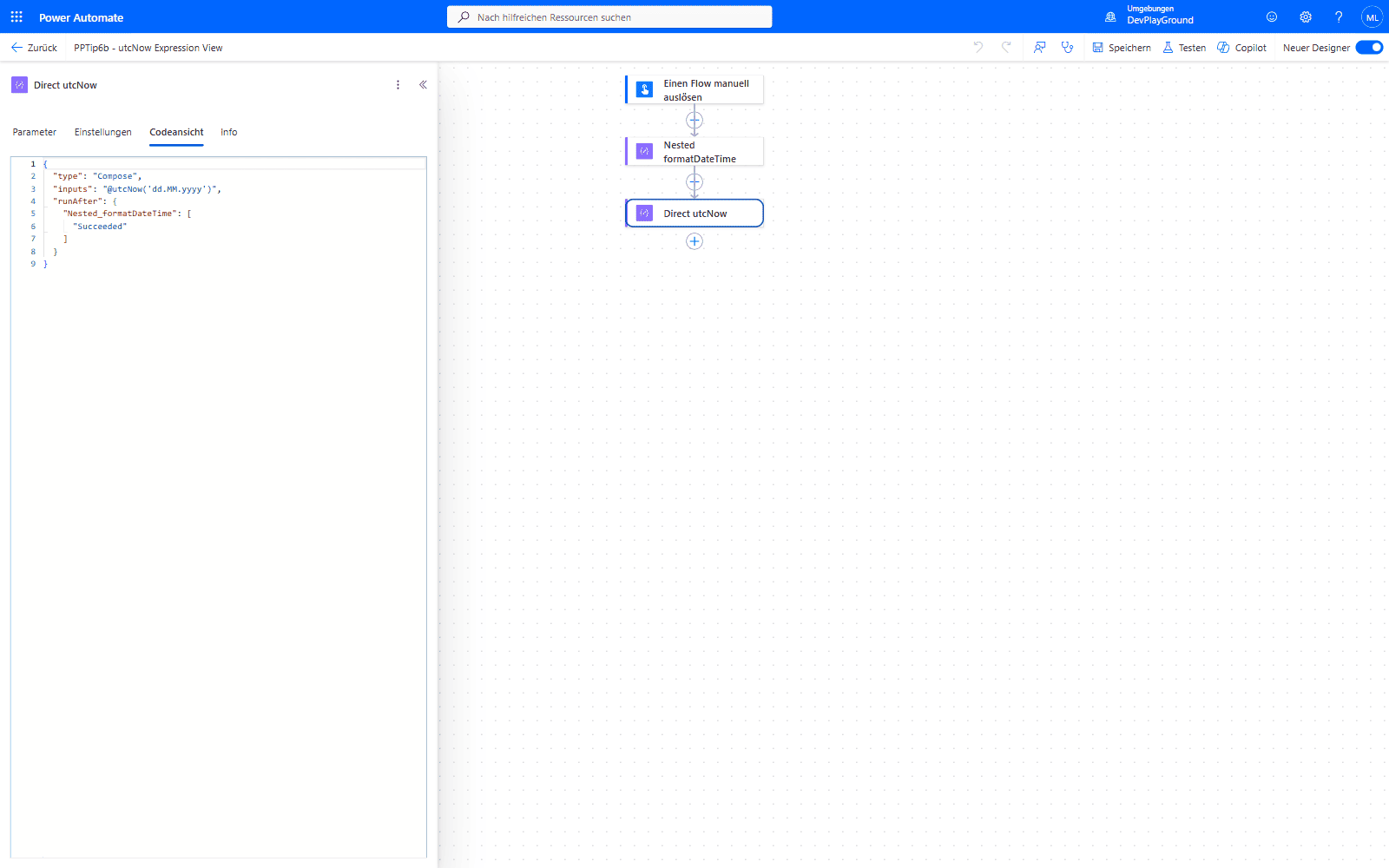 The action’s Code View: the whole expression is just
 utcNow('dd.MM.yyyy'), no nested formatDateTime needed.
2. Apply your date-time format
🔸 Use the same format string you need directly inside utcNow.
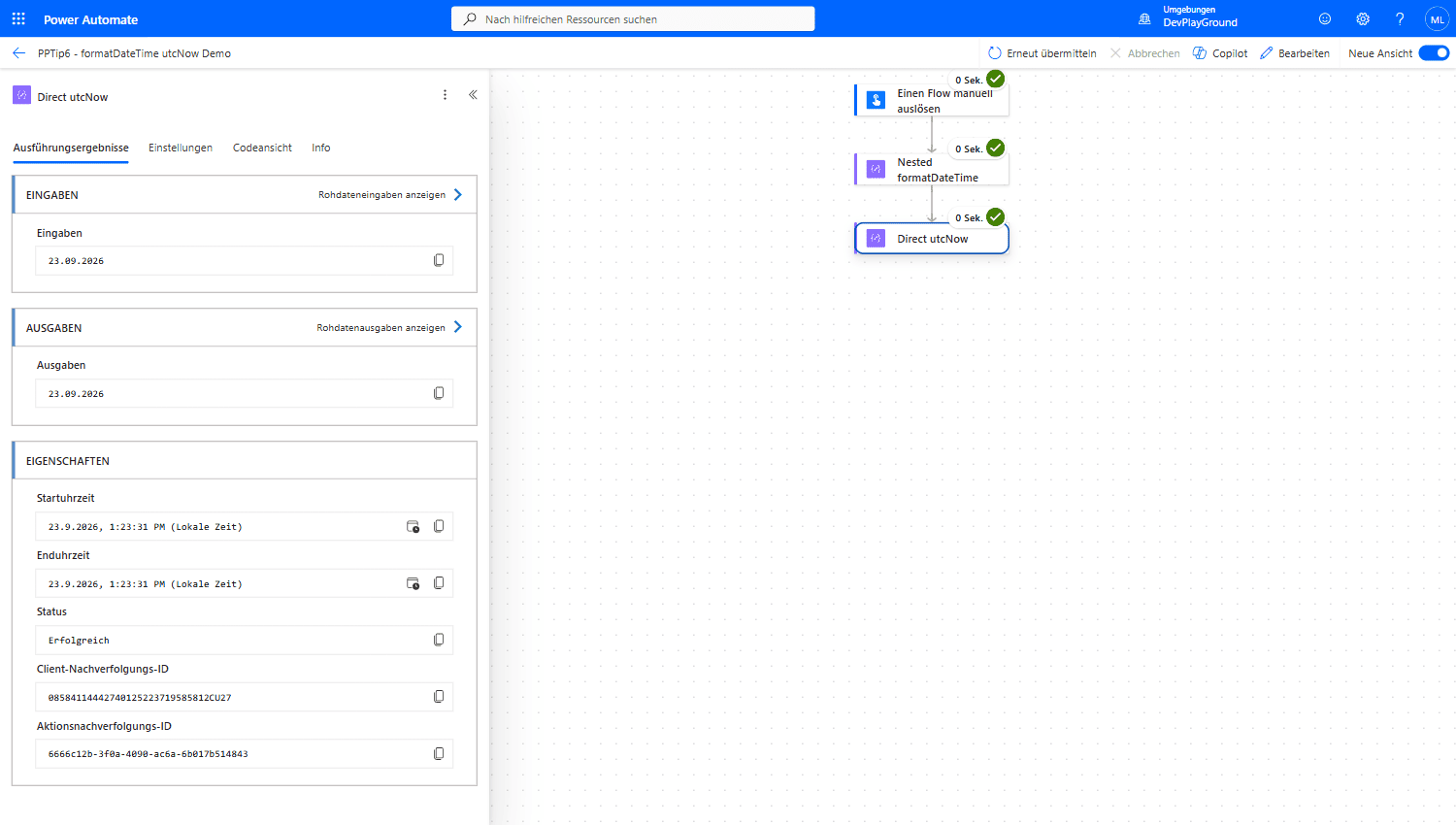 Real flow run: both approaches produce the same output,
 23.09.2026 - the direct call just skips the extra step.
3. Test your flow
🔸 Run and verify your flow in a non-production environment to ensure it works as expected.
🎉 Result
By directly formatting dates within utcNow, you simplify and streamline your flows, reducing steps and improving readability and performance.
🌟 Key Advantages
🔸 Simplicity: Eliminates the need for an additional formatDateTime function.
🔸 Efficiency: Reduces the number of expressions in your flow.
🔸 Clarity: Makes your flow easier to read and maintain.
🛠️ FAQ
1. What format strings can I use with utcNow()?
You can use standard .NET DateTime format strings like ‘yyyy-MM-dd’, ‘HH:mm:ss’, or custom combinations to format the date and time as needed.
2. Is utcNow() always in UTC timezone?
Yes, utcNow() always returns the current time in UTC. If you need local time, consider using the convertTimeZone() function.
3. Can I combine utcNow() formatting with other functions?
Absolutely! You can chain utcNow() with other functions like addDays(), addHours(), or use it within expressions for complex date calculations.
🔗 Related Tips
🔸 #PowerPlatformTip 17: ‘Format Data by Example’ - let Power Automate generate other tricky formatting expressions for you the same way.
🔸 #PowerPlatformTip 112: ‘Consistent Data Formats’ - keep formatted dates and other values consistent across your whole flow.
This tip is by Marcel Lehmann, Microsoft MVP (Business Applications) and founder of the Power Platform Academy – live Power Platform workshops, free or CHF 49. Join the workshop waitlist to get notified about new dates. For companies that want this implemented for them, see KMUpower – Power Platform consulting & automation for SMEs (DACH).