#PowerPlatformTip 7: 'UNION and FilterArray'
TL;DR: Merge and deduplicate arrays with
union()(pass the same array twice for DISTINCT), then narrow results with the Filter Array action.
💡 Challenge
Data manipulation is a cornerstone of Power Automate, and you often need to merge or filter data sets for various workflows, which quickly gets messy with basic actions alone.
✅ Solution
Combine the union() function and the ‘Filter Array’ action. union() merges arrays (and deduplicates), while ‘Filter Array’ returns only the items you’re looking for.
🔧 How It’s Done
1. Use union()
🔸 union() merges two arrays into one. Passing the same array twice makes it behave like DISTINCT, removing duplicates.
2. Use ‘Filter Array’
🔸 Keep only the items that match your condition and drop the rest.
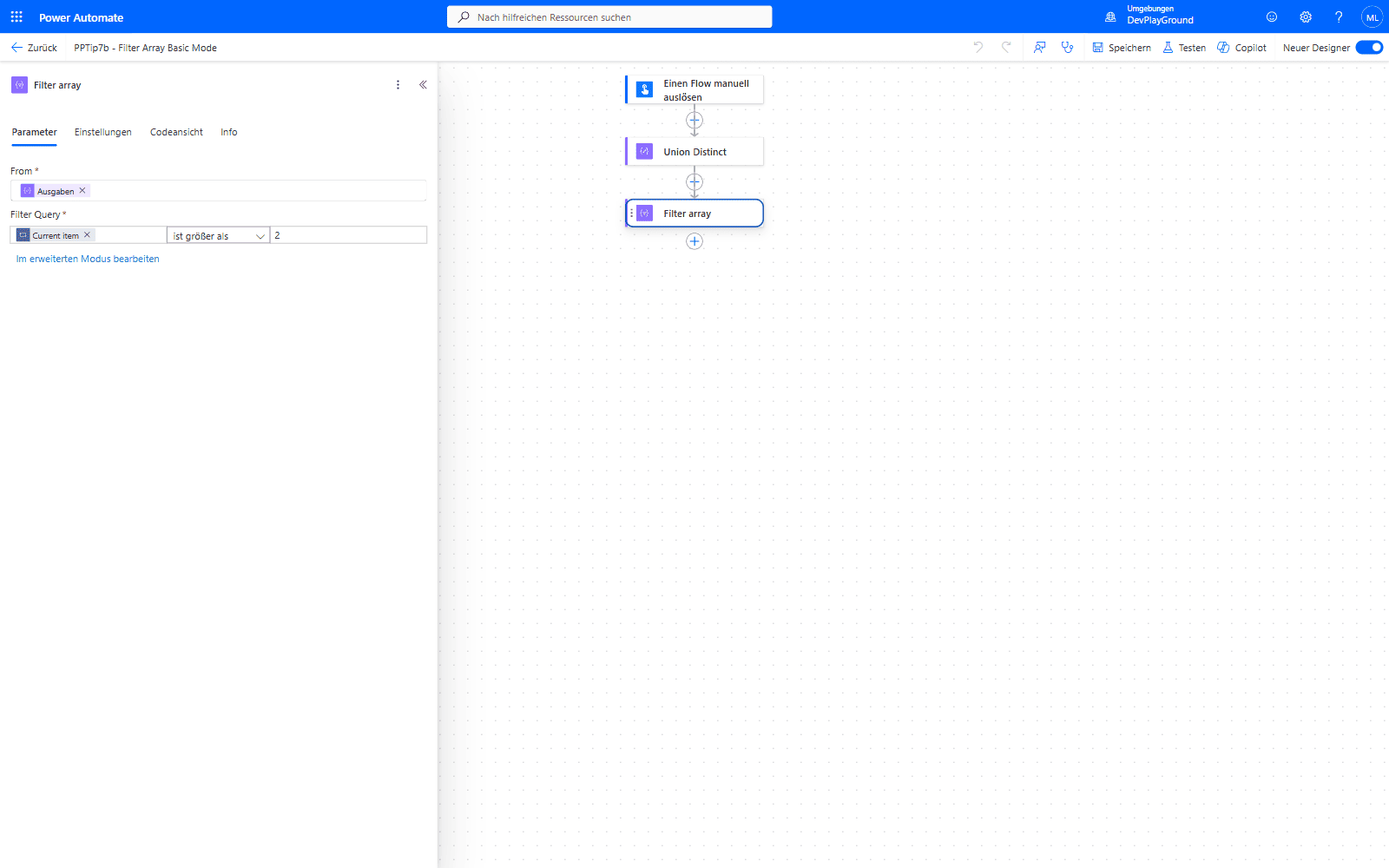 Filter Array’s basic mode: Power Automate recognizes a simple comparison like this one and renders it as dropdowns instead of raw syntax.
3. Combine both
🔸 Merge/deduplicate with union(), then narrow the result with ‘Filter Array’ for precise data sets.
![Power Automate real flow run: union([1,2,3],[2,3,4]) deduplicates to [1,2,3,4], then Filter Array keeps only items greater than 2](/assets/images/posts/2022/12/union-filterarray-result.png) Real flow run:
Real flow run: union([1,2,3],[2,3,4]) merges and deduplicates, then Filter Array narrows it down to [3,4].
🎉 Result
With union() and ‘Filter Array’, you can efficiently merge, deduplicate and filter data sets, fewer actions, cleaner data, faster runs.
🌟 Key Advantages
🔸 Efficiency: Handle merge/dedupe/filter in just a couple of built-in actions.
🔸 Flexibility: Both work with simple values and complex objects.
🔸 Data Integrity: union(x, x) acts as DISTINCT to remove duplicates automatically.
🎥 Video Tutorial
🛠️ FAQ
1. Does UNION automatically remove duplicates?
Yes, union() returns unique values when combining arrays, ensuring no duplicates in the result.
2. Can I use Filter Array with complex nested objects?
Absolutely! ‘Filter Array’ works with complex objects and supports advanced expressions to filter based on nested properties.
3. What’s the performance impact of combining UNION and Filter Array?
Both are built-in actions and fast, but with very large datasets consider processing in batches to keep run times optimal.
🔗 Related Tips
🔸 #PowerPlatformTip 24: ‘Merge Arrays or Tables’ - the join-concat-split alternative to union() when you need to keep duplicates.
🔸 #PowerPlatformTip 3: ‘Advanced Filtering Array’ - go beyond basic conditions with custom expressions in Filter Array’s advanced mode.
This tip is by Marcel Lehmann, Microsoft MVP (Business Applications) and founder of the Power Platform Academy – live Power Platform workshops, free or CHF 49. Join the workshop waitlist to get notified about new dates. For companies that want this implemented for them, see KMUpower – Power Platform consulting & automation for SMEs (DACH).