#PowerPlatformTip 100: 'Bypassing Complexity in PowerAutomate'
TL;DR: Replace Switch/Condition sprawl by storing options in a JSON object in a Compose action and fetching values dynamically with
outputs('Compose')?[key].
💡 Challenge
Standard use of Switch or Condition in Power Automate can often be bypassed for more streamlined processes. A Switch with a dozen cases, or worse, nested Conditions three levels deep, is slow to read, slow to extend (every new case means editing the flow’s structure), and turns a simple “look up a value by key” need into a maintenance burden.
✅ Solution
Pass a simple identifier to Power Automate. Use a dynamic formula to retrieve corresponding data, avoiding complex structures.
🔧 How It’s Done
Here’s how to do it:
-
Add a Compose action in Power Automate with a structured JSON object.
🔸 Use a JSON object with keys “A”, “B” and “C”.🔸 Example:
1
2
3
4
5
6
7
8
9
10
11
12
13
14
{
  "A": {
    "Title": "Ok",
    "Description": "Text"
  },
  "B": {
    "Title": "Confirmed",
    "Description": "Approved"
  },
  "C": {
    "Title": "Denied",
    "Description": "Rejected"
  }
}
-
Use a dynamic formula to retrieve the desired value.
🔸 To get the Title:outputs('Compose')?[InputValue]?['Title']🔸 To get the Description:
outputs('Compose')?[InputValue]?['Description']🔸 Note the double
?: the first guards againstInputValuenot existing as a key at all (returns null instead of erroring the whole expression), the second guards against that entry existing but not having aTitleproperty. Drop either?and an unexpected input value fails the whole action instead of degrading gracefully. -
Handle unknown or missing keys explicitly.
🔸 Wrap the lookup incoalesce(outputs('Compose')?[InputValue]?['Title'], 'Unknown')so an input value that doesn’t match any key in the object falls back to a sensible default instead of silently passingnulldownstream, where it can surface much later as a confusing error in an unrelated action. -
Nest it one level for environment- or tenant-specific config.
🔸 The same pattern extends naturally to a second dimension:{ "Prod": { "A": {...}, "B": {...} }, "Test": { "A": {...}, "B": {...} } }, then look up withoutputs('Compose')?[EnvironmentValue]?[InputValue]?['Title']. This is a common way to keep environment-specific lookup tables (different approver emails, different SharePoint site URLs per stage) inside the flow itself without a Switch per environment layered on top of a Switch per case.
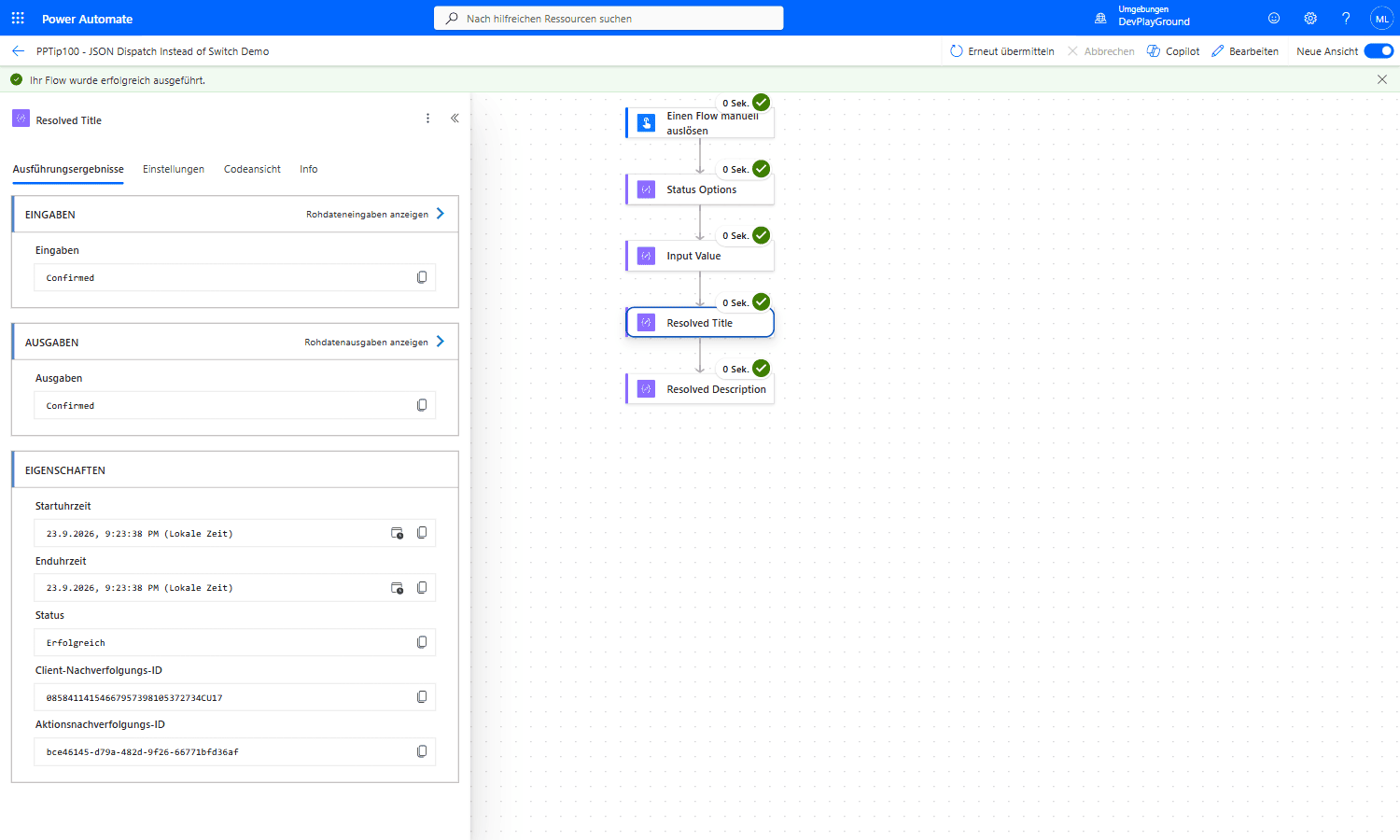 Real flow run: a 3-key JSON object (
A/B/C) plus the runtime key "B" resolves straight to Confirmed, no Switch action anywhere in the flow.
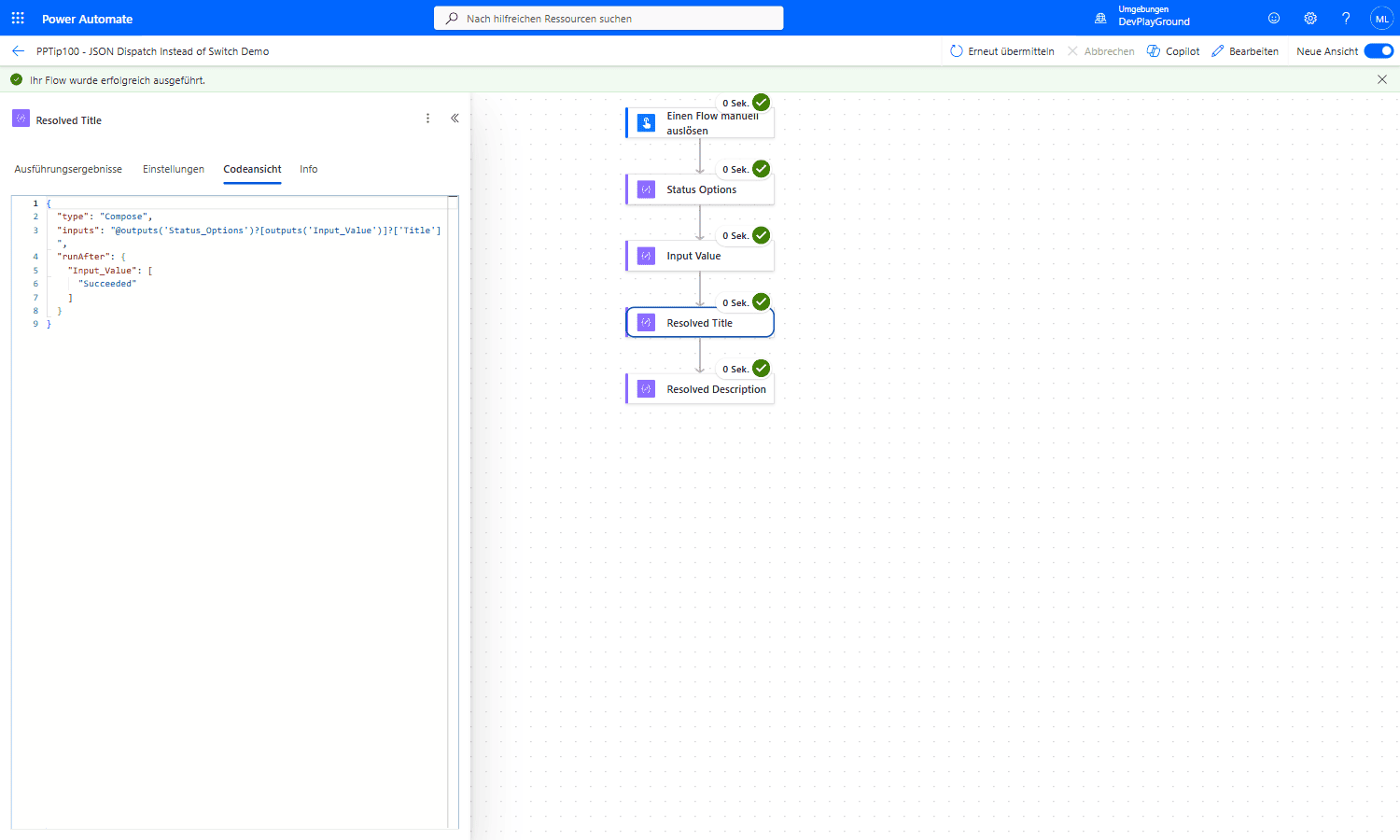 Real flow run: Code View confirms the actual expression,
 @outputs('Status_Options')?[outputs('Input_Value')]?['Title'], the double ? guards both the missing-key and missing-property case.
🎉 Result
This method allows fetching specific data (‘Title’ or ‘Description’) for different entries (‘A’, ‘B’, ‘C’) without needing complex conditions or switches, and degrades gracefully instead of failing when a new, not-yet-mapped identifier shows up.
🌟 Key Advantages
🔸 Streamlines data retrieval
🔸 Reduces workflow complexity
🔸 Enhances performance, this is a single Compose action evaluated once, versus a Switch action that Power Automate must step through case by case
🔸 Extends cleanly to multi-dimensional lookups (e.g. per-environment config) without adding more branching actions
🎥 Video Tutorial
🛠️ FAQ
1. What are the benefits of using a structured JSON object instead of Switch or Condition?
Using structured JSON avoids multiple branches, simplifies maintenance, and speeds up data retrieval.
2. Can this approach handle more than three cases?
Yes, you can add as many keys and values to the JSON object as needed.
3. How do I handle missing or invalid input values?
Implement default values or wrap the expression with error handling, e.g. using coalesce or condition checks before accessing the value.
🔗 Related Tips
🔸 #PowerPlatformTip 33: ‘Coalesce’ - the fallback function to reach for when a key is missing from the Compose lookup above.
🔸 #PowerPlatformTip 37: ‘Table to JSON’ - build the lookup object itself from tabular data instead of typing it by hand.
This tip is by Marcel Lehmann, Microsoft MVP (Business Applications) and founder of the Power Platform Academy – live Power Platform workshops, free or CHF 49. Join the workshop waitlist to get notified about new dates. For companies that want this implemented for them, see KMUpower – Power Platform consulting & automation for SMEs (DACH).