#PowerPlatformTip 15: 'try-catch-finally'
TL;DR: Wrap your flow in Try, Catch and Finally Scope actions and use Configure run after so Catch runs only on failure and Finally always runs cleanup, no matter what happened before.
Flows that fail silently are painful to troubleshoot. Borrow the try-catch-finally pattern from programming: run your main logic in a Try scope, handle failures in a Catch scope, and always run cleanup in a Finally scope, driven by each scope’s Configure run after settings.
💡 Challenge
Without explicit error handling, a cloud flow stops at the first failing action, fails silently, and leaves you with little to work with. Temporary data never gets cleaned up, and no one is notified that something broke.
✅ Solution
Structure your flow into three Scope actions, Try, Catch and Finally, and use Configure run after so the Catch runs only when the Try fails and the Finally always runs, whether the flow succeeded or not.
🔧 How It’s Done
1. Add a Try scope
🔸 Put your core logic inside a Scope action named Try and include every critical action there.
2. Add a Catch scope
🔸 Add a second Scope named Catch. Open its ⋯ menu → Configure run after and tick has failed, has timed out and is skipped (leave is successful unchecked). Put your error handling here: notifications, logging, and (optionally) a Terminate action set to Failed so the run is flagged as failed in the run history.
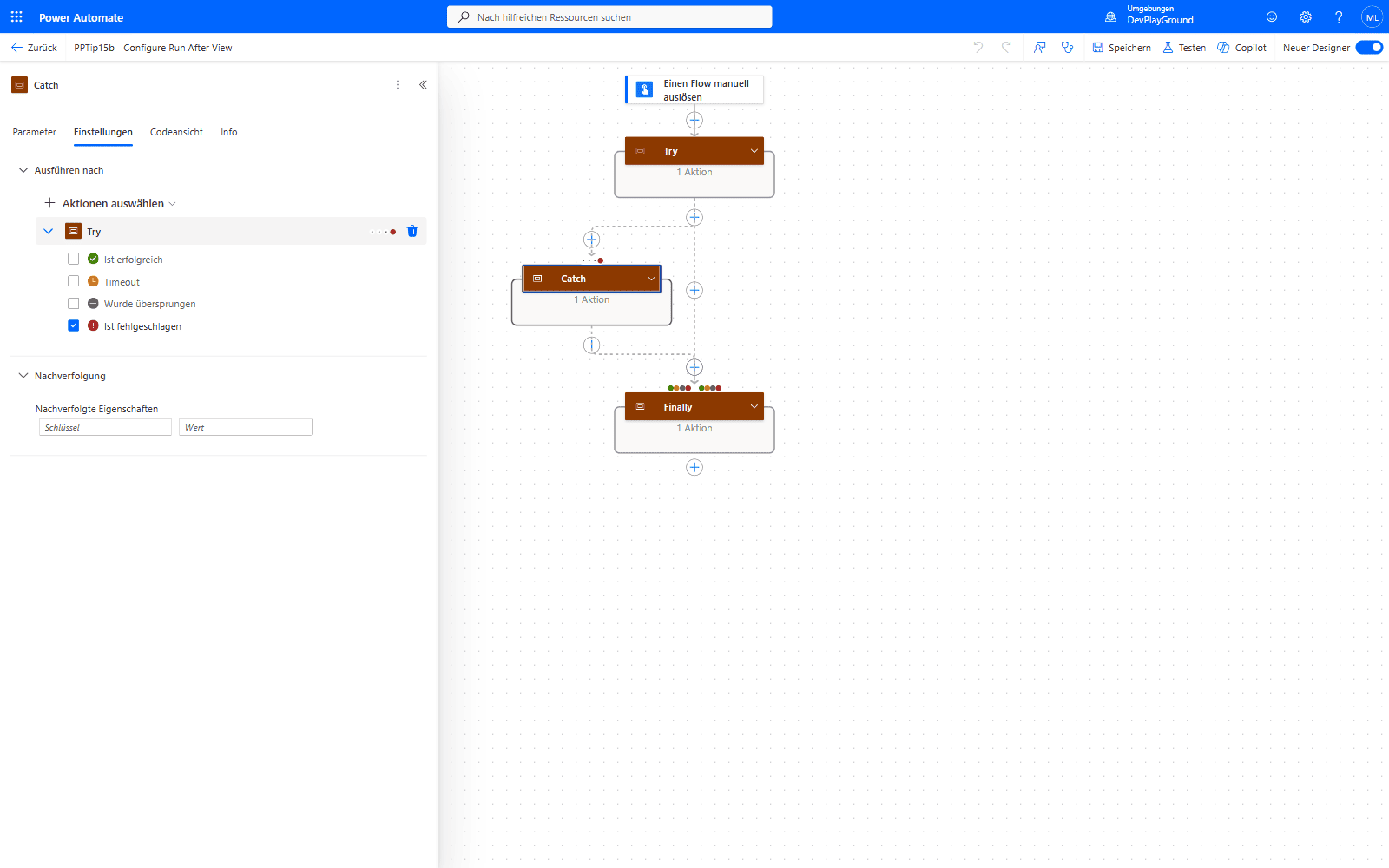 Catch’s Configure run after settings: only “Ist fehlgeschlagen” (has failed) is ticked - “Ist erfolgreich” (is successful) stays unchecked, or Catch would run on every successful flow too.
3. Add a Finally scope
🔸 Add a third Scope named Finally. In its Configure run after, tick all four statuses (is successful, has failed, has timed out, is skipped) so it always runs, use it for cleanup like deleting temporary files or releasing locks.
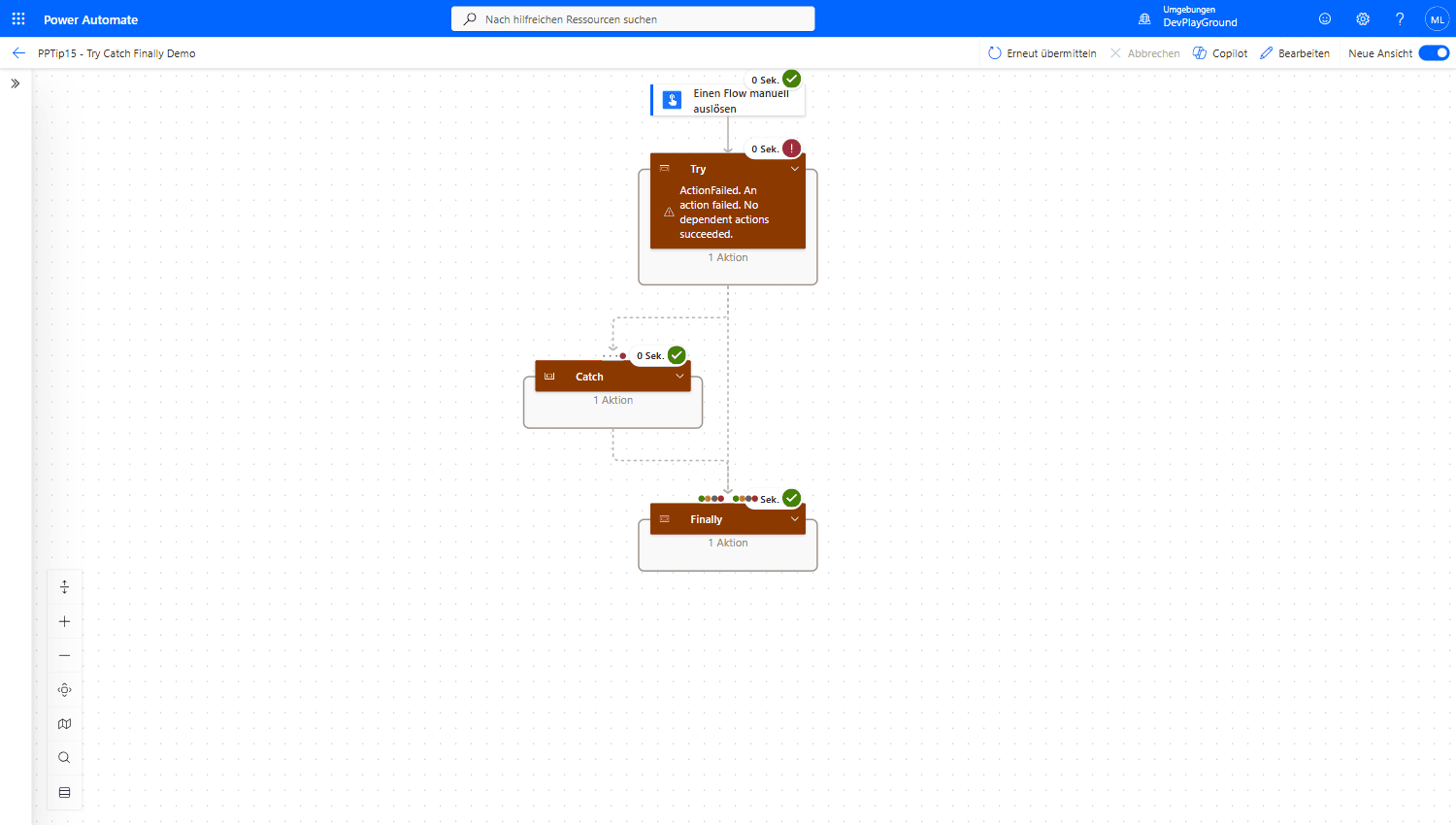 Real flow run: Try fails on purpose (
div(1,0)), Catch picks it up, Finally always runs, the overall flow still finishes as Succeeded.
Extra tip: build a direct link to the current run for your logs with this expression:
1
concat('https://unitedkingdom.flow.microsoft.com/manage/environments/', workflow()?['tags']['environmentName'], '/flows/', workflow()?['name'], '/runs/', workflow()?['run']['name'])
🔸 Adjust the regional host (e.g. emea, unitedstates) to match your tenant’s Power Automate URL.
🎉 Result
Failures surface clearly, the right people get notified, cleanup always runs, and your flows behave predictably when things go wrong instead of stopping half-finished.
🌟 Key Advantages
🔸 Surface failures: no more silent errors, you know what went wrong and where.
🔸 Guaranteed cleanup: a dedicated Finally scope keeps post-processing tidy and always runs.
🔸 Reliability: structured handling makes flows more robust, testable and dependable.
⚠️ Watch Out
🔸 Uncheck “is successful” on the Catch scope, otherwise your error handling runs on every successful flow, too.
🔸 A Scope only reports failure for actions inside it. Keep every critical action within the Try scope, anything outside it bypasses your Catch.
🔸 Configure run after only reacts to the immediately preceding action/scope. Chain Try → Catch → Finally directly so the statuses flow through as intended.
🔸 There is no stack trace. Use the result() expression on the Try scope to read each action’s status, error code and message for your logs.
🛠️ FAQ
1. When should I use try-catch-finally in Power Automate?
Use it for critical flows where error handling matters, external API calls, file operations, Dataverse writes and complex business processes that must not fail silently.
2. What’s the difference between “has failed” and “has timed out” in Configure run after?
Has failed covers actions that returned an error; has timed out covers actions that exceeded their timeout limit. Tick both on the Catch scope so long-running or hung actions are caught as well.
3. How do I read the actual error message in the Catch scope?
Use the result('Try') expression to return an array of the actions in the Try scope with their status, code and error message. Filter or loop over it to log exactly which action failed and why.
4. How do I make the whole run show as “Failed” in the run history?
Add a Terminate action set to Failed (with a custom message) inside the Catch scope. Without it, a handled error can make the overall run appear successful.
5. Can I nest Try-Catch scopes?
Yes, you can nest scopes for granular handling, but keep it simple and clearly named so the flow stays readable.
🔗 Related Tips
🔸 #PowerPlatformTip 75: Speed up ‘Apply to each’ with concurrency, reliable loops that still need clean error handling.
This tip is by Marcel Lehmann, Microsoft MVP (Business Applications) and founder of the Power Platform Academy – live Power Platform workshops, free or CHF 49. Join the workshop waitlist to get notified about new dates. For companies that want this implemented for them, see KMUpower – Power Platform consulting & automation for SMEs (DACH).