#PowerPlatformTip 18: 'Download & Save Files'
TL;DR: Public file: OneDrive for Business Upload file from URL, one action, standard connector. Protected file: HTTP action (premium) with the right authentication, then pass
body('HTTP')unchanged into Create file. Don’t wrap it inbase64(), that is what corrupts files.
Downloading files in a flow works differently depending on whether the file is openly accessible or behind authentication. Use the right action for each case: a simple URL action for public files, and an authenticated HTTP request for protected ones.
💡 Challenge
Public and password-protected files need different handling, one approach doesn’t cover both accessibility and security. And even once you’ve picked the right action, the file’s binary content still has to survive the trip from an HTTP response into a SharePoint, OneDrive, or Dataverse “Create file” action without getting corrupted.
✅ Solution
Use two methods depending on the source: Upload file from URL for public files, and HTTP request + Create file for files that require authentication.
🔧 How It’s Done
1. Public files
🔸 Use the Upload file from URL action, straightforward for files that are openly accessible online.
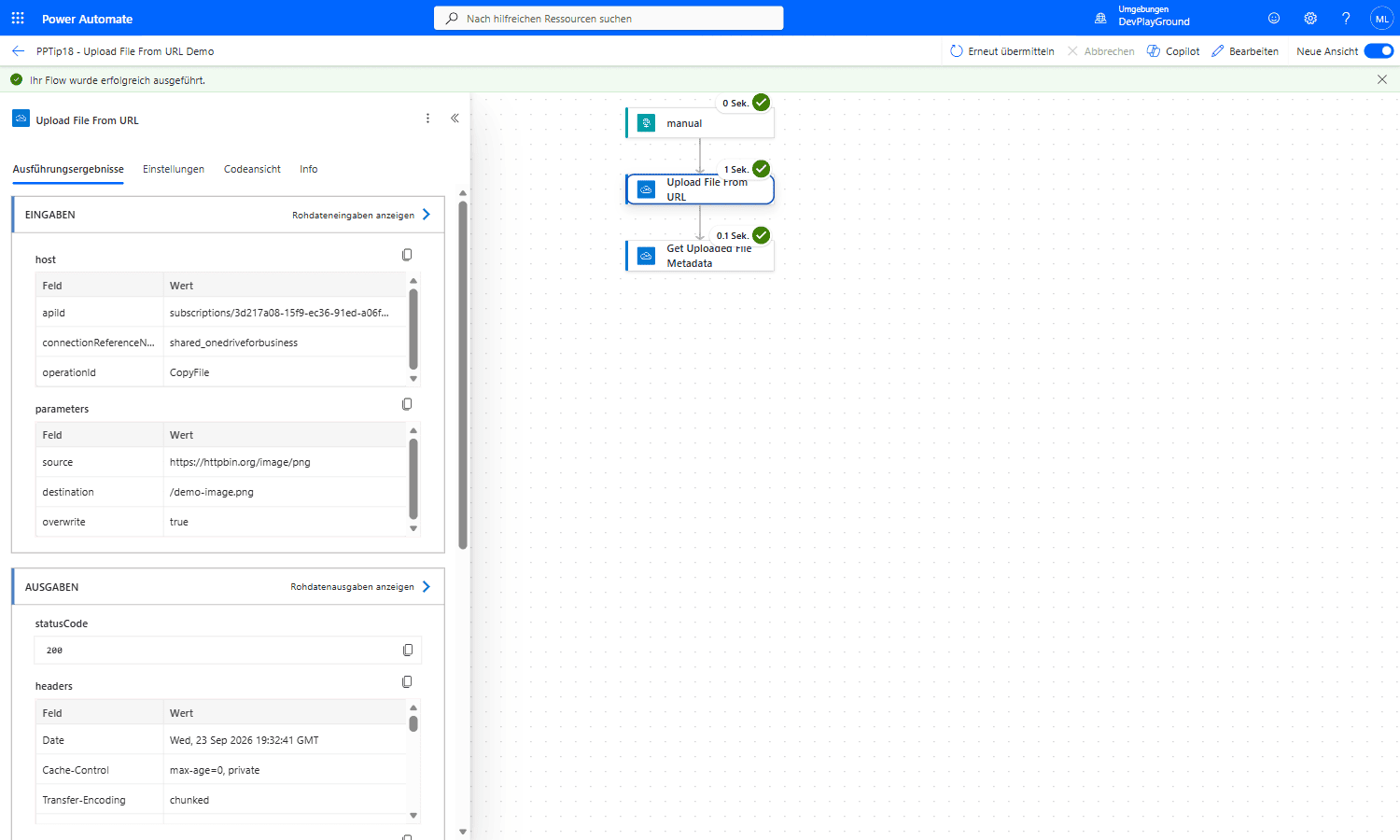 Real flow run: the OneDrive for Business Upload file from URL action pulls a public PNG straight from
 httpbin.org to /demo-image.png, no HTTP action, no intermediate Compose, just source/destination/overwrite and a Status 200.
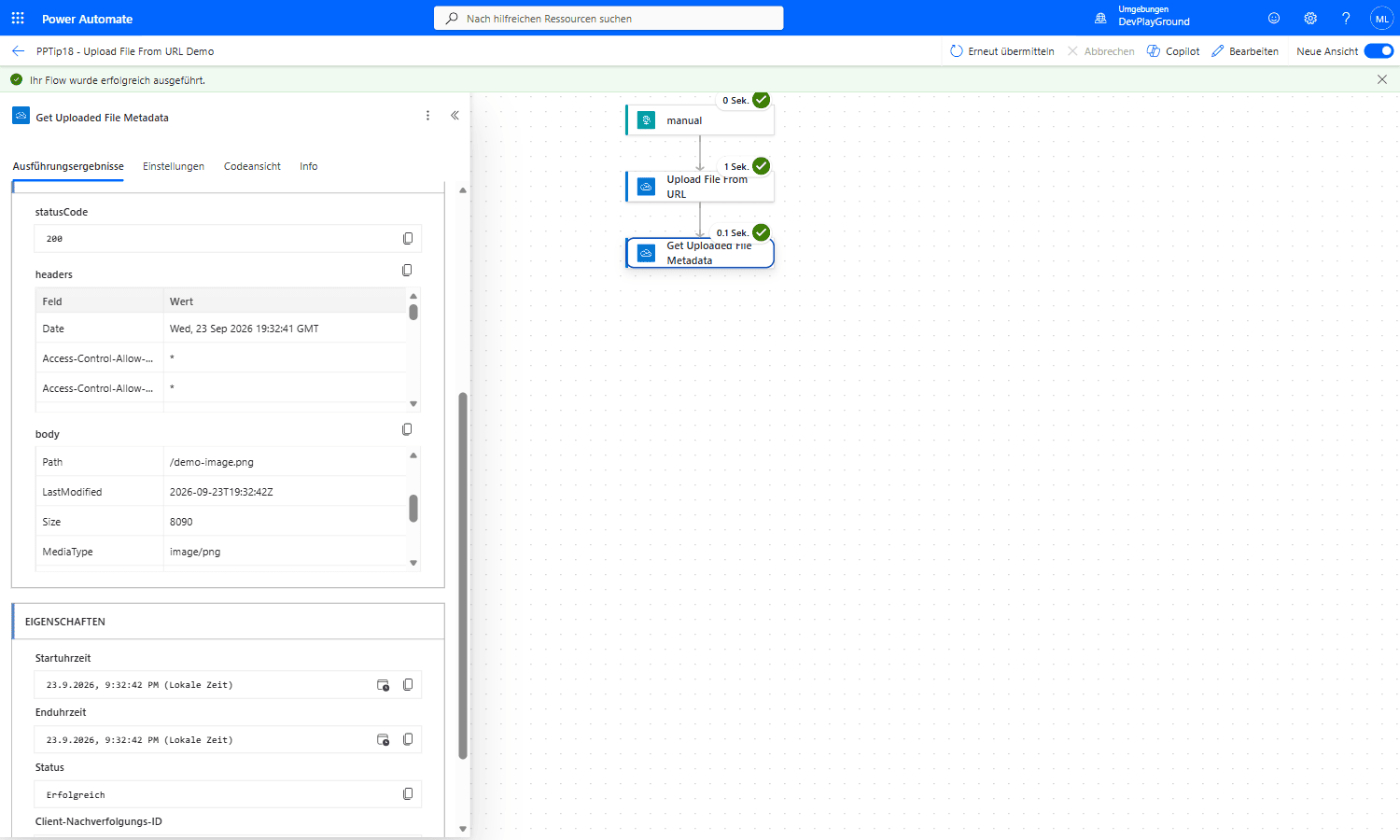 Real flow run: a follow-up Get file metadata call confirms the file exists at
 /demo-image.png, 8090 bytes, image/png, the binary content survived the trip intact.
🔸 Upload file from URL exists in the OneDrive for Business connector. For SharePoint, download first (step 2) or move the file afterwards.
2. Password-protected files
🔸 Use the HTTP action. It is a premium action, so the flow owner (or the flow) needs a Power Automate Premium licence.
🔸 Pick the authentication the source expects:
1
2
3
Method:  GET
URI:     https://api.example.com/files/report.pdf
Headers: Authorization   Bearer @{variables('token')}
🔸 For user name and password, set Authentication in the HTTP action to Basic instead of building the header yourself. For an API key, add the header the API documents, for example x-api-key.
🔸 Turn on Secure inputs and Secure outputs in the action settings, so the token or password doesn’t appear in the run history.
🔸 Add Create file (SharePoint or OneDrive for Business) and set File Content to body('HTTP').
3. Handle the binary content correctly
🔸 For a binary response, body('HTTP') is an object with $content-type and $content (the file as base64). Create file understands this object directly, so pass it unchanged.
🔸 Don’t use base64(body('HTTP')). It encodes the whole object as text a second time, and the saved file opens as corrupted.
🔸 Need the file as a base64 string, for example for a JSON body or an email attachment API? Use body('HTTP')?['$content']. To turn a base64 string back into a file, use base64ToBinary(<base64 string>).
4. Set the right content type
🔸 Some APIs return a generic application/octet-stream content-type header regardless of the actual file type. Always set the File Name in Create file with its extension, for example report.pdf, rather than relying on that header.
🎉 Result
A reliable, secure process for downloading and saving files regardless of whether they’re public or protected, with the binary content arriving intact on the other end.
🌟 Key Advantages
🔸 Secure handling of sensitive, authenticated files.
🔸 Simple path for public files with a single standard action.
🔸 Streamlined file management in your Power Platform solutions.
🔸 Corruption-proof: passing body('HTTP') unchanged saves you from silently broken files that only surface as a support ticket later.
🛠️ FAQ
1. What file types can I download and save?
Any type. The flow moves the bytes and doesn’t care whether it is a PDF, an image or a ZIP file, as long as you pass the content unchanged and set the right file extension.
2. How do I handle authentication for protected files?
Use the Authentication setting of the HTTP action (Basic, Client Certificate, Active Directory OAuth, Raw, Managed Identity) or an Authorization header with a bearer token. Keep secrets out of the flow definition, for example in an environment variable of type Secret, and enable Secure inputs/outputs.
3. Are there size limits when downloading files?
Yes. A single message is limited to 100 MB. With Allow chunking in the action’s content transfer settings the limit rises to 1 GB, as long as the server supports it.
🔗 Related Tips
🔸 #PowerPlatformTip 156: ‘Handle Large Files with Chunking’ - get past the size limits mentioned in the FAQ above, up to 1 GB.
🔸 #PowerPlatformTip 19: ‘Resize Files’ - shrink an image after downloading it, using SharePoint’s built-in thumbnails.
This tip is by Marcel Lehmann, Microsoft MVP (Business Applications) and founder of the Power Platform Academy – live Power Platform workshops, free or CHF 49. Join the workshop waitlist to get notified about new dates. For companies that want this implemented for them, see KMUpower – Power Platform consulting & automation for SMEs (DACH).