#PowerPlatformTip 167: 'Date Math Without a dateDiff() - the ticks() Trick'
TL;DR: There is no
dateDiff()in Cloud Flow expressions. Convert both timestamps withticks(), subtract them, and divide by a fixed constant to get the difference in days, hours, minutes or seconds. Bonus: comparing dates withticks()is far safer than comparing formatted strings.
You need the number of days between a due date and today - a two-line calculation in almost any language. In a Cloud Flow you reach for the expression editor and… there is no dateDiff(). So people start slicing strings, comparing text, and getting subtly wrong results the moment a format or a time zone shifts. There is a clean, reliable primitive hiding in plain sight: ticks().
💡 Challenge
Power Automate’s Workflow Definition Language has functions to add time (addDays, addHours) and to format time (formatDateTime), but no function to subtract two dates and return a duration. Comparing dates as strings works only by luck (and only for a strict YYYY-MM-DD layout), and it breaks as soon as time components, offsets, or locales enter the picture.
✅ Solution
Use ticks(). A tick is a 100-nanosecond interval, and ticks('<timestamp>') returns the number of ticks since the year 0001 as a big integer. Because it collapses any timestamp to one comparable number, you can subtract two ticks to get an exact duration - and divide by a fixed constant to convert that duration into days, hours, minutes or seconds. The same number also gives you a bullet-proof date comparison.
🔧 How it’s done
1. Difference between two dates (in days).
🔸 Subtract the two tick values and divide by the number of ticks in one day (864000000000):
div(sub(ticks(outputs('DueDate')), ticks(utcNow())), 864000000000)
🔸 The result is a whole number of days. Positive means the due date is in the future, negative means it’s overdue.
2. Pick your unit with the right constant.
🔸 Keep the div(sub(ticks(a), ticks(b)), <constant>) shape and just swap the divisor:
🔸 Days = 864000000000, Hours = 36000000000, Minutes = 600000000, Seconds = 10000000.
3. Reliable date comparison.
🔸 Don’t compare formatted strings. Compare ticks instead:
greater(ticks(outputs('DateA')), ticks(outputs('DateB')))
🔸 This is a numeric comparison, so it is immune to formatting and time-zone surprises. Use it in a Condition or a Filter array to check “is A after B?”.
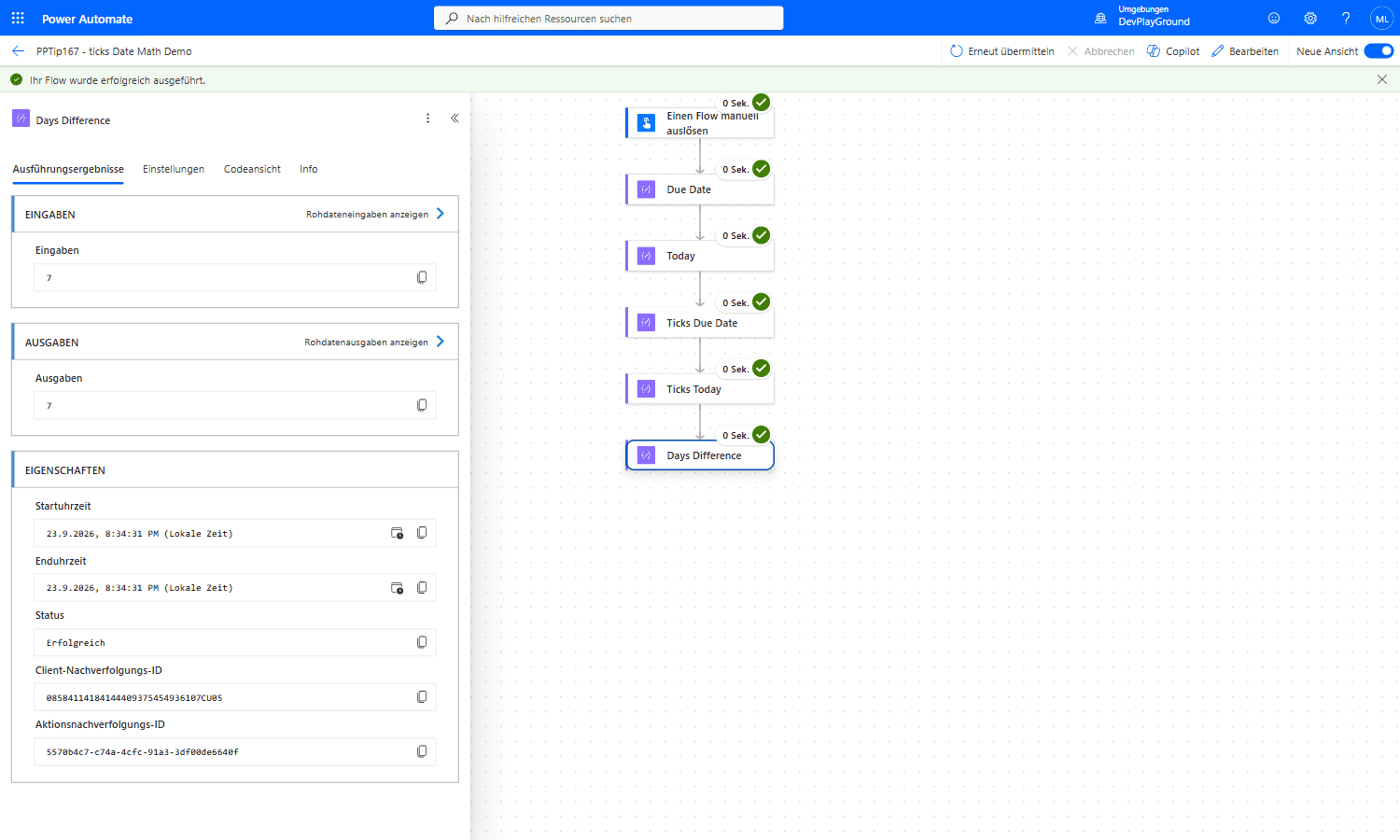 Real flow run: a 5-action chain (Due Date → Today → Ticks Due Date → Ticks Today → Days Difference) resolves
 div(sub(ticks(...), ticks(...)), 864000000000) to an exact 7 days, no dateDiff() needed.
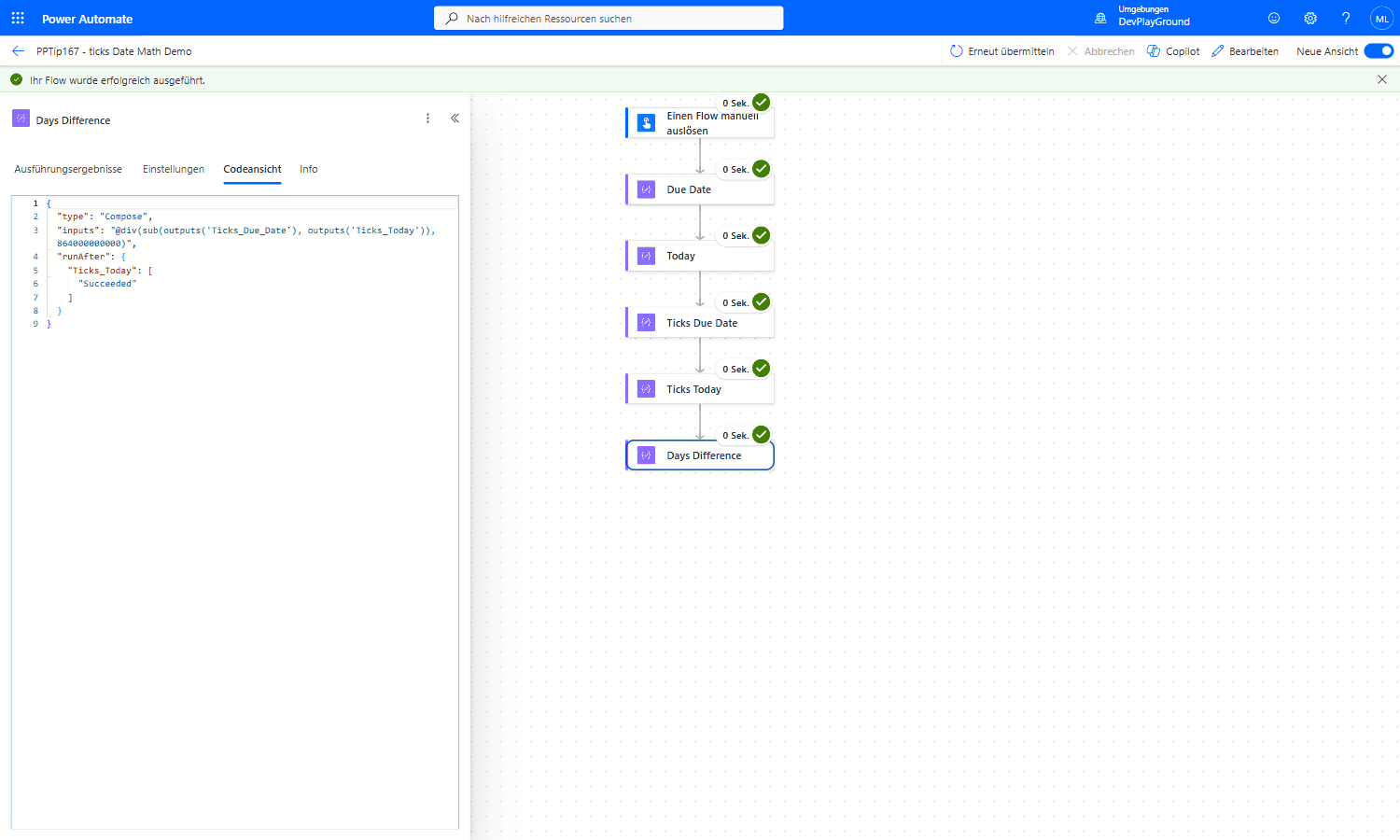 Real flow run: Code View confirms the actual expression behind that result, subtracting two
 ticks() outputs and dividing by the fixed day constant.
4. Build a sortable timestamp.
🔸 Need a value that always sorts chronologically (e.g. as a SharePoint column or a file-name prefix)? ticks(utcNow()) gives you a single monotonic integer - no locale, no separators, no ambiguity.
🎉 Result
You get exact date differences in whatever unit you need, date comparisons that never lie, and a clean sortable timestamp - all from one tiny function, with no premium connector and no dateDiff() in sight.
🌟 Key Advantages
🔸 No missing function: replaces the dateDiff() that Cloud Flows simply don’t have.
🔸 Exact and unit-flexible: one pattern, four constants - days, hours, minutes, seconds.
🔸 Comparison you can trust: numeric ticks() comparison beats fragile string comparison.
🔸 Sortable by design: ticks(utcNow()) is a monotonic integer, perfect for ordering.
🛠️ FAQ
Q1: Why not just compare the date strings?
String comparison only happens to work for a strict YYYY-MM-DD layout with identical time zones. Add a time component, an offset, or a different format and the ordering breaks. ticks() turns every timestamp into one comparable number, so the comparison is always correct.
Q2: Can I use ticksToDays() / ticksToHours() / ticksToMinutes()?
Not in Cloud Flows. Those helpers exist only in Adaptive Expressions (Copilot Studio / Bot Framework), not in the Workflow Definition Language used by Power Automate cloud flows. In a flow, divide by the fixed constant yourself (see step 2).
Q3: Where do the magic numbers come from?
A tick is 100 ns, so one second is 10,000,000 ticks. Multiply up: minute 600,000,000, hour 36,000,000,000, day 864,000,000,000. Keep them as plain integers in the expression.
Q4: My difference is off by a day - why?
ticks() respects the time portion, so a difference of 23 hours divides down to 0 days, not 1. If you only care about calendar days, normalise both inputs first (e.g. formatDateTime(x, 'yyyy-MM-dd')) before taking ticks() - and remember MM is month while mm is minute.
🔗 Related Tips
- #PowerPlatformTip 6: formatDateTime in utcNow, format a timestamp directly - and the classic MM vs mm gotcha.
- #PowerPlatformTip 3: Advanced Filtering Array, where a ticks() comparison shines inside a Filter array.
- #PowerPlatformTip 11: Trigger Condition, drop a ticks() comparison straight into a trigger condition.
This tip is by Marcel Lehmann, Microsoft MVP (Business Applications) and founder of the Power Platform Academy – live Power Platform workshops, free or CHF 49. Join the workshop waitlist to get notified about new dates. For companies that want this implemented for them, see KMUpower – Power Platform consulting & automation for SMEs (DACH).