#PowerPlatformTip 155: 'Float Before Div for Correct Decimals in Power Automate'
TL;DR: In Power Automate
div()truncates when both operands are integers. Cast them withfloat(),div(float(a), float(b)), so the result is a Float and your decimals survive.
You build a percentage or ratio from two whole numbers and the result is 0 or a rounded-down integer instead of a proper decimal. The reason is simple: div() returns an Integer whenever both operands are integers, it truncates, it does not round. Convert the operands to Float first and everything lines up.
💡 Challenge
You want a completion or share percentage, for example matching records versus all records. A natural expression looks like this:
1
mul(div(outputs('Count_Matching'), outputs('Count_All')), 100)
With Count_Matching = 75 and Count_All = 200 you expect 37.5, but you get 0. Both outputs are integers, so div(75, 200) truncates to 0 and mul(0, 100) stays 0. Whenever the dividend is smaller than the divisor the result collapses to zero, and larger values silently lose their decimals.
✅ Solution
div() only returns a Float when the dividend or the divisor is a Float. Wrap both operands in float() so the division keeps its decimal places:
1
mul(div(float(outputs('Count_Matching')), float(outputs('Count_All'))), 100)
With the same inputs this now returns 37.5. One Float operand is technically enough, but casting both is explicit and safe when the source type can vary.
🔧 How it’s done
1. Spot the integer division.
🔸 Look for div() where both operands are whole numbers, for example Compose outputs, length() results, counts or integer variables.
🔸 Quick test in the expression editor: div(11, 5) returns 2 (not 2.2) and div(75, 200) returns 0.
2. Cast both operands to Float.
🔸 Change div(a, b) to div(float(a), float(b)):
1
mul(div(float(outputs('Count_Matching')), float(outputs('Count_All'))), 100)
🔸 As soon as one operand is a Float, div() returns a Float, e.g. div(float(75), float(200)) returns 0.375.
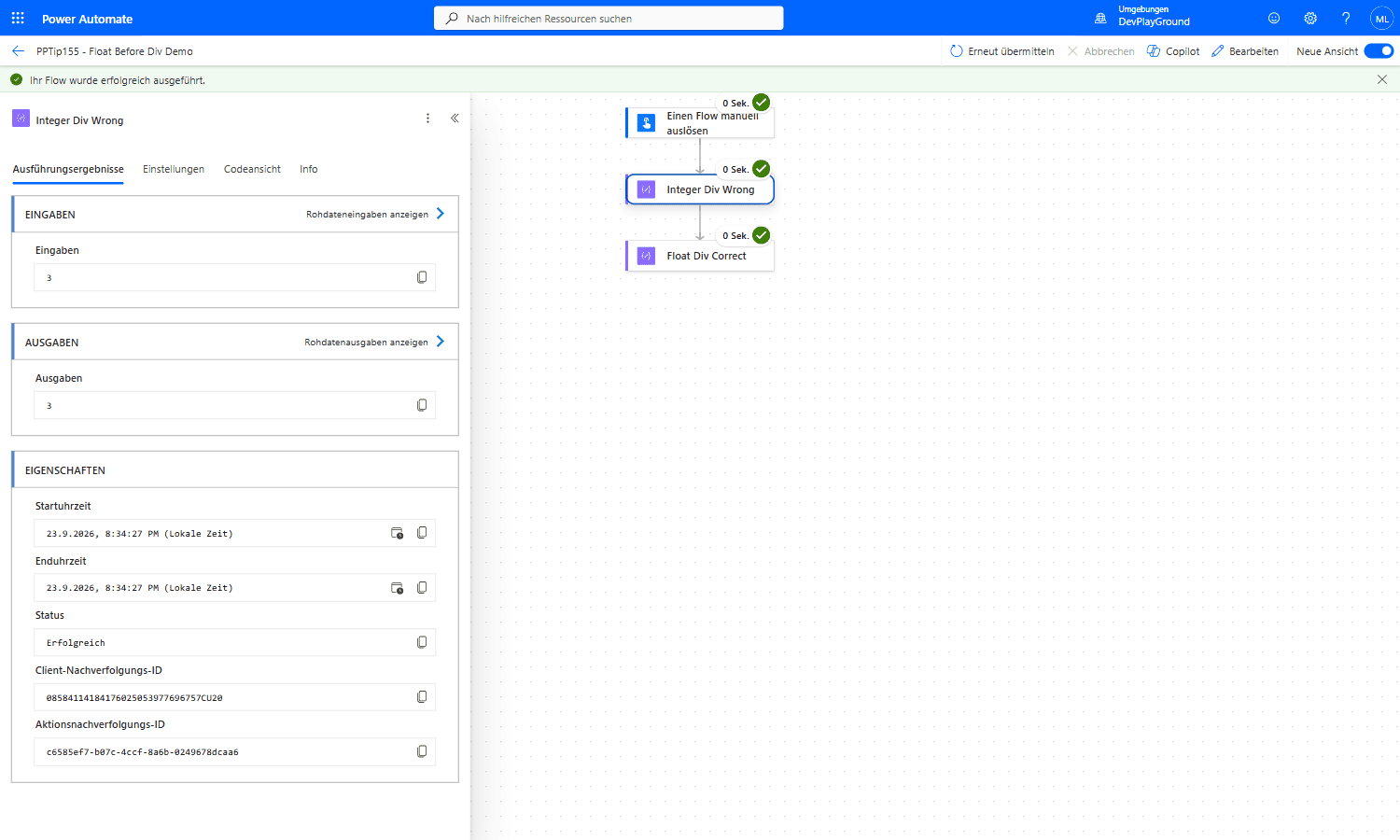 Real flow run:
 @div(7, 2) with two plain integer operands truncates to 3, the .5 is simply gone.
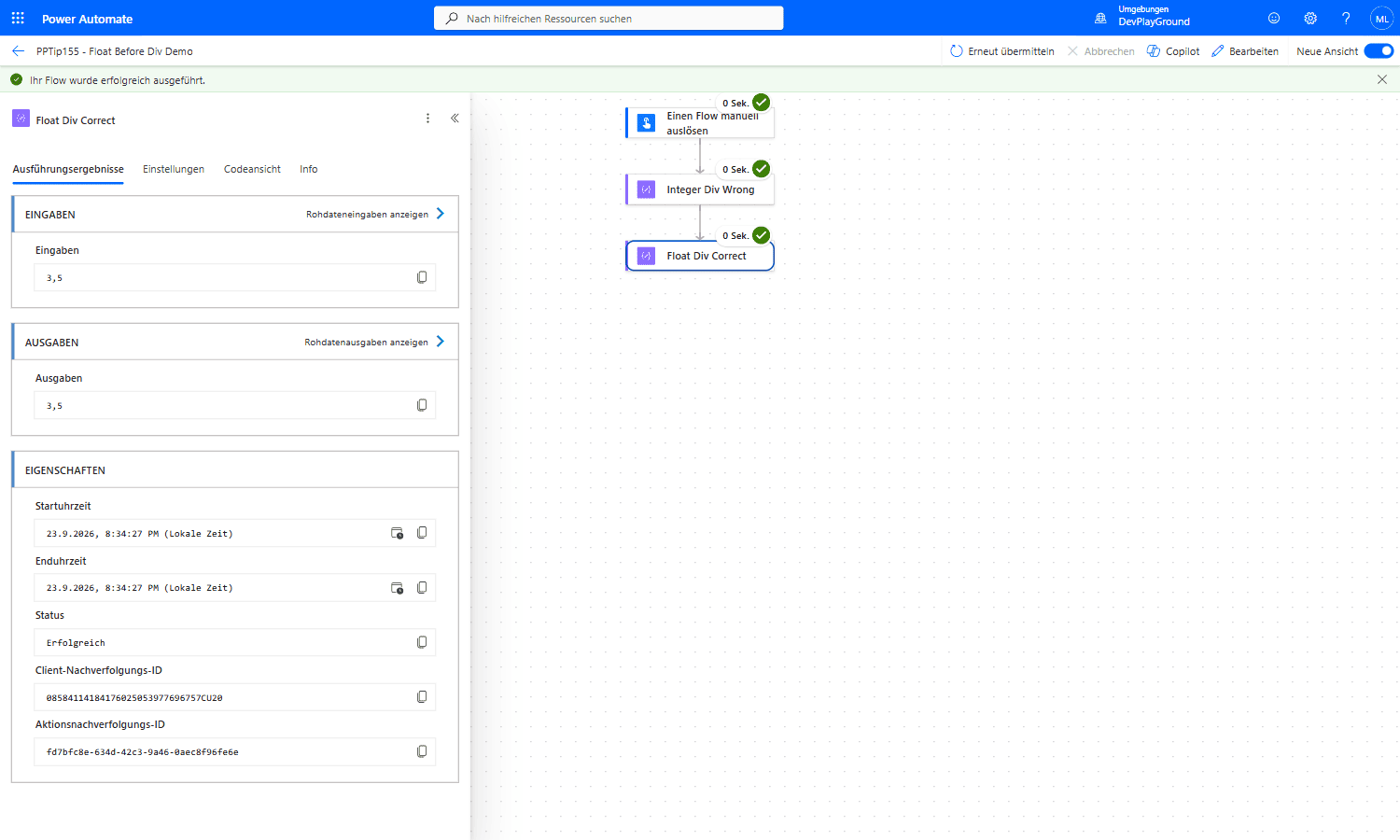 Real flow run, same numbers:
 @div(float(7), float(2)) correctly returns 3.5, casting both operands to Float is the entire fix.
3. Format the output for display (optional).
🔸 Wrap the result in formatNumber(..., 'N2') for a clean two-decimal value:
1
formatNumber(mul(div(float(outputs('Count_Matching')), float(outputs('Count_All'))), 100), 'N2')
🔸 This returns 37.50 as a string. If you keep calculating on it, parse it back with float(formatNumber(...)).
4. Guard against divide-by-zero.
🔸 div() fails when the divisor is 0. Protect the expression with if():
1
if(equals(outputs('Count_All'), 0), 0, mul(div(float(outputs('Count_Matching')), float(outputs('Count_All'))), 100))
🔸 A zero total now returns 0 instead of throwing an error.
🎉 Result
Your percentage and ratio calculations return accurate decimals instead of 0 or truncated integers, no Azure Function and no extra actions, just the built-in float() conversion, optionally formatted with formatNumber().
🌟 Key Advantages
🔸 Correct math: decimals survive instead of being truncated to Integer.
🔸 No workaround actions: a pure expression fix, no extra Compose or Scope needed.
🔸 Locale-safe display: formatNumber(..., 'N2') gives predictable, formatted output.
🔸 Robust: combined with an if() guard it also handles divide-by-zero cleanly.
🛠️ FAQ
Q1: Why does div() drop my decimals?
If both operands are integers, div() returns an Integer and truncates. It only returns a Float when the dividend or the divisor is a Float, so div(11, 5) is 2 but div(11.0, 5) is 2.2.
Q2: Do I have to cast both values, or is one enough?
One Float operand is technically enough to force a Float result. Casting both with float() is more explicit and protects you when the input type can change.
Q3: Why is my result a string after formatting?
formatNumber() returns a string. If you need to keep doing math, parse it back with float(formatNumber(...)).
Q4: How do I avoid a flow failure when the divisor is 0?
Wrap the expression in if(equals(divisor, 0), 0, div(...)) so a zero total returns 0 instead of throwing an error.
🔗 Related Tips
- #PowerPlatformTip 59: Handle Dynamic Content, safely access properties in expressions with the
?operator. - #PowerPlatformTip 3: Advanced Filtering Array, write custom expressions in Filter Array’s Advanced Mode.
- #PowerPlatformTip 145: Power Platform Tools, browser-based helpers for building and translating Power Platform expressions.
This tip is by Marcel Lehmann, Microsoft MVP (Business Applications) and founder of the Power Platform Academy – live Power Platform workshops, free or CHF 49. Join the workshop waitlist to get notified about new dates. For companies that want this implemented for them, see KMUpower – Power Platform consulting & automation for SMEs (DACH).