#PowerPlatformTip 128: 'Dynamic Data Retrieval'
TL;DR: Keep your lookup values in one JSON object (a Compose named
Config) and read them with a key that comes from the run:outputs('Config')?[outputs('Selected_Key')]. One expression replaces a Switch or If cascade.
🧰 Free tool: Working with JSON on the Power Apps side too? Turn a JSON sample into ready-to-use Power Fx (
ParseJSON,Type(),ClearCollect/ForAll): ParseJSON in Power Apps converter.
💡 Challenge
Handling dynamic data in Power Automate often pushes you toward sprawling Switch or If structures, one branch per language, user role or message type. That gets hard to maintain fast.
✅ Solution
Store the variants as properties of one JSON object and read the property by a key that is computed at runtime. Instead of ?['dev'] you write ?[outputs('Selected_Key')], so the same expression returns different content (URLs, greetings, settings) based on the run.
🔧 How It’s Done
1. Put the lookup table into a Compose
🔸 Add a Compose action, rename it Config and paste the object:
1
2
3
4
5
{
  "prod": "https://api.prod.com",
  "dev":  "https://api.dev.com",
  "test": "https://api.test.com"
}
🔸 A Compose with JSON content returns an object, so no Parse JSON is needed. If the JSON arrives as a string (from a file, an HTTP response or a SharePoint text column), convert it with json(...) or a Parse JSON action first.
2. Determine the key
🔸 Add a second Compose named Selected_Key (or use a variable) that holds the key for this run, for example from a trigger input, the user’s language or the environment.
3. Read the value by dynamic key
🔸 In the action that needs the value, use:
1
outputs('Config')?[outputs('Selected_Key')]
🔸 With a Parse JSON action instead of a Compose, the same pattern reads body('Parse_JSON')?[variables('key')].
4. Handle missing keys
🔸 With ?[...] a missing key returns null instead of failing the action. Add a fallback: coalesce(outputs('Config')?[outputs('Selected_Key')], 'https://api.prod.com').
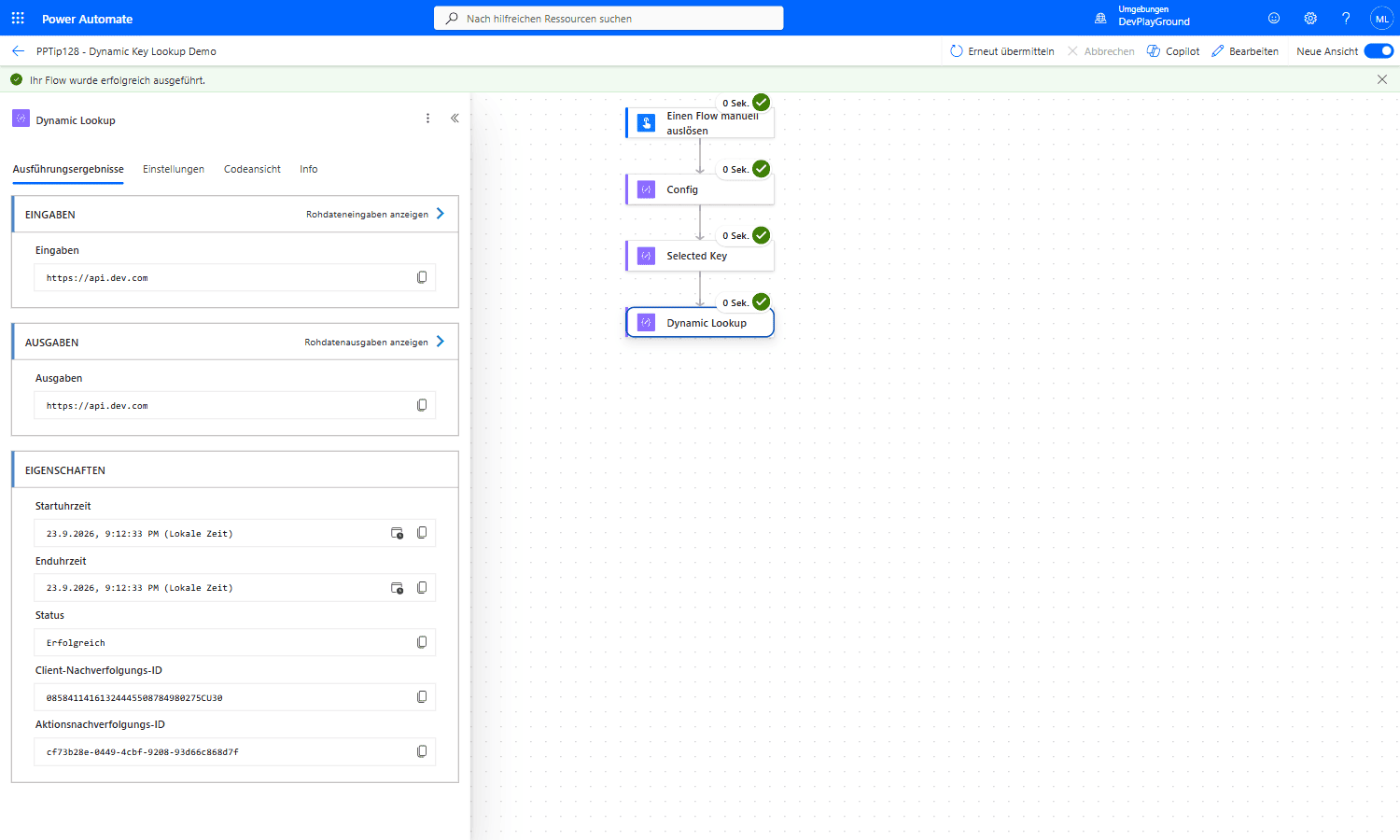 Real flow run: a 3-entry config object (
prod/dev/test) plus a runtime key "dev" resolves straight to https://api.dev.com, no Switch/If cascade needed.
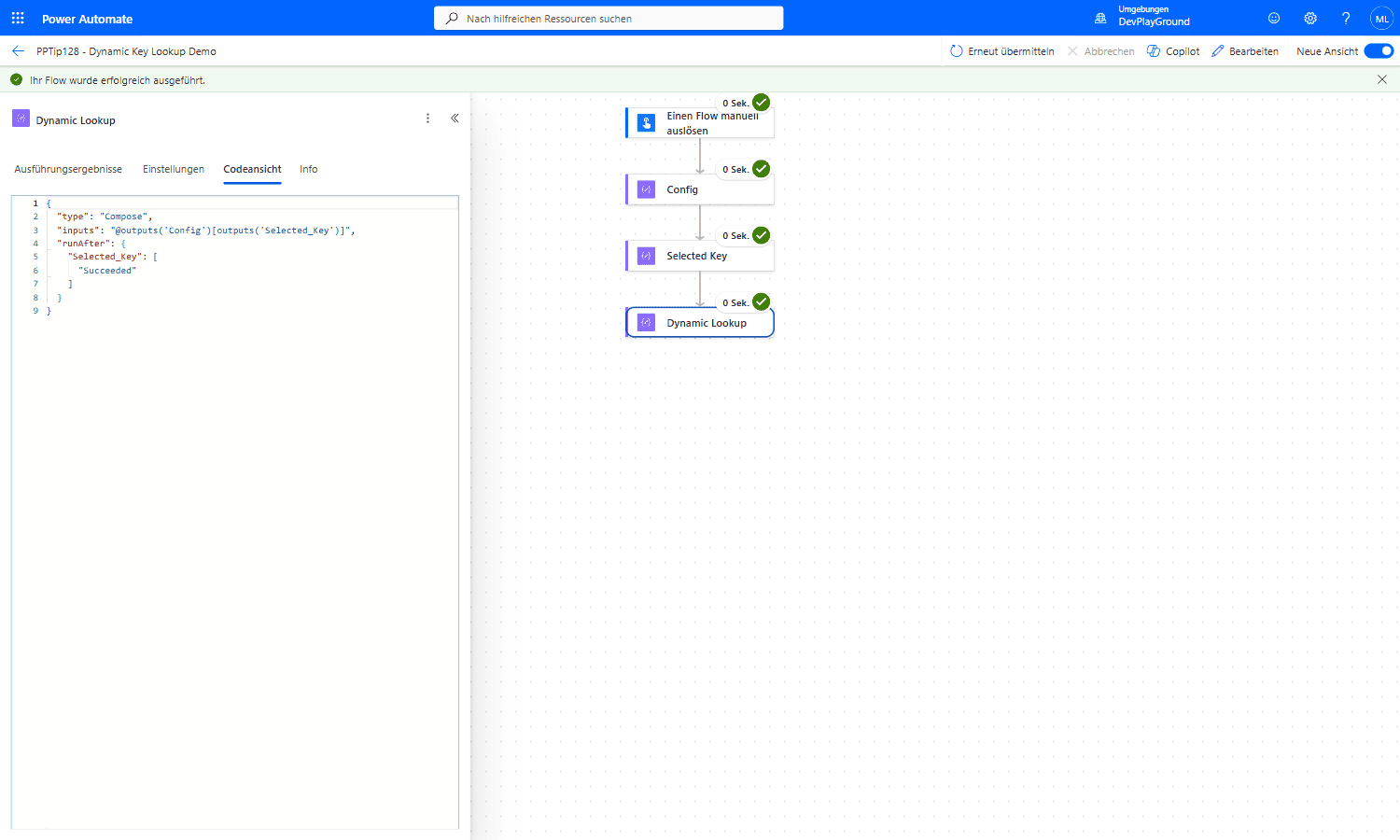 Real flow run: Code View shows the actual expression,
 @outputs('Config')[outputs('Selected_Key')], the key itself comes from the Selected_Key Compose, not a hardcoded property name.
🎉 Result
A new variant is one more line in the Config object, not a new branch in a Switch. The flow stays short, and the lookup is visible in one place.
🌟 Key Advantages
🔸 No complex Switch/If conditions
🔸 Quick to adapt for new data variations
🔸 Flexible across many use cases
🎥 Video Tutorial
🛠️ FAQ
1. Do I need Parse JSON for this?
Not if the object is in a Compose: its output is already an object. You need json() or Parse JSON only when the JSON arrives as text. For a dynamic key, the schema of Parse JSON doesn’t help anyway, because the property name isn’t known at design time.
2. What happens if a key doesn’t exist in the JSON?
With the ? operator, outputs('Config')?['unknown'] returns null. Without it, the action fails with an error that the property doesn’t exist. Use coalesce() to provide a default.
3. Can I use this approach for nested JSON objects?
Yes. Chain the dynamic and fixed parts, for example outputs('Config')?[outputs('Selected_Key')]?['url'].
🔗 Related Tips
- #PowerPlatformTip 104: Efficient JSON Handling, more techniques for working with JSON in flows.
- #PowerPlatformTip 33: Coalesce, provide clean fallbacks for missing values.
- #PowerPlatformTip 100: Bypassing Complexity in PowerAutomate, the same Compose-as-lookup idea applied to replace complex conditions.
This tip is by Marcel Lehmann, Microsoft MVP (Business Applications) and founder of the Power Platform Academy – live Power Platform workshops, free or CHF 49. Join the workshop waitlist to get notified about new dates. For companies that want this implemented for them, see KMUpower – Power Platform consulting & automation for SMEs (DACH).