#PowerPlatformTip 123: 'Get Lowest / Highest SharePoint ID & TotalCount'
TL;DR: Get the lowest ID, highest ID and total count of a SharePoint list in Power Automate with three simple
$orderby/ItemCountREST calls.
💡 Challenge
You need the highest, lowest, and total count of item IDs in a SharePoint list, to build reports, paginate, or manage data more efficiently, without scanning the whole list.
✅ Solution
Use three small HTTP requests against the SharePoint REST API to fetch the lowest ID, the highest ID and the total item count directly.
🔧 How It’s Done
1. Get the lowest ID
🔸 Send an HTTP GET to the SharePoint API: /_api/Web/Lists/GetByTitle('YourListName')/Items?$select=ID&$filter=ID gt 0&$top=1&$orderby=ID asc
🔸 Set the method to GET and the header accept: application/json; odata=nometadata.
2. Get the highest ID
🔸 Same request, ordered descending: /_api/Web/Lists/GetByTitle('YourListName')/Items?$select=ID&$filter=ID gt 0&$top=1&$orderby=ID desc
🔸 Use the same method and headers.
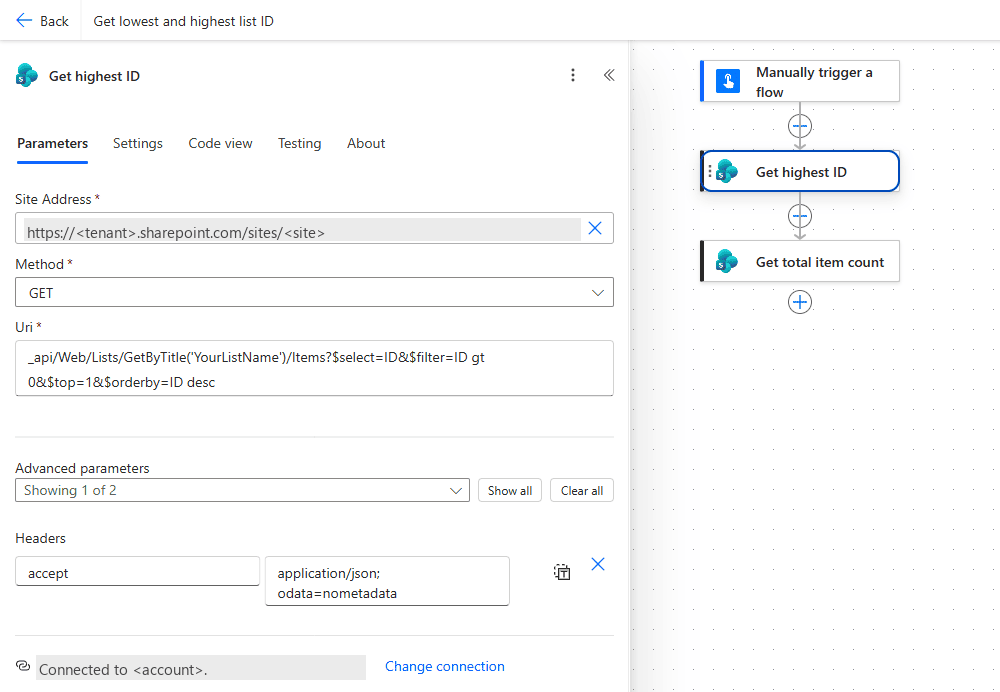 The highest-ID request as a Send an HTTP request to SharePoint action: Method GET, the Uri with
 $top=1&$orderby=ID desc and the accept header. The lowest ID uses the same action with asc.
3. Get the total item count
🔸 Call the ItemCount endpoint: /_api/Web/Lists/GetByTitle('YourListName')/ItemCount
🔸 Again use GET with the same headers.
🔢 Without HTTP, and What ItemCount Really Counts
Tested on a library with 204 items (135 files, 69 folders).
Lowest and highest ID with the standard actions
🔸 ‘Get items’ or ‘Get files (properties only)’ with Order By ID desc and Top Count 1 returned exactly one row, the highest ID (530). ID asc with Top Count 1 returned ID 1. Read it with first(body('Get_files')?['value'])?['ID'].
🔸 Add Filter Query FSObjType eq 0 to get the highest file ID when folders should not count.
ItemCount includes folders
🔸 /ItemCount returned 204 for 135 files plus 69 folders, and 207 after one folder, one sub-folder and one file were added. If you need files only, use ‘Get files (properties only)’ with FSObjType eq 0, Pagination on, and length(body('Get_files')?['value']) (135).
What does not work for counting
🔸 /items/$count answers 404: Cannot find resource for the request $count.
🔸 /items?$inlinecount=allpages is accepted but ignored: the response holds results and __next, no __count.
🔸 length(body(...)?['value']) without Pagination counts at most 100, the action’s default page size. With Pagination on (threshold 5000) it counted all 204, with a Top Count of 6000 as well.
🎉 Result
You get the lowest, highest, and total count of IDs in your SharePoint list in seconds, perfect for reports and data analysis.
🌟 Key Advantages
🔸 Automated and fast data retrieval
🔸 Simplifies management of large lists
🔸 No manual searching required
🎥 Video Tutorial
🛠️ FAQ
1. Do I need any special permissions to run these HTTP requests? You need at least read permissions on the SharePoint list to retrieve IDs and item counts via the API. Ensure your connection in Power Automate has the appropriate access.
2. Can this approach handle large lists with more than 5,000 items? Yes. Retrieving the lowest or highest ID with $top=1 is efficient, but be aware of list view thresholds when filtering larger datasets. For total count, the ItemCount endpoint stays performant.
3. How can I adapt this to retrieve other columns or values? Adjust the $select and $orderby query parameters to include the desired fields (e.g., Title) and order by those columns as needed.
4. Can I get the highest ID without an HTTP request? Yes. ‘Get items’ with Order By ID desc and Top Count 1 returns one row with the highest ID; ID asc gives the lowest. The HTTP request only saves the larger response payload.
5. Does ItemCount include folders? Yes. A library with 135 files and 69 folders reports ItemCount 204. For files only, use ‘Get files (properties only)’ with FSObjType eq 0 and Pagination on, then length(body('Get_files')?['value']).
6. Why does $count return 404? SharePoint’s REST endpoint does not implement /items/$count (Cannot find resource for the request $count.) and ignores $inlinecount=allpages. ItemCount or a paginated Get items are the two working options.
🔗 Related Tips
- #PowerPlatformTip 97: Enhanced Pagination, handle large SharePoint result sets efficiently.
- #PowerPlatformTip 95: Optimized SharePoint Queries, build fast, delegable list queries.
This tip is by Marcel Lehmann, Microsoft MVP (Business Applications) and founder of the Power Platform Academy – live Power Platform workshops, free or CHF 49. Join the workshop waitlist to get notified about new dates. For companies that want this implemented for them, see KMUpower – Power Platform consulting & automation for SMEs (DACH).