#PowerPlatformTip 95: 'Optimized SharePoint Queries'
TL;DR: Filter SharePoint data at the source with OData Filter Query expressions in Get items to retrieve only the records you need.
🧰 Free tool: Assemble valid OData
$filterexpressions for the SharePoint Get items action: SharePoint OData filter builder.
💡 Challenge
Filtering data within SharePoint via Power Automate can be cumbersome, particularly with large lists and intricate filter conditions.
✅ Solution
Employ OData query options in Power Automate’s standard SharePoint connectors to refine and streamline your queries.
🔧 How It’s Done
Here’s how to do it:
-
Configure the SharePoint action filter
🔸 Use the Filter Query option in Get items🔸 Or in Get files (properties only)
-
Build your OData query from the supported operators 🔸 eq / ne: equal / not equal, for text, numbers, choices, lookups and dates
🔸 gt / ge / lt / le: greater than, greater or equal, less than, less or equal
🔸 and / or: combine conditions, use brackets to group them
🔸 startswith(Title, ‘Rep’): text begins with a value
🔸 substringof(‘port’, Title): text contains a value (note the order: value first, column second)
🔸 day(), month(), year(): compare parts of a date, for example
year(Created) eq 2026🔸 Not supported by SharePoint:
endswith,tolower,toupper,trim,concat,substringand arithmetic such asaddorsub. Use Filter array after Get items for those cases.
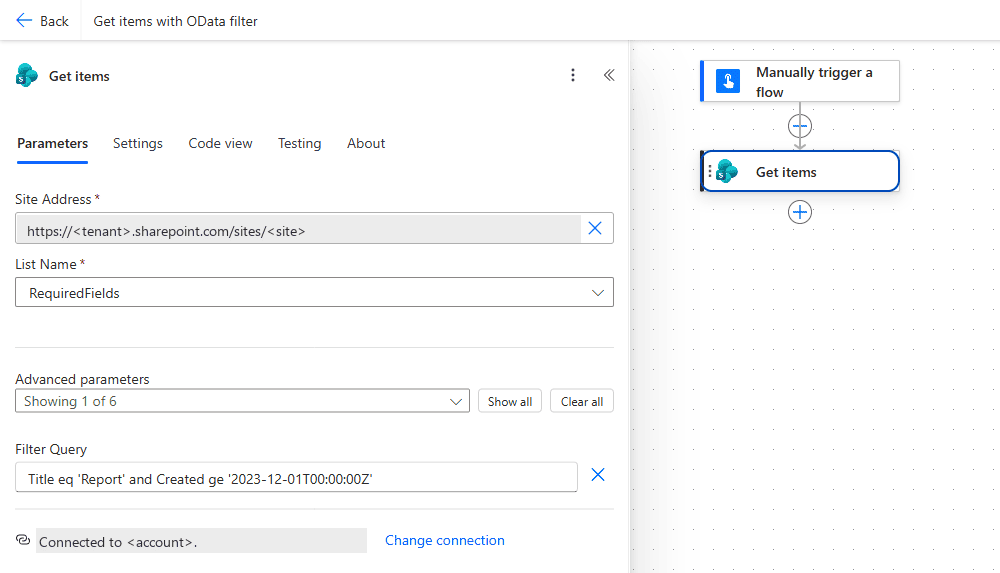 The OData expression goes into the Filter Query field of Get items (under Advanced parameters). Here
 eq and ge are combined with and: text in single quotes, the date in ISO 8601.
📑 Filter Syntax per Column Type
Every row was run in ‘Get items’ against a test list with one column of each type (and ‘Get files (properties only)’ for the library rows). The right-hand column is what came back.
| Column type | Filter Query | Observed |
|---|---|---|
| Text | Title eq 'ZZ tip test root item' | 1 row. Comparison is case-insensitive: Title eq 'zz tip test ROOT item' also returned 1. |
| Text, contains | substringof('root', Title) | 1 row. substringof('root', Title) eq true fails: The query is not valid. |
| Internal name with space | Cost_x0020_Center eq 'CC1' | 1 row. Cost Center eq 'CC1' fails: The expression "Cost Center eq 'CC1'" is not valid. Creating query failed. |
| Column name casing | title eq '...' | Fails: Column 'title' does not exist. It may have been deleted by another user. |
| Choice | Status eq 'Done' | 1 row. Status/Value eq 'Done' fails: The query is not valid. Status ne 'Done' also returns rows whose Status is empty. |
| Multi-choice | Tags eq 'Gamma' | 1 row (the item that has Gamma selected). |
| Lookup | Ref/Id eq 1, Ref/Title eq 'Contoso', Ref eq 1 | 1 row each. |
| Person | Owner/EMail eq 'user@domain.com', Owner/Id eq 9, Owner/Title eq 'Marcel Lehmann' | 1 row each. Owner eq 'Marcel Lehmann' returns 0 rows and no error. |
| Yes/No | Done eq 1 | The 1 row with Done = Yes. Done eq true returned the 2 rows with Done = No. Use 1 and 0. |
| Number | Amount gt 5 | 1 row. |
| Date | Due ge '2026-12-01', Created ge '2026-01-01T00:00:00Z', Created ge datetime'2026-01-01T00:00:00Z' | Work with quotes. Unquoted fails: The expression "Created ge 2026-01-01T00:00:00Z" is not valid. Creating query failed. |
| Library: folders | FSObjType eq 0 / FSObjType eq 1 | Files only / folders only. |
| Library: file type | File_x0020_Type eq 'pdf' | Same rows as substringof('.pdf', FileLeafRef). |
| Not supported | endswith(Title, 'x') | The function operator 'endswith' is not supported or its usage is invalid. |
🔸 A wrong column name or operator fails the action with a 400. A wrong value shape on a person column does not, it returns an empty result, so check length(body('Get_items')?['value']) when a filter unexpectedly matches nothing.
🔸 ‘Get items’ returns at most 100 rows unless you set a Top Count or turn on Pagination, see #PowerPlatformTip 97.
📏 Large Lists: Index the Filter Column
🔸 On lists with more than 5,000 items, the list view threshold applies. A Filter Query on a column without an index can fail with The attempted operation is prohibited because it exceeds the list view threshold.
🔸 Fix: in the list settings, open Indexed columns and create an index on the column you filter by first (for example Status or Created). Put the most selective indexed condition at the start of the expression.
🔸 Not every column type can be indexed: multiple lines of text, multi-value choice, multi-value person or lookup, calculated and hyperlink columns can’t. On large lists, filter first by an indexable column (single line of text, number, date, single choice, single person or lookup, yes/no) and narrow down with Filter array if needed.
🎉 Result
This method enables more sophisticated and efficient queries, ensuring your workflows are optimized and only the necessary data is retrieved.
🌟 Key Advantages
🔸 Precision: Exact data retrieval with specific OData filters.
🔸 Efficiency: Minimize data processing and server load by fetching only needed data.
🔸 Flexibility: Craft complex queries by mixing various OData options to meet your needs.
🎥 Video Tutorial
🛠️ FAQ
1. What is the Filter Query option in Power Automate?
The Filter Query option lets you apply an OData expression directly in SharePoint actions like Get items or Get files, so only matching records are retrieved.
2. Which OData operators can I use in Power Automate?
SharePoint supports eq, ne, gt, ge, lt, le, and, or, startswith, substringof and the date functions day(), month() and year(). endswith is not supported and fails with The function operator ‘endswith’ is not supported or its usage is invalid.
3. How do I format date or text values in an OData query?
Enclose text values in single quotes (e.g., Title eq ‘Report’) and format dates in ISO 8601 inside single quotes (e.g., Created ge ‘2023-12-01T00:00:00Z’). Without the quotes the action fails with The expression "..." is not valid. Creating query failed.
4. How do I filter on a choice, lookup or person column?
Choice: Status eq 'Done' (no /Value). Lookup: Ref/Id eq 1 or Ref/Title eq 'Name'. Person: Owner/EMail eq 'user@domain.com', Owner/Id eq 9 or Owner/Title eq 'Display Name'. Owner eq 'Display Name' silently returns nothing.
5. Why does my Yes/No filter return the wrong rows?
Done eq true returned the rows with Done = No in the test. Use Done eq 1 for Yes and Done eq 0 for No.
6. What does “Column ‘x’ does not exist” mean when the column is there?
The Filter Query needs the internal name with exact casing: Title, not title; Cost_x0020_Center, not Cost Center.
7. Why does my filter fail on a big list but work on a small one?
Above 5,000 items the list view threshold applies. Create an index on the column you filter by in List settings → Indexed columns.
🔗 Related Tips
🔸 #PowerPlatformTip 97: ‘Enhanced Pagination’ - raise the item limit once your OData filter still returns more rows than the default cap.
🔸 #PowerPlatformTip 11: ‘Trigger Condition’ - filter out irrelevant runs before the flow even starts, ahead of any Get items query.
This tip is by Marcel Lehmann, Microsoft MVP (Business Applications) and founder of the Power Platform Academy – live Power Platform workshops, free or CHF 49. Join the workshop waitlist to get notified about new dates. For companies that want this implemented for them, see KMUpower – Power Platform consulting & automation for SMEs (DACH).