#PowerPlatformTip 146: Encode & Decode Functions
Stop special characters breaking your flows. Use EncodeUrl, EncodeHTML, encodeUriComponent & decodeUriComponent, plus OData apostrophe escaping, the right way.
TL;DR: Encode special characters in Power Platform,
EncodeUrl/EncodeHTMLin Power Apps,encodeUriComponent/decodeUriComponentin flows, and double apostrophes for OData filters.
🧰 Free tool: Encode or decode text to and from Base64 (UTF-8 safe, right in the browser): Base64 to Text converter.
💡 Challenge
Developers face critical issues when special characters like quotes (“), apostrophes (‘), or JSON brackets ({}) are interpreted as code syntax instead of data content. This causes broken HTTP requests, failed API calls, invalid JSON errors, and runtime failures in both Power Apps and Power Automate. Without proper encoding, URLs with query parameters break, filter queries fail, and data transmission produces unpredictable results.
✅ Solution
Use native encode/decode functions to convert special characters into safe escape sequences (%XX format). Power Apps offers EncodeUrl() and EncodeHTML() for encoding output, but lacks native decoding. Power Automate provides full bidirectional support through encodeUriComponent() and decodeUriComponent(), essential for HTTP requests and JSON payloads. Important: OData filter queries require different escaping techniques.
flowchart TD
    A["Special characters need handling"] --> B{"Where is the data going?"}
    B -->|"URL / query string"| C["EncodeUrl in Power Apps,<br/>encodeUriComponent in flows"]
    B -->|"JSON request body"| D["setProperty / json<br/>escapes the value for you"]
    B -->|"OData filter apostrophe"| E["replace to double up<br/>the apostrophe"]
    B -->|"HTML output"| F["EncodeHTML in Power Apps,<br/>replace chain in flows"]
    B -->|"Receiving encoded data"| G["decodeUriComponent in flows"]
🔧 How It’s Done
Power Apps Functions
1. EncodeUrl(), encode URLs and query parameters safely
🔸 Expression: EncodeUrl("https://example.com/search?q=hello world")
🔸 Returns: "https://example.com/search?q=hello%20world"
🔸 Special characters: Space→%20, ?→%3F, &→%26, #→%23
🔸 Use case: Launch(EncodeUrl("https://wa.me/?text=Check O'Neill's offer!"))
2. EncodeHTML(), prevent HTML injection and display issues
🔸 Expression: EncodeHTML("<script>alert('test')</script>")
🔸 Returns: "<script>alert('test')</script>"
🔸 Converts: < → <, > → >, & → &, “ → "
🔸 Use case: Display user comments safely in HTML Text controls without XSS vulnerability
3. PlainText(), strip HTML tags and decode entities
🔸 Expression: PlainText("<p>Hello "World"</p>")
🔸 Returns: "Hello "World""
🔸 Removes all HTML/XML tags and converts entities to readable text
🔸 Use case: Clean SharePoint rich text fields for plain text display or search
4. DecodeUrl() limitation
🔸 No native function exists in Power Apps
🔸 Solution: Call a Power Automate flow with the decodeUriComponent() expression
Power Automate Expressions
5. encodeUriComponent(), critical for URL parameters
🔸 Expression: encodeUriComponent('How are you?')
🔸 Returns: 'How%20are%20you%3F'
🔸 Special characters: Space→%20, ?→%3F, ‘→%27, “→%22, {→%7B, }→%7D
🔸 Use case 1: Encode JSON as URL parameter: encodeUriComponent('{"name":"John"}')
🔸 Use case 2: Prepare query string parameters for HTTP GET requests
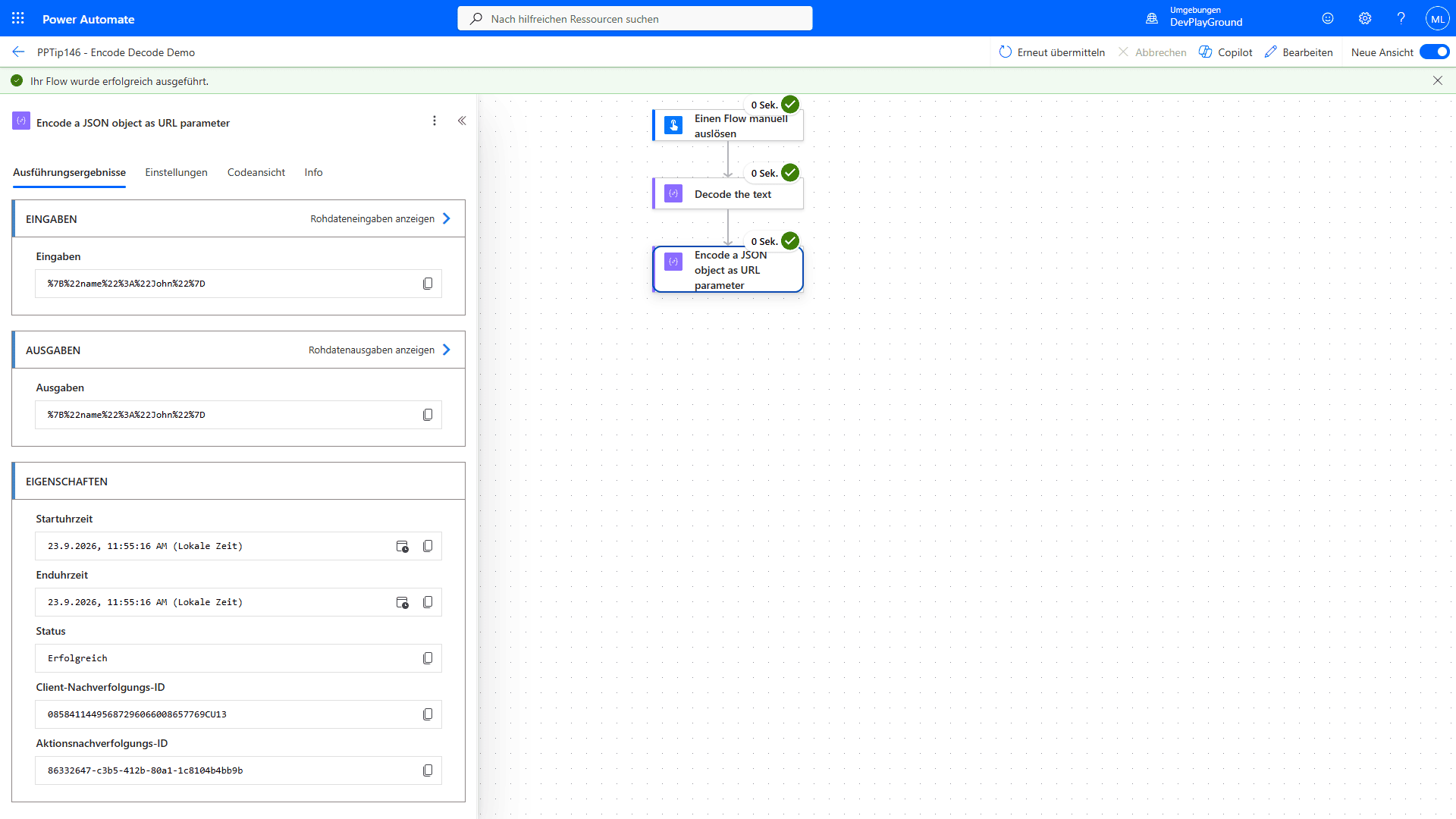 Real flow run:
 encodeUriComponent('{"name":"John"}') returns %7B%22name%22%3A%22John%22%7D.
6. decodeUriComponent(), convert encoded data back to readable format
🔸 Expression: decodeUriComponent('https%3A%2F%2Fexample.com%2Fsearch%3Fq%3Dhello%20world')
🔸 Returns: 'https://example.com/search?q=hello world'
🔸 Decode apostrophes: decodeUriComponent('Tom%27s%20Diner') returns 'Tom's Diner'
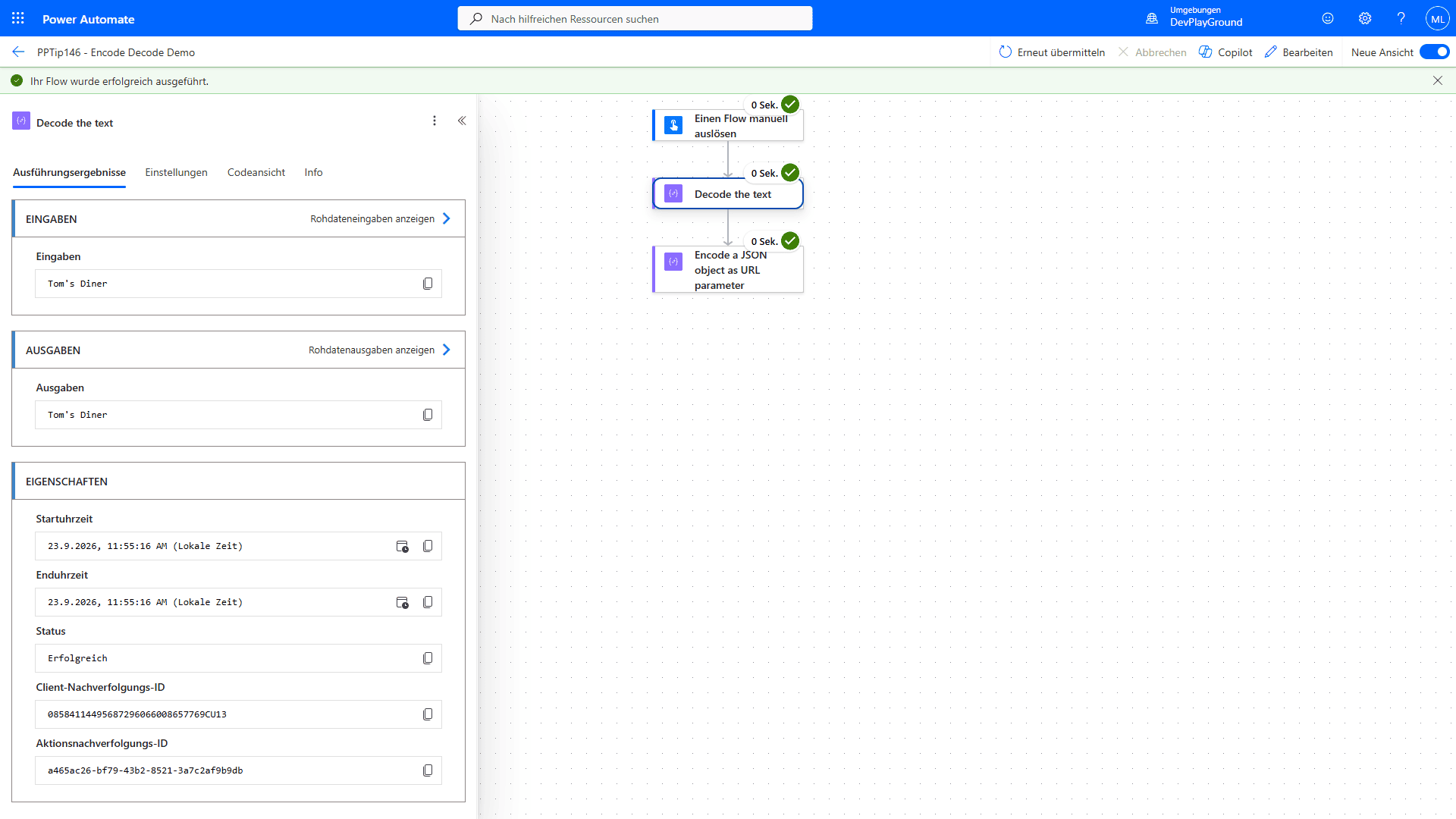 Real flow run:
 decodeUriComponent('Tom%27s%20Diner') returns Tom's Diner.
🔸 Use case: Process encoded webhook data or query string parameters from external systems
7. JSON escaping for HTTP request body
🔸 Problem: Double quotes, backslashes and line breaks in a text value break the JSON of a request body
🔸 Robust expression: let the runtime build the object, it escapes everything for you:
1
string(setProperty(json('{}'), 'title', variables('text')))
🔸 Real flow run: with the text a"b\c + line break + d this returns {"title":"a\"b\\c\nd"}, valid JSON.
🔸 Same idea when you only need the escaped string literal (quotes included): string(createArray(variables('text'))) returns ["a\"b\\c\nd"], strip the outer [ and ] and you have a ready-to-paste JSON string.
🔸 Why not replace(text, '"', '\"'): it escapes quotes only. In the same run, json(concat('{"title":"', replace(text, '"', '\"'), '"}')) failed with Bad JSON escape sequence: \c because the backslash in the value was never escaped. Fine for plain words, wrong as soon as a path, a line break or a backslash shows up.
8. OData filter query with apostrophes
🔸 Problem: Filter query fails with Title eq 'Tom's Diner'
🔸 Solution: Use replace() to double apostrophes: replace(Title,'''','''''')
🔸 How it works: Two apostrophes ('') represent one apostrophe in the data
🔸 Result: 'Tom's Diner' becomes 'Tom''s Diner' in the OData query
🔸 Important: Do NOT use encodeUriComponent() for OData filters - it breaks the query syntax
🧩 Escape and Unescape HTML in Power Automate
Power Automate has no encodeHtml() or decodeHtml() expression. Both directions work with what is there, all results below come from one flow run.
Escape HTML (text → entities)
🔸 Chain replace() calls, & must be first so you do not double-encode the entities you create afterwards:
1
replace(replace(replace(replace(replace(variables('text'),'&','&'),'<','<'),'>','>'),'"','"'),'''',''')
🔸 Input <b>Tom & Jerry's "show"</b> returns <b>Tom & Jerry's "show"</b>
Unescape HTML (entities → text)
🔸 Wrap the text in an XML element and read it back with xpath(), the XML parser decodes the entities:
1
xpath(xml(concat('<r>', variables('escaped'), '</r>')), 'string(/r)')
🔸 The escaped string above comes back as <b>Tom & Jerry's "show"</b>
🔸 Numeric entities decode too:  €€& returns a non-breaking space followed by €€&
🔸 Limit: named HTML entities that are not part of XML break the parser. xpath(xml('<r>a b</r>'), 'string(/r)') fails with Reference to undeclared entity 'nbsp'. Replace such entities with their numeric form first ( →  ), or decode with the reverse chain below.
🔸 Reverse replace() chain, & must be last:
1
replace(replace(replace(replace(replace(variables('escaped'),'<','<'),'>','>'),'"','"'),''',''''),'&','&')
🔸 Returns the identical <b>Tom & Jerry's "show"</b>, no XML parser involved, so it also works on text that is not well-formed.
🎉 Result
Developers can safely transmit data containing quotes, apostrophes, JSON structures, and special characters without syntax errors or runtime failures. HTTP requests work reliably, OData queries process correctly with proper apostrophe escaping, and the distinction between code and content is preserved across Power Platform solutions.
🌟 Key Advantages
🔸 Prevents “invalid JSON” errors in HTTP actions through proper quote escaping
🔸 Enables safe transmission of JSON objects as URL parameters with encodeUriComponent()
🔸 Solves OData filter query failures when values contain apostrophes using replace()
🔸 Distinguishes between syntax characters and data content in Power Fx and expressions
🔸 No premium connectors required, works with standard HTTP and SharePoint actions
🛠️ FAQ
1. Why do my HTTP requests fail with “invalid JSON” even though the JSON looks correct?
The issue is often unescaped double quotes, backslashes or line breaks in dynamic values that break JSON syntax. For URL parameters, use encodeUriComponent(). For JSON request bodies, let the runtime escape the value: string(setProperty(json('{}'), 'title', variables('text'))) returns valid JSON for any text. A plain replace(text, '"', '\"') only handles quotes and fails on a backslash or line break.
2. How do I handle text with apostrophes in Power Automate OData filter queries?
Use the replace() expression to double apostrophes: replace(varTitle,'''',''''''). This escapes the apostrophe so 'Tom's Diner' becomes 'Tom''s Diner' in the query. Two apostrophes together are interpreted as a single apostrophe in the data. NEVER use encodeUriComponent() for OData filters as it encodes the filter syntax itself and breaks the query.
3. What’s the difference between encodeUriComponent() for URLs vs. JSON escaping for request bodies?
Use encodeUriComponent() only for URL parameters and query strings - it converts characters to %XX format. For JSON in HTTP request bodies, build the object with setProperty() or json() so the runtime escapes quotes, backslashes and line breaks for you. URL encoding and JSON escaping serve different purposes and are not interchangeable.
4. How do I escape HTML in Power Automate?
There is no encodeHtml() expression. Chain replace() calls, ampersand first: replace(replace(replace(replace(replace(text,'&','&'),'<','<'),'>','>'),'"','"'),'''','''). Tested: <b>Tom & Jerry's "show"</b> becomes <b>Tom & Jerry's "show"</b>.
5. How do I unescape (decode) HTML entities in Power Automate?
Wrap the text in an XML element and read it back: xpath(xml(concat('<r>', text, '</r>')), 'string(/r)'). It decodes < > & " ' and numeric entities such as   or €. Named HTML entities like are not XML and make xml() fail, so replace them with their numeric form first or use a reverse replace() chain with & last.
🔗 Related Tips
- #PowerPlatformTip 58: HTTP Actions, where proper encoding keeps requests valid.
- #PowerPlatformTip 121: Filtering SharePoint File Fields with OData, apply apostrophe escaping in real filters.
This tip is by Marcel Lehmann, Microsoft MVP (Business Applications) and founder of the Power Platform Academy – live Power Platform workshops, free or CHF 49. Join the workshop waitlist to get notified about new dates. For companies that want this implemented for them, see KMUpower – Power Platform consulting & automation for SMEs (DACH).