#PowerPlatformTip 148: 'Limit Apply to Each with take()'
TL;DR: Limit an ‘Apply to each’ loop to the first X items during testing with
take(array, X), swap it in and out, no restructuring.
When building flows against large SharePoint lists or Dataverse tables, testing an “Apply to each” loop on the full dataset wastes run quota and time. The take() expression is a one-line fix that limits the loop to exactly the records you need for a confident test, then remove it when you’re done, no restructuring required.
💡 Challenge
Your “Apply to each” loop is connected to a Select action that returns hundreds or thousands of items. Every test run processes every single item, burns flow-run quota, and takes minutes. You need to test just the first 5 items without rebuilding the flow.
✅ Solution
Replace the array input of your “Apply to each” action with a take() expression. take(array, count) returns only the first X elements of any array and discards the rest, keeping the full flow structure intact so you just swap the expression in and out.
🔧 How It’s Done
1. Clear the loop input
🔸 Open your “Apply to each” action and clear the current input field.
🔸 Make sure you’re on the Expression tab, not Dynamic content.
2. Enter the take() expression
🔸 Point it at your previous action’s output:
1
take(outputs('Select'), 5)
🔸 German interface with the action named “Auswählen”? Use take(outputs('Auswählen'), 5).
🔸 Different action name? Replace 'Select' with your exact action name.
3. Test
🔸 Save and run, the loop executes exactly 5 times regardless of array size.
🔸 Confirm your “Create item” logic and matching conditions behave correctly on the 5 records.
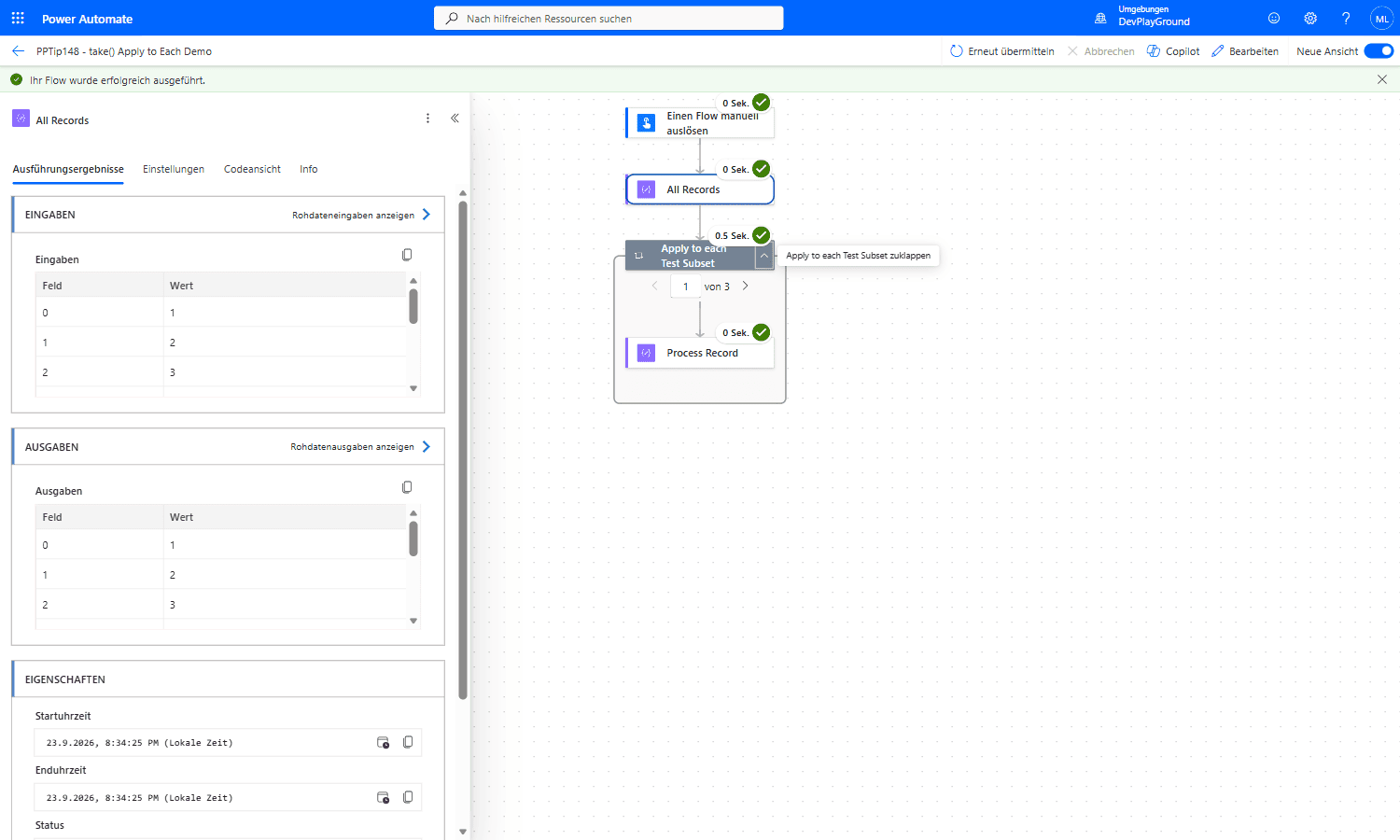 Real flow run: a Compose action outputs 10 records, but
 @take(outputs('All_Records'), 3) as the loop input caps “Apply to each” at 1 von 3, exactly 3 iterations instead of 10.
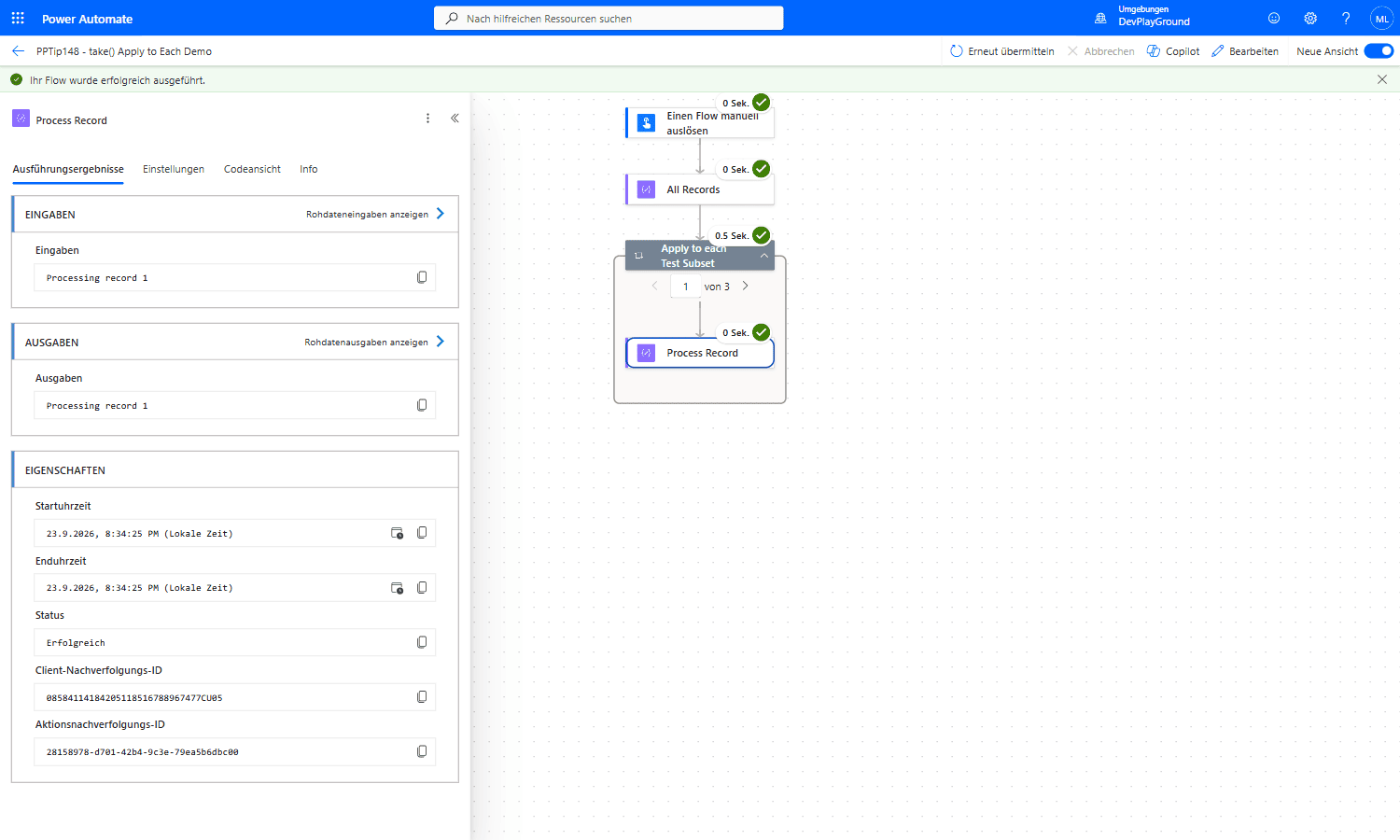 Real flow run: inside the loop, iteration 1 of 3 correctly processes only the first record, “Processing record 1”, proving
 take() sliced the array before the loop ever started.
4. Restore
🔸 Remove the take() wrapper and reselect the original output from your Select/Filter action.
🎉 Result
Test runs complete in seconds instead of minutes, use only 5 iterations instead of hundreds, and your logic is fully validated before you unleash it on the full dataset. No parallel branches, no condition hacks, no duplicate flows.
🌟 Key Advantages
🔸 Zero structural changes to your flow, one expression swap in, one swap out
🔸 Works with any array source: Select, Filter Array, List Rows, Get Items, and more
🔸 No premium connectors or custom code required, pure built-in expression
🛠️ FAQ
1. Does take() throw an error if the array has fewer items than the number I specify? No. If the array contains fewer elements than X, take() simply returns all available items without an error.
2. Can I use take() with a “Filter Array” action instead of a “Select” action? Yes. Any array-type output works. Use take(body('Filter_Array'), 5) or the equivalent outputs() reference for your action name.
3. Is there a risk of accidentally leaving take() in a production flow? Yes, always double-check before promoting to production. A good practice is to add a flow note or a comment action as a visible reminder that take() is active.
🔗 Related Tips
- #PowerPlatformTip 36: Static Result, another way to test flows without full runs.
- #PowerPlatformTip 117: Optimize Parallel Object Processing, speed up loops once testing is done.
This tip is by Marcel Lehmann, Microsoft MVP (Business Applications) and founder of the Power Platform Academy – live Power Platform workshops, free or CHF 49. Join the workshop waitlist to get notified about new dates. For companies that want this implemented for them, see KMUpower – Power Platform consulting & automation for SMEs (DACH).