#PowerPlatformTip 164: 'Invite External Users (Guests) to Microsoft Entra ID with Power Automate'
TL;DR: To invite an external user by hand: Entra admin center > Entra ID > Users > New user > Invite external user. To invite them from a flow:
POST /v1.0/invitationswithinvitedUserEmailAddressandinviteRedirectUrladds an external user to Microsoft Entra ID (Azure AD) as a guest. SetsendInvitationMessage: trueto let Graph email the invite, or use the returnedinviteRedeemUrlto send your own. Run it via HTTP with Microsoft Entra ID (preauthorized) - no app registration of your own, as long as the connector’s scopes cover the call (see FAQ Q5).
⚠️ Licensing and permission: HTTP with Microsoft Entra ID (preauthorized) is a Premium connector. The signed-in connection also needs the delegated User.Invite.All permission; if that scope isn’t granted to the connector, the call fails with 403.
Invite an external user manually
For a one-off guest, the Microsoft Entra admin center is enough: Entra ID > Users > New user > Invite external user, enter the email address and display name, tick Send invite message if you want to add a short message and a CC recipient, then Review and invite > Invite. The guest is added to the directory as a guest user; its invitation state stays PendingAcceptance until they redeem the invitation (visible under the user’s properties). Everything below is for the case where you want a flow to do this for you.
Invite external users automatically
Onboarding external partners, freelancers, or customers as guests usually means clicking through the Entra admin center one person at a time. When that onboarding is already part of a process - a new project, a signed contract, an approved access request - you want it to happen automatically. Microsoft Graph’s B2B invitation API does exactly that from a flow.
💡 Challenge
An external collaborator needs access to a Team, a SharePoint site, or an app. Today someone manually invites each guest in the Microsoft Entra admin center, then follows up to grant access. It’s repetitive, easy to forget, and disconnected from the request or approval that triggered it.
✅ Solution
Use the Microsoft Graph create invitation endpoint to add the external user as a B2B guest straight from Power Automate. A single POST /invitations creates a userType: Guest account and either sends the standard Microsoft invitation email or returns an inviteRedeemUrl you can drop into your own branded email. Call it through the preauthorized HTTP with Microsoft Entra ID action (see #138) when its delegated User.Invite.All scope has been granted; this avoids creating your own app registration, but the connector is Premium.
🔧 How It’s Done
1. Add the Graph call.
🔸 HTTP with Microsoft Entra ID → Method POST, Uri:
1
https://graph.microsoft.com/v1.0/invitations
🔸 Body - only invitedUserEmailAddress and inviteRedirectUrl are required:
1
2
3
4
5
6
{
  "invitedUserEmailAddress": "jane@partner.com",
  "invitedUserDisplayName": "Jane (Partner Co.)",
  "inviteRedirectUrl": "https://myapps.microsoft.com",
  "sendInvitationMessage": true
}
🔸 inviteRedirectUrl is where the user lands after redeeming (e.g. https://myapps.microsoft.com or your app). sendInvitationMessage: true tells Graph to email the invite; omit it (defaults to false) if you’ll send your own.
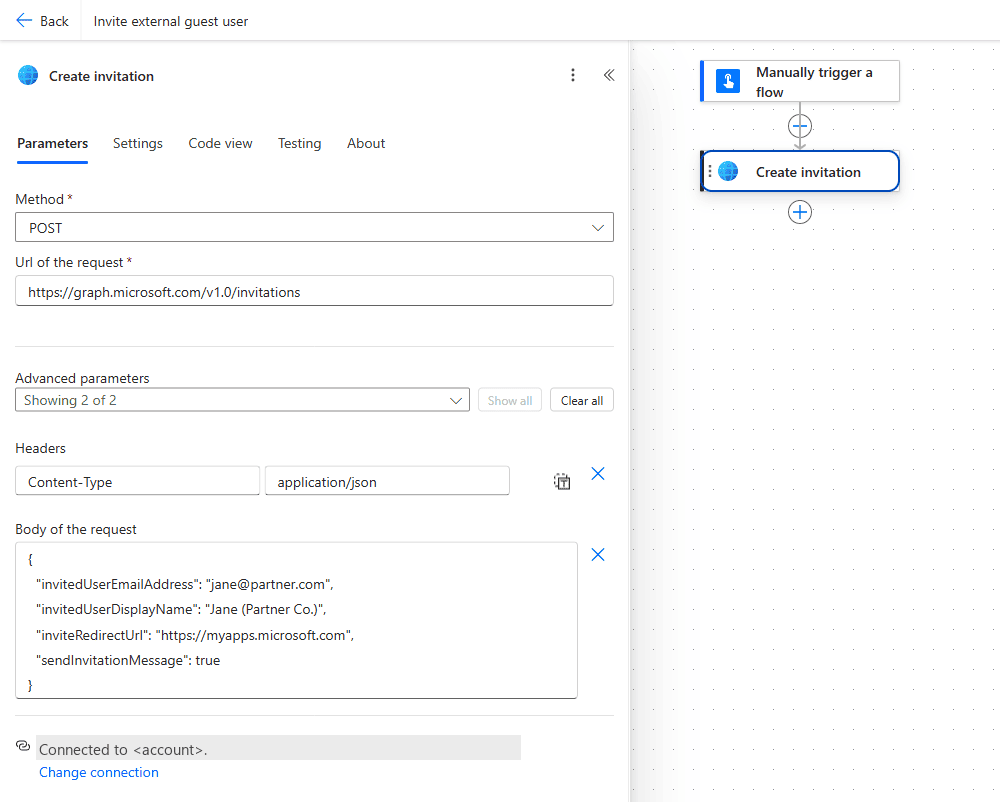 The complete action: Method POST, the Url of the request
 https://graph.microsoft.com/v1.0/invitations, the Content-Type: application/json header and the Body of the request with the four invitation fields.
2. Send your own email instead (optional).
🔸 The 201 Created response contains inviteRedeemUrl. Set sendInvitationMessage to false, then feed body('HTTP')?['inviteRedeemUrl'] into a Send an email (V2) action for a fully branded onboarding message.
3. Personalise the standard invite (optional).
🔸 Add invitedUserMessageInfo with a customizedMessageBody and ccRecipients to include a welcome note and CC the internal sponsor - while still letting Graph handle delivery.
4. Use the new guest downstream.
🔸 The response also returns invitedUser.id. Use that object id in follow-up calls to add the guest to a group or Team - all in the same flow.
🎉 Result
The moment your process fires - an approval, a form, a new project - the external user is created as a guest in Microsoft Entra ID and invited automatically. No manual admin-center clicks, consistent display names, and you can chain group/Team membership right after. Onboarding that took a support ticket now takes zero clicks.
🌟 Key Advantages
🔸 No app registration of your own: the HTTP with Microsoft Entra ID (preauthorized) action calls Graph on behalf of the connection’s signed-in user (#138). It is a premium connector.
🔸 Least privilege: User.Invite.All is enough - you don’t need broad directory write access.
🔸 Your email or theirs: send the default Microsoft invite, or use inviteRedeemUrl for a branded one.
🔸 Chainable: the returned guest id lets you add group/Team membership in the same run.
🛠️ FAQ
0. Who is allowed to invite external users?
By default, all users, including guests, can invite guests. A tenant admin can restrict this under Entra ID > External Identities > External collaboration settings > Guest invite settings (for example to specific admin roles only, or to no one). With a delegated connection, the signed-in user must be allowed to invite: either by the tenant default or by a role such as Guest Inviter, Directory Writers or User Administrator (Guest Inviter works even if only admin roles may invite). If the invite fails with a permissions error, check that setting first. Application (app-only) permissions do not work when B2B invitations are disabled in the tenant. Source: Create invitation, Microsoft Graph.
1. Which Graph permission is the minimum?
User.Invite.All (delegated or application) is the least-privileged permission for creating invitations. User.ReadWrite.All and Directory.ReadWrite.All also work but grant far more - stick with User.Invite.All.
2. Does the guest get access to anything just by being invited?
No. The invitation creates a userType: Guest account, but the person must still redeem the invitation, and you must still grant access to specific resources (add them to a group, Team, or app). Inviting ≠ authorising.
3. Can I invite without sending the Microsoft email?
Yes. Leave out sendInvitationMessage (or set it to false) - no email is sent. Take inviteRedeemUrl from the response and deliver your own onboarding email, or store it for later.
4. Can I add them as a full member instead of a guest?
Set invitedUserType to Member in the body (only possible as a company administrator). Use this sparingly and deliberately - members have broader default directory access than guests, so Guest (the default) is the safer choice for external people.
5. Why do I get 403 Authorization_RequestDenied from HTTP with Microsoft Entra ID?
The preauthorized connector has a limited set of scopes and acts on behalf of the signed-in user. If User.Invite.All is not among the granted scopes, the connection is created but the call fails at runtime with 403 Insufficient privileges. A Global Administrator can grant the missing scope with the ManagePermissionGrant.ps1 script from Microsoft, or you use the plain HTTP action with your own app registration instead. Source: HTTP with Microsoft Entra ID (preauthorized) connector. A Graph 403 on another endpoint printed the scope list the connector’s token carried in our tenant: User.Read, User.Read.All, User.ReadWrite, Group.ReadWrite.All, Mail.*, Calendars.*, Files.ReadWrite.All, Sites.Read.All, Application.ReadWrite.All, DelegatedPermissionGrant.ReadWrite.All, ... with no User.Invite.All in it (full list in #138), so check that grant before you build the flow.
6. How do I see whether a guest has redeemed the invitation?
Read it, no invitation needed. Through HTTP with Microsoft Entra ID:
1
GET https://graph.microsoft.com/v1.0/users?$filter=userType eq 'Guest'&$select=userType,externalUserState,externalUserStateChangeDateTime&$top=3
returns 200 with externalUserState = PendingAcceptance (invited, not redeemed) or Accepted, plus externalUserStateChangeDateTime. For a pending guest that timestamp equals createdDateTime. Filtering on the state works without extra headers: $filter=userType eq 'Guest' and externalUserState eq 'PendingAcceptance'. Add &$count=true with the header ConsistencyLevel: eventual and the response also carries @odata.count. The list pages with @odata.nextLink. A GET /v1.0/invitations is not a thing: it answers 404, the endpoint is POST only.
🔗 Related Tips
- #PowerPlatformTip 76: PowerApps Sharing with Guests, what to do once the guest exists and should open your app.
- #PowerPlatformTip 138: Graph API via HTTP with Microsoft Entra ID, the auth-free way to run this request.
- #PowerPlatformTip 87: Licensing, Sharing Canvas Apps with Guests, what your new guests need to actually use your apps.
- #PowerPlatformTip 58: HTTP Actions, the fundamentals of calling REST APIs from a flow.
This tip is by Marcel Lehmann, Microsoft MVP (Business Applications) and founder of the Power Platform Academy – live Power Platform workshops, free or CHF 49. Join the workshop waitlist to get notified about new dates. For companies that want this implemented for them, see KMUpower – Power Platform consulting & automation for SMEs (DACH).